



Gesture-based home automation allows users to control household devices through simple hand movements, removing the need for switches or remotes. It improves convenience, accessibility, and hygiene with its touchless interface—ideal for users of all ages, including the elderly and differently abled.
By combining sensors and microcontrollers, the system recognises and interprets gestures to perform tasks such as lighting control or appliance operation, making home environments smarter and more intuitive.
Smart home automation is advancing rapidly, replacing traditional controls with hands-free, gesture-based alternatives. These systems are gaining traction for their ease of use, accessibility, and hygienic operation.

The system shown here uses the DFRobot GR10-30 gesture sensor integrated with an Arduino-compatible microcontroller. It allows appliances to be operated with simple hand gestures, delivering a seamless and futuristic user experience. Fig. 1 shows the prototype. The required components are listed in the Bill of Materials table.
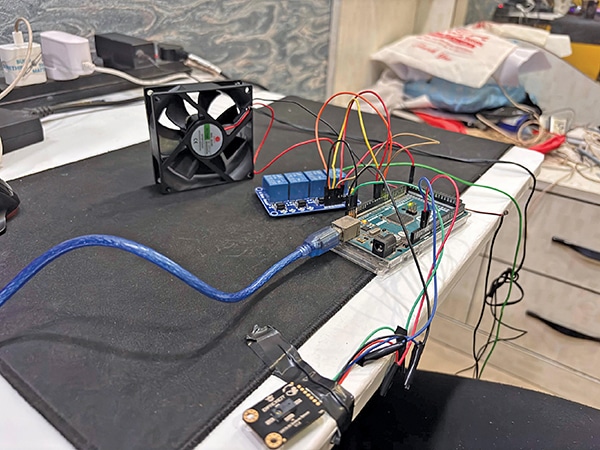
| Table 1: Bill of Materials | ||
| Components | Description | Quantity |
| DFRobot GR10-30 gesture sensor (S1) | Sensor for hand gesture detection | 1 |
| Arduino Mega/Uno (Mod1) | For programming and processing | 1 |
| 5V four-channel relay (RL1) | 5V operated for four appliance control | 1 |
| 5V DC adaptor | For powering a device | 1 |
POC Video Tutorial
Circuit and Working
The components are connected as shown in the circuit diagram (refer to Fig. 2). The Arduino and relay module are powered using a 5V DC power source. Although the Arduino is compatible with an input range of 5V to 12V, the relay module used in this system operates at 5V.
Therefore, it is advisable to use a single 5V power supply for all components, including the relay module, sensor, and Arduino.

Refer to Table 2 for the connections between the gesture sensor and Arduino Mega, and Table 3 for the connections between the 4-channel relay module and Arduino Mega.