





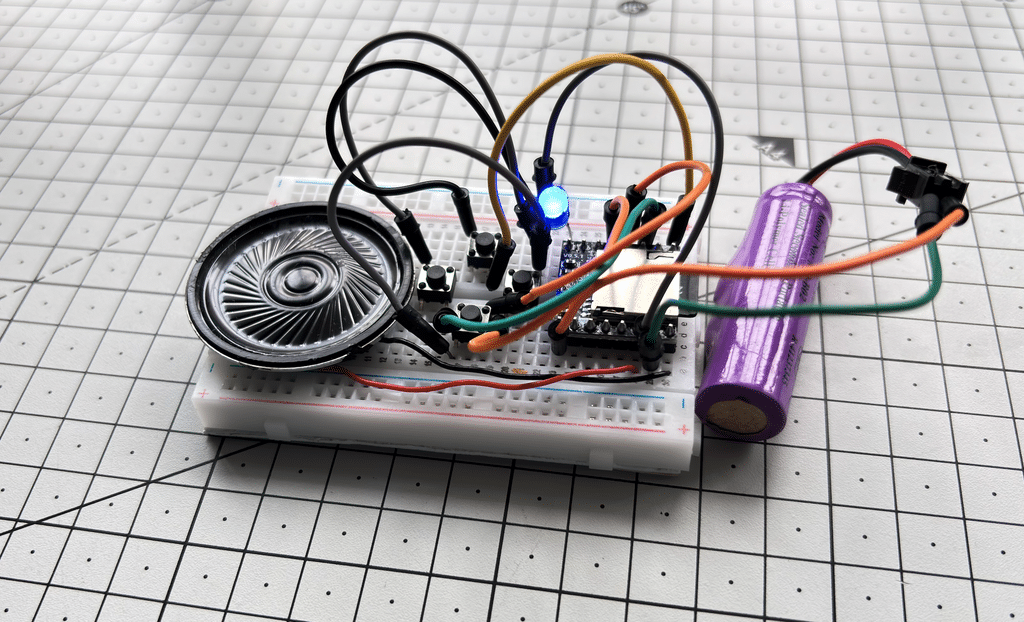
Back in the 2000s, the iPod was every tech enthusiast’s dream device. As engineers, we were always curious about how it was designed and how we could build one ourselves. In this project, we recreate that classic iPod experience in the simplest possible way — without any microcontroller and without writing a single line of code. Using only the popular MP3-TF-16P (DFPlayer Mini) module, the entire player can be built for well under ₹130 and easily kept under ₹100 with careful component selection.
The design works as a complete standalone music player that supports all the essential functions of a classic iPod: play, pause, stop, next track, previous track, seek, and volume control. It offers both speaker output through the module’s built-in 3W amplifier and a direct earphone connection. In addition, the circuit allows direct USB connection to any laptop or USB-enabled device so you can control the music from your computer. Two expandable AD Key inputs (ADKEY1 and ADKEY2) are also provided; simply adding two push buttons lets you instantly play specific favourite tracks with a single key press.
Bill of Materials
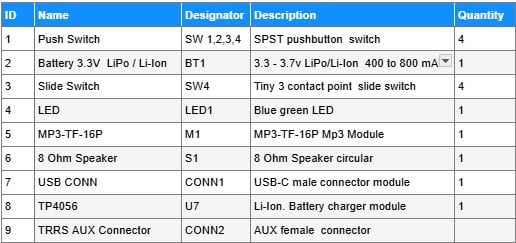
In this design we will use the MP3-TF-16P module along with four push buttons for the basic functions. However, if you plan to create a favourite library of music and songs and play them directly with a key press, you can add up to 20 more buttons with resistors ranging from 0 kΩ to 200 kΩ. Since this is a minimum design, we have used only four switches for the essential controls.
Circuit
In this design we will use the MP3-TF-16P module along with four push buttons for the basic functions. However if you plan to make a favourite library of music and songs and play them directly by key press then you can add up to 20 more buttons with resistors ranging from 0 kΩ to 200 kΩ. Since this is a minimum design we have used only four switches for the basic controls.
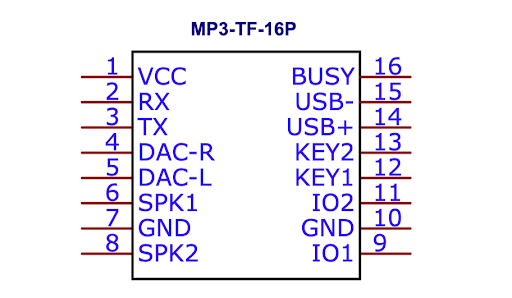
As per the datasheet of the MP3-TF-16P the module provides both TTL and USB ports for control from USB. It supports SD card up to 32GB and normal music formats. The BUSY pin can be used to indicate the busy status of the module. KEY1 and KEY2 are used for AD mode keys. ADKEY1 triggers play of the first segment while ADKEY2 triggers play of the fifth segment and these can be expanded with 20 push buttons and different resistor values to play specific favourite songs from the list.
IO1 and IO2 pins are used with push buttons for the main functions. According to the datasheet a short press on IO1 plays the previous track and a long press decreases the volume. A short press on IO2 plays the next track and a long press increases the volume.
In the circuit the MP3-TF-16P is the main module. Power comes from a 3.7V 1000mAh LiPo battery which is charged using the TP4056 module. A power switch is provided to turn the circuit on and off. An 8ohm speaker is connected directly to the speaker pins of the module. An LED is connected to the BUSY pin so it shows when the music is playing. USB lines are also brought out so you can connect the player to a laptop or any USB device and control the music from there.
The four push buttons are connected as follows. SW1 is connected to KEY2, SW2 is connected to KEY1, SW3 is connected to IO2 and SW4 is connected to IO1. Because they are connected directly without extra resistors they perform the basic functions of previous, next, volume control and playing the first and fifth segments.
If you want to play particular songs from your favourite library then you can use the full AD key circuit with different resistors as shown in the Fig. 4. For that you need to arrange the songs in numbered folders like 01, 02 and name the files as 001.mp3, 002.mp3 and so on as explained in the datasheet.
Basic 4-key Functions
- SW4 connected to IO1 (Pin 9): Short press plays the previous track, long press decreases the volume.
- SW3 connected to IO2 (Pin 11): Short press plays the next track, long press increases the volume.
- SW2 connected to ADKEY1 (Pin 12): Plays Segment 1 (first track in AD mode).
- SW1 connected to ADKEY2 (Pin 13): Plays Segment 5.