

An earlier version of this automatic gateman system, built around a camera-based design, was published on the Electronics For You website and can be accessed here.
That system used an ultrasonic distance sensor to detect approaching vehicles, after which a Raspberry Pi camera captured the number plate image. While the concept worked, its performance revealed several practical limitations. The ultrasonic sensor could not reliably distinguish between a vehicle and a person, so anyone carrying a fake number plate could unintentionally trigger the capture process. Recognition accuracy was inconsistent, and overall operation remained slow.
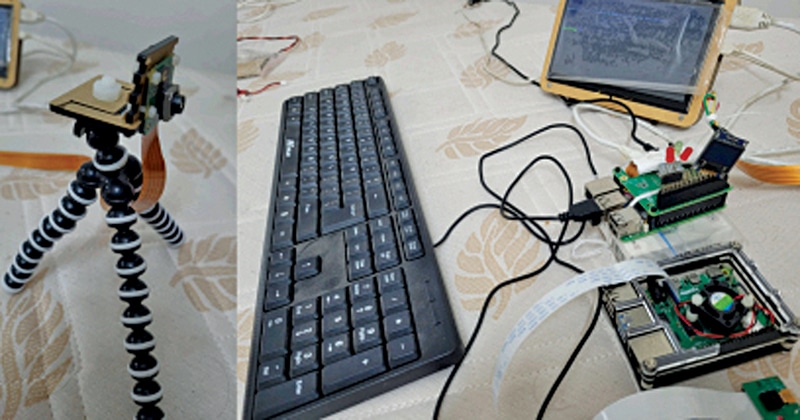
POC Video Tutorial:
To address these shortcomings, a more advanced and robust architecture has been developed. In the updated system, the camera not only captures and stores the vehicle’s number plate in a database but also runs an additional machine-learning model in parallel to classify the approaching object.
This enables clear differentiation between vehicles, humans, animals (such as cats and dogs), fake boards, and counterfeit number plates. The system first confirms that the detected object is a vehicle and only then proceeds to locate and recognise the number plate.
A YOLO-based object-detection framework supports this process. Two models, YOLO and kbest.pt, operate simultaneously to detect the vehicle and subsequently extract and recognise its number plate with higher accuracy.
Together, these enhancements improve robustness, reliability, and operational efficiency. The system runs on a Raspberry Pi 5 (or Raspberry Pi 4), selected for its strong processing capability and suitability for edge-based AI applications. Continuous YOLOv8 inference generates considerable heat, making effective thermal management essential.
To manage this, a cost-effective active cooling solution has been integrated. The setup uses a forced-air cooler with an onboard temperature and RPM sensor connected directly to the Raspberry Pi 5. This arrangement enables real-time thermal monitoring and maintains stable operating conditions during extended AI workloads.
With active cooling in place, the Raspberry Pi operates within safe temperature limits and supports slight overclocking for improved performance. The resulting optimised configuration ensures consistent, efficient operation while meeting the real-time requirements of object detection and number-plate recognition.
The required components for building the system are listed in Bill of Materials table.
| Bill Of Materials | |
| Components | Quantity |
| Raspberry Pi 5 (8GB) | 1 |
| MicroSD card (32GB or larger) | 1 |
| Power adaptor 5V DC, 3A | 1 |
| Raspberry Pi camera | 1 |
| RPi camera ribbon cable connector | 1 |
Check the best online electronics component stores to buy these components.
Software requirements
- Operating system. Raspberry Pi OS (64-bit recommended for better performance)
- Python. Version 3.11 or higher
- AI models. kbest.pt and yolov8n.pt
- Tesseract-OCR. Required for number plate text extraction
- Virtual environment. Recommended for managing Python dependencies and avoiding conflicts
- Python libraries. OpenCV, Ultralytics YOLO, NumPy, and Pillow
A detailed requirements.txt file is provided. After creating and activating the virtual environment, the dependencies are installed using:
pip install -r requirements.txtIf the HailoRT AI accelerator is also used on the same system, the provided requirements.txt file should be installed without modification. It has been configured to prevent dependency conflicts, particularly with the NumPy version. Installing a higher NumPy version may cause compatibility issues.
Configuration
The Raspberry Pi must be overclocked to handle the processing load required for real-time YOLO-based object detection. Overclocking improves performance but also increases heat generation and potential long-term hardware stress. Proper cooling and temperature monitoring are therefore essential. Follow the steps below for configuration:
1. Creating a temperature monitoring script
$ nano temp
clear
sensors
vcgencmd measure_temp
vcgencmd measure_clock arm
Create an overclock control script:
$> nano overclock
sudo cpufreq-set -g performance
sudo cpufreq-set -g ondemand
sudo cpufreq-set -g powersave
vcgencmd measure_clock arm
vcgencmd measure_temp
2. Enabling overclocking
sudo nano /boot/firmware/config.txt
$> sudo nano /boot/firmware/config.txt
[reboot after each changes] [overclock]
over_voltage=4
arm_freq=2500
gpu_freq=750
Reboot the system after each change.
The on-demand performance mode allows the CPU clock frequency to vary between 1.5GHz and 2.5GHz, while the fan RPM is automatically regulated through thermal management.
3. Installing the required monitoring tools.
Install the lm-sensors package:
sudo apt-get install lm-sensors
$>sensors # to show cooler fan rpm & CPU
temperature.
Check CPU temperature and fan RPM:
sensorsMake both scripts executable:
chmod +x temp overclockRun them using:
$> ./overclock
$> ./temp
4. Virtual environment setup