




Brain-Controlled Verbal Communication-Enabled Wheelchair: This project uniquely combines brain-controlled wheelchair navigation and verbal communication in a single affordable assistive platform. Unlike many existing systems that only provide movement control or require costly multi-channel EEG hardware, our solution uses a consumer-grade EEG headset and Arduino UNO Q to achieve real-time performance at a significantly lower cost. The integration of machine learning, embedded control, and speech assistance makes the system practical for everyday use while remaining accessible for educational and healthcare applications.
Team Members
| S. No. | Name | Role / Contribution |
|---|---|---|
| 1. | Sudiksha Sawant | Team Lead |
| 2. | Om Rane | Team Member |
Component List
| ID | Name | Designator | Quantity |
|---|---|---|---|
| 1 | Arduino UNO Q | MOD1 | 1 |
| 2 | MindWave EEG / Bluetooth eye-blink headset | EEG1 | 1 |
| 3 | BTS7960 motor driver | DRV1, DRV2 | 2 |
| 4 | DC geared planetary motor | M1, M2 | 2 |
| 5 | HC-SR04 ultrasonic sensor | US1 | 1 |
| 6 | MPU6050 tilt sensor | IMU1 | 1 |
| 7 | NEO-6M GPS module | GPS1 | 1 |
| 8 | INA226 + suitably rated current shunt | BAT1 | 1 |
| 9 | 12 V, 12 Ah lead-acid battery | B1 | 1 |
| 10 | Smartphone camera / camera source | CAM1 | 1 |
| 11 | Speaker / text-to-speech output | SPK1 | 1 |
| 12 | Wheelchair chassis and power distribution | ENC1 | 1 set |
| 13 | Wi-Fi, web dashboard and backend services | SW1 | Software |
| 14 | Emergency stop push button | ESTOP1 | 1 |
Project Explanation Step By Step
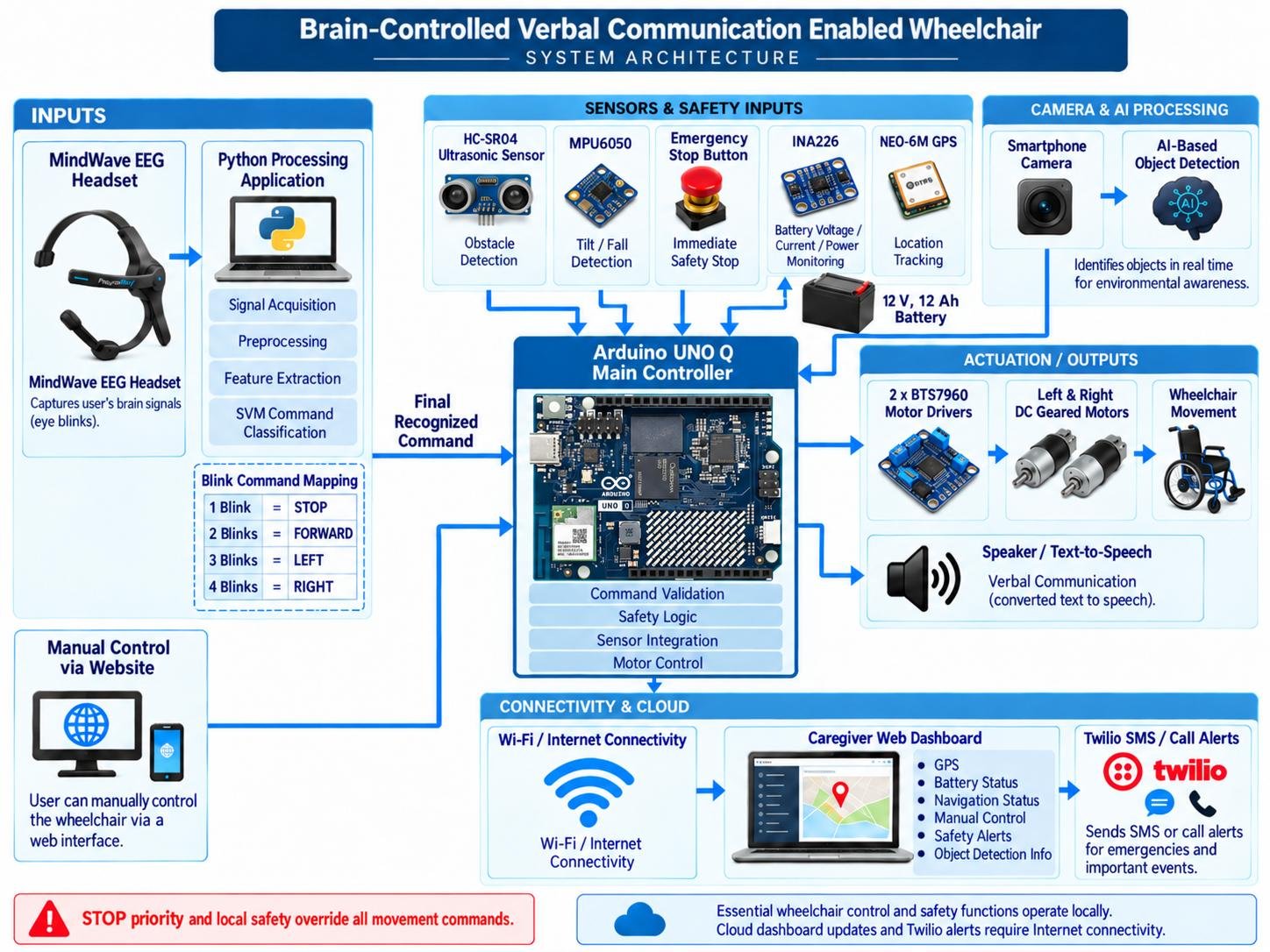
The Brain-Controlled Verbal Communication Enabled Wheelchair is an assistive mobility platform for people with severe motor and speech impairments. It combines EEG-derived intentional eye-blink navigation, Arduino UNO Q-based motor control, smartphone-camera object detection, obstacle and tilt safety sensing, an emergency stop button, GPS tracking, battery monitoring, text-to-speech communication, and an online caregiver dashboard.
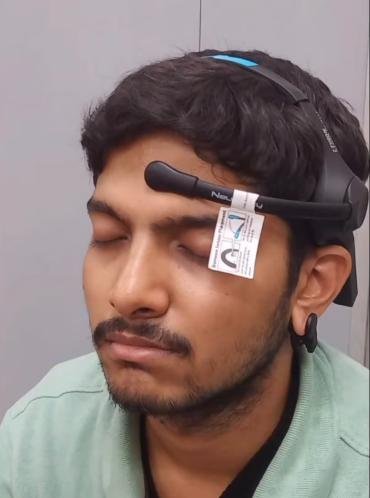
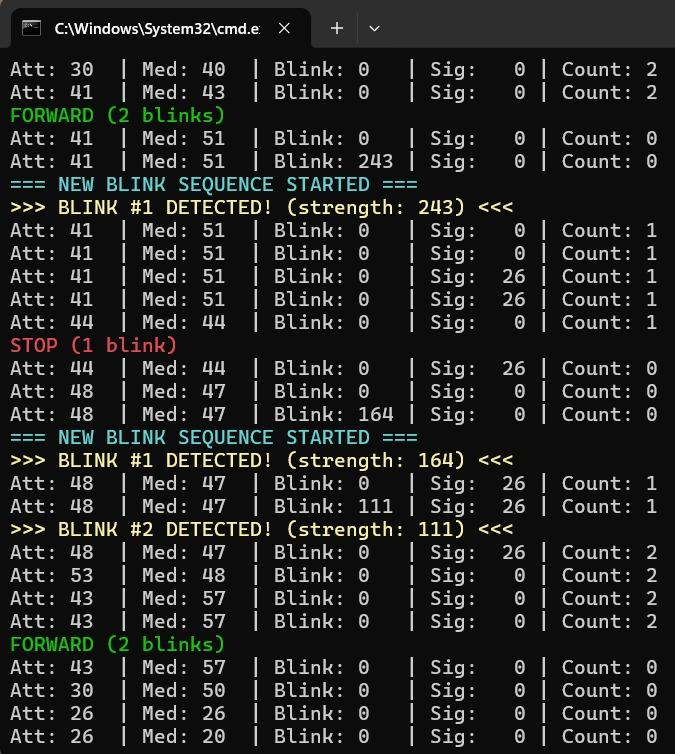
Step 1 – Input and navigation: A MindWave headset supplies EEG-derived intentional eye-blink signals to the Python processing application. After preprocessing and feature extraction, a Support Vector Machine (SVM) classifier classifies the input into STOP, FORWARD, LEFT, or RIGHT. The final recognized command is sent to the Arduino UNO Q, which validates local safety conditions before issuing motor-drive commands. A manual navigation interface provides an additional input method. STOP takes priority over movement commands.
| Intentional blink input | Command | Wheelchair action |
|---|---|---|
| 1 blink | STOP | Stop the wheelchair |
| 2 blinks | FORWARD | Move when the forward path is clear |
| 3 blinks | LEFT | Turn left subject to local safety checks |
| 4 blinks | RIGHT | Turn right subject to local safety checks |
Step 2 – Motion and safety: Two BTS7960 motor drivers control the left and right DC geared planetary motors. The HC-SR04 detects nearby obstacles and automatically stops the wheelchair when an obstacle is within the configured 30 cm safety distance. The MPU6050 monitors abnormal wheelchair tilt and supports a stop-and-alert response. A physical emergency stop button is also provided so that the wheelchair can be stopped immediately whenever required.
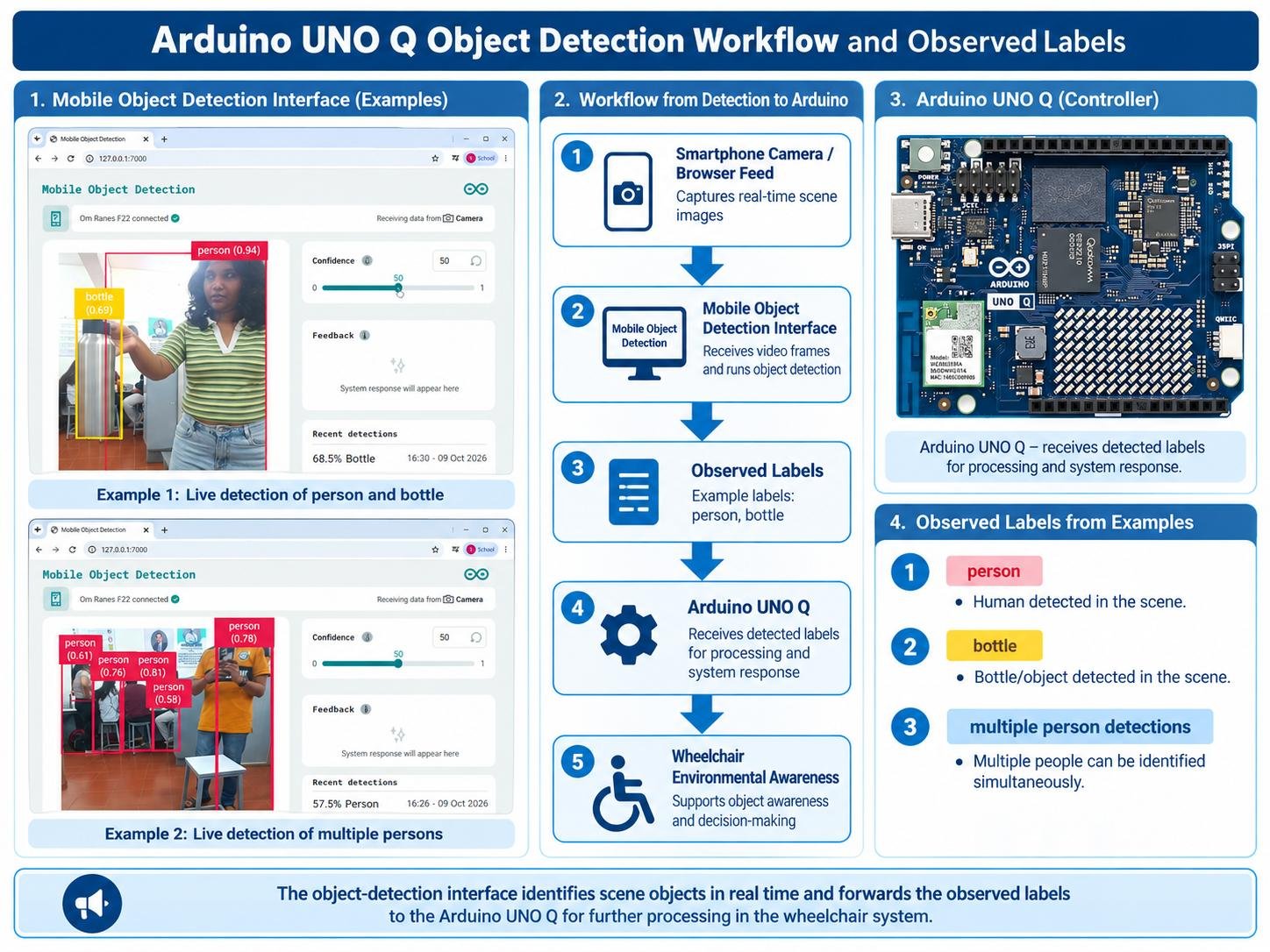
Step 3 – Visual awareness: A smartphone camera supplies frames to the Arduino UNO Q object-detection workflow. The selected model identifies the object classes it supports and displays detection labels. Visual detections provide scene information alongside the independent ultrasonic distance and tilt safety functions.
Step 4 – Monitoring and communication: A NEO-6M GPS module provides the wheelchair’s location. The INA226 continuously monitors battery voltage and current, while the system calculates power consumption, estimated battery percentage, and low-battery warnings. The wheelchair uses a 12 V, 12 Ah lead-acid battery. Text-to-speech messages support verbal communication.
Step 5 – Caregiver connectivity: When network access is available, the website displays navigation status, GPS location, battery information, and configured alerts. Twilio supports Internet-based SMS and call notifications through the backend. Local wheelchair control and safety functions are designed to continue without cloud access; remote updates and external alert delivery require connectivity.
Coding Explanation and Configuration
1. EEG / Intentional Eye-Blink Processing and SVM Classification
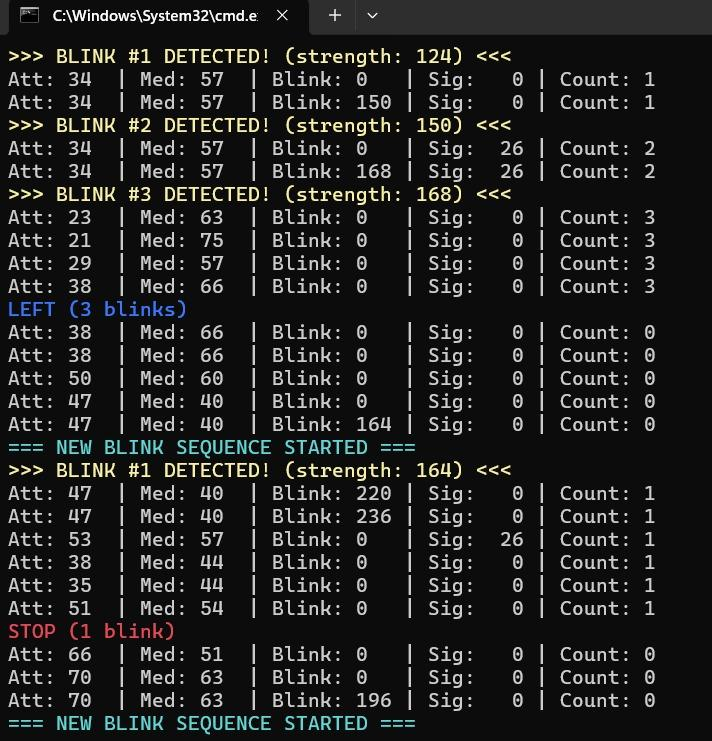
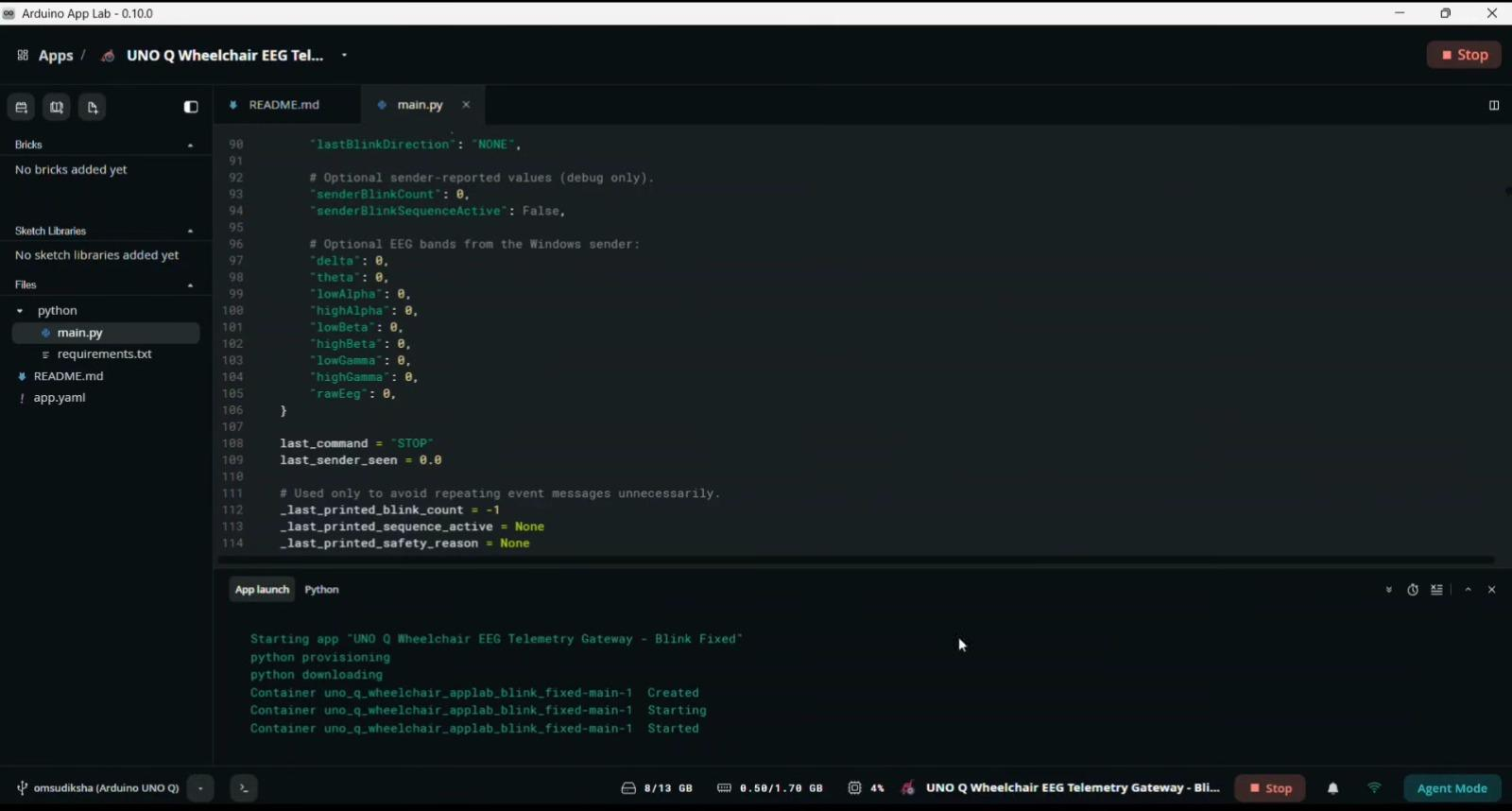
Connect the MindWave EEG headset to the processing device through its supported Bluetooth interface. The Python application acquires intentional eye-blink signals and performs preprocessing and feature extraction. A Support Vector Machine (SVM) classifier classifies the input into STOP, FORWARD, LEFT, or RIGHT using the 1/2/3/4-blink command mapping. The final recognized command is sent to the Arduino UNO Q for local safety validation and wheelchair actuation. Record the actual command transport, headset connection settings, classification results, and tested timing in the final submission.
2. Arduino UNO Q Motor and Sensor Control
The wheelchair control application receives the final SVM-recognized command and manual-control requests, applies STOP priority, and controls the two BTS7960 motor drivers. The HC-SR04 continuously checks obstacle distance and the MPU6050 monitors wheelchair tilt. The physical emergency stop button has the highest safety priority and immediately stops motor movement when pressed. Close obstacles, abnormal tilt, or invalid commands also place the wheelchair in a safe stopped state.
3. Smartphone-Camera Object Detection
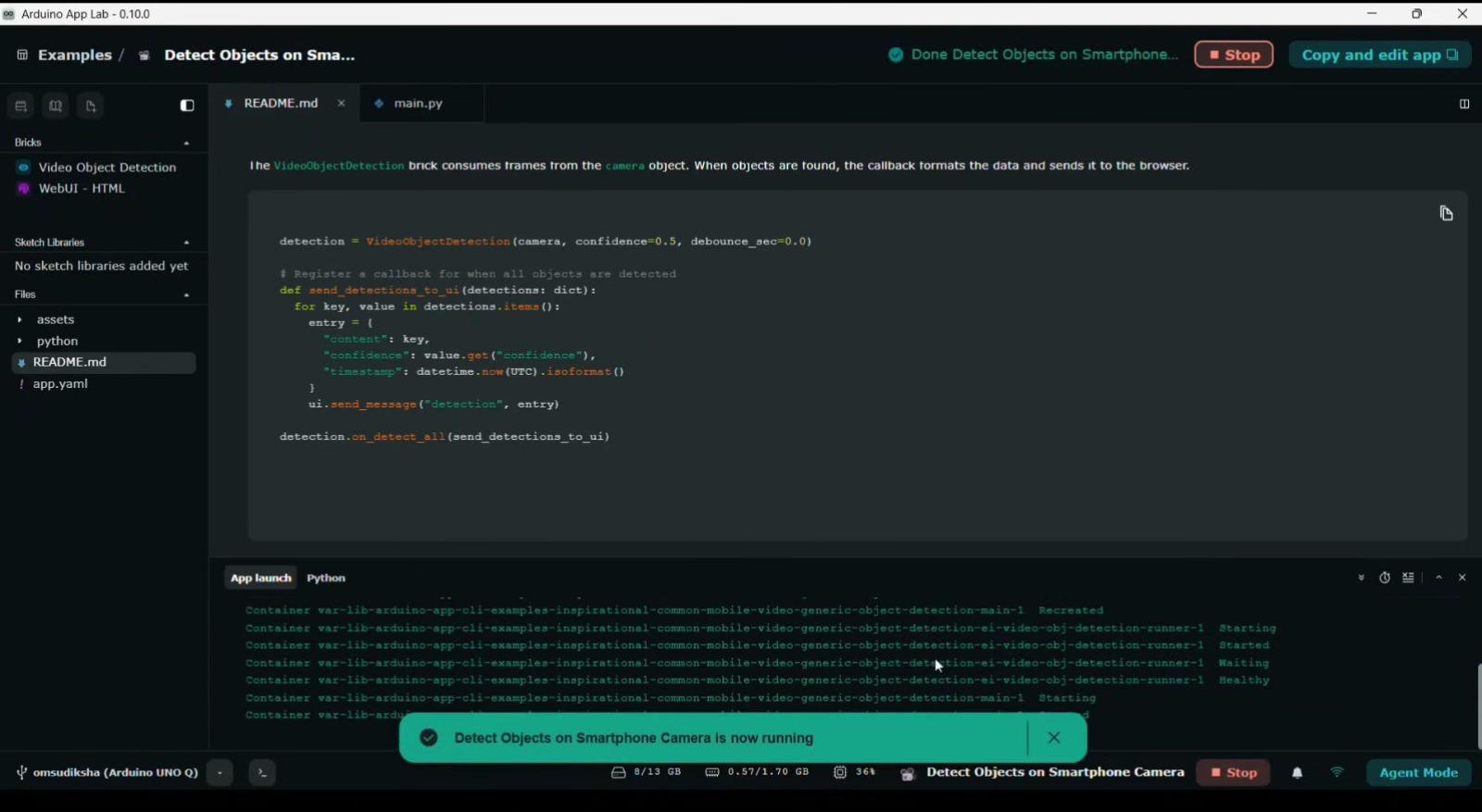
Configure the Arduino App Lab smartphone-camera object-detection workflow and the camera connection. The detection application processes camera frames and presents labels for the supported object classes. Capture the running camera screen, record the exact model name and observed class labels, and show the real detection output in the final article.
4. Battery, GPS, Dashboard and Alerts
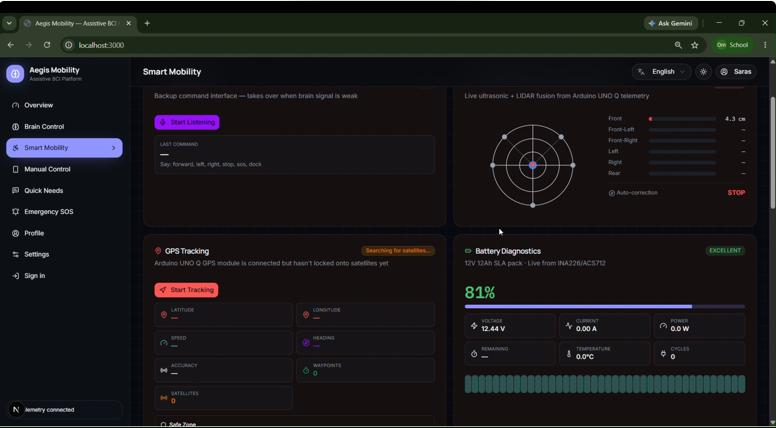
The INA226 measures battery voltage and current, and the system calculates power consumption and estimated battery percentage. Low-battery warnings are displayed on the caregiver website. The NEO-6M GPS provides location data when a valid fix is available. The dashboard displays battery status, GPS location, navigation information, and safety alerts, while configured SOS requests can be sent through the backend using Twilio when Internet access is available.
App / Website Making
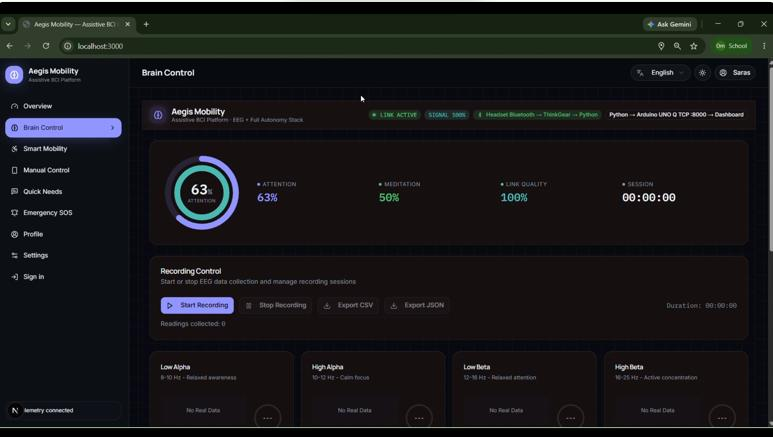
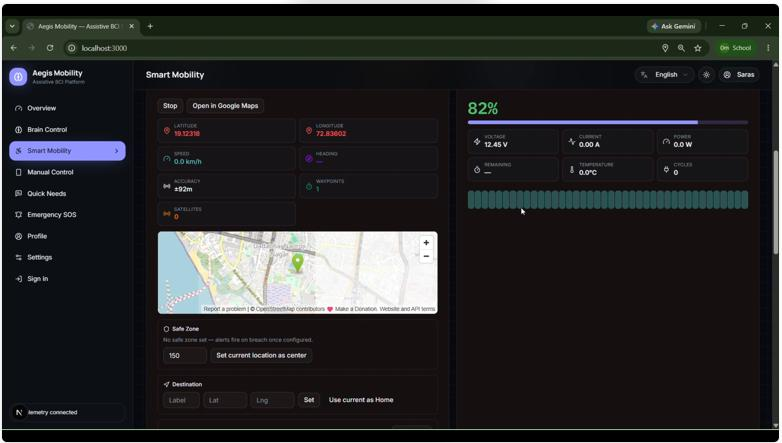
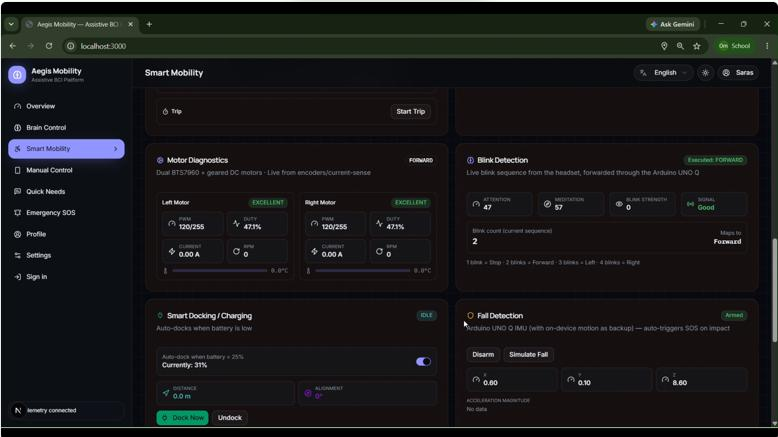
The caregiver website provides manual wheelchair control, a GPS map, live battery monitoring, navigation status, emergency alerts, and text-to-speech message controls. The battery section displays voltage, current, power consumption, estimated battery percentage, and low-battery warnings. The smartphone-camera object-detection application provides live object detections from the wheelchair’s surroundings.
The manual control panel provides the same Forward, Left, Right, and Stop commands as the blink interface. Local safety functions such as obstacle detection, tilt monitoring, and the physical emergency stop button always take priority over movement commands. During a network interruption, essential navigation and safety functions continue locally, while dashboard updates and Twilio notifications require Internet access.
Connection Explanation
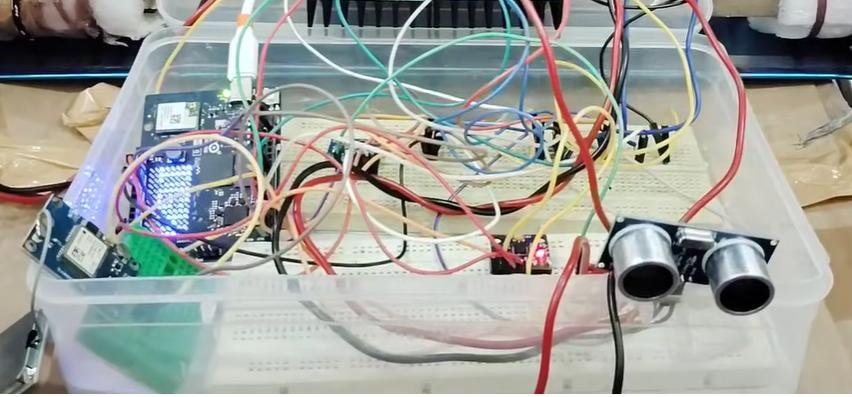
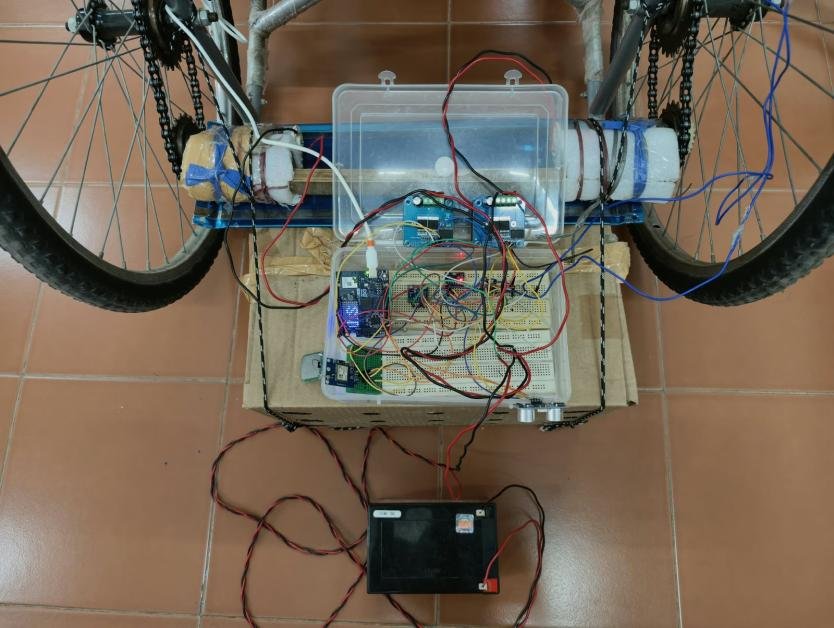
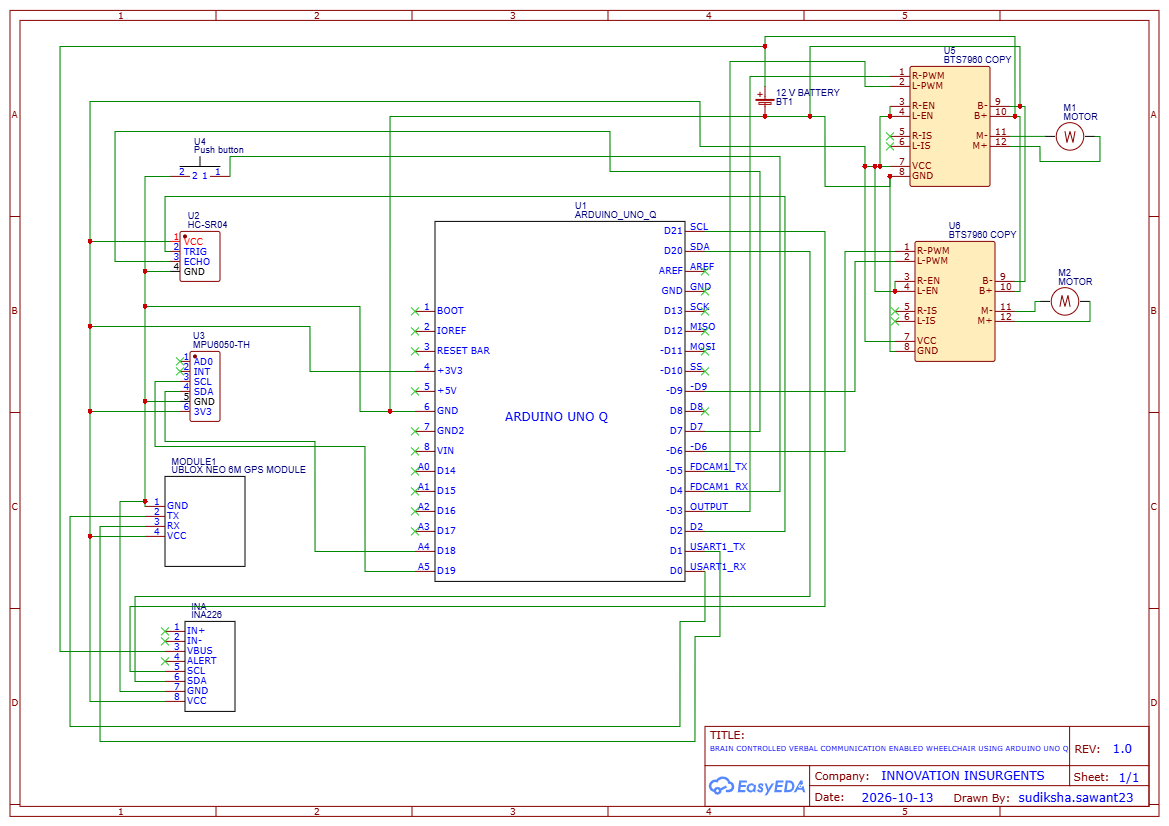
The Arduino UNO Q is the main processing and control platform. Two BTS7960 motor drivers operate the wheelchair motors. The HC-SR04 provides obstacle-distance information, while the MPU6050 monitors wheelchair tilt. The physical emergency stop button is connected to the control system so that motor movement can be stopped immediately when required. The INA226 monitors battery voltage and current for power and battery-percentage estimation, and the NEO-6M GPS provides location information.
The smartphone camera supplies image frames for AI-based object detection, while the headset processing application sends the final SVM-recognized navigation command to the Arduino UNO Q. The hardware connections include the motor drivers, HC-SR04, MPU6050, emergency stop button, NEO-6M GPS, INA226 battery-monitoring circuit, battery supply, and the required power and communication connections.
Testing
The wheelchair is tested to verify all major functions. Test SVM classification for the four blink commands and confirm that the final recognized command reaches the Arduino UNO Q correctly. Check automatic stopping using the HC-SR04, tilt detection using the MPU6050, and immediate stopping using the physical emergency stop button. Verify object detection, manual control, INA226 battery voltage/current/power and estimated percentage, GPS tracking, text-to-speech output, online alerts, and local operation during Internet interruptions. Record the actual measured results and screenshots from the final prototype.
| Test | Expected behavior | Observed result / evidence |
|---|---|---|
| 1 / 2 / 3 / 4 blinks + SVM | SVM recognises STOP / FORWARD / LEFT / RIGHT; final command reaches UNO Q | 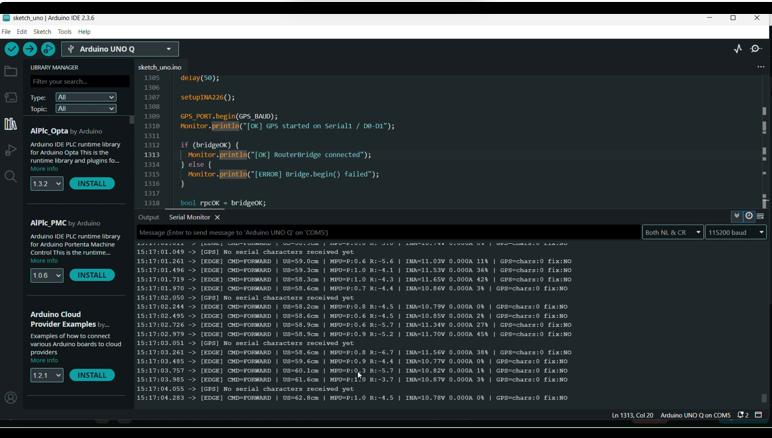 |
| Safety stop | Stop at configured close-obstacle threshold; verify stopping distance | 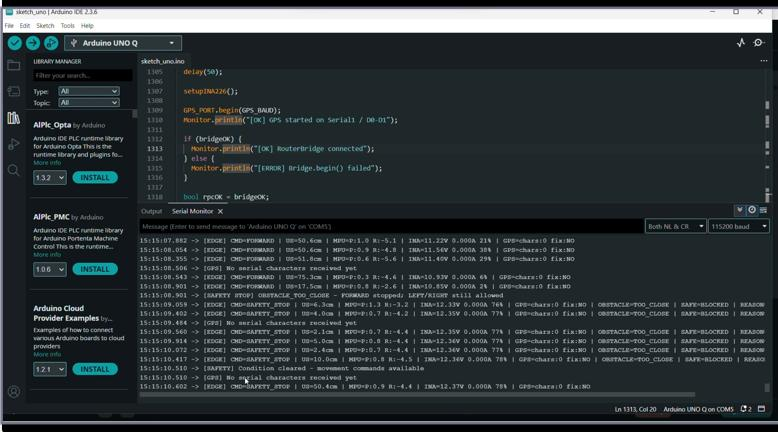 |
| Camera object detection | Visible model-supported detection labels | 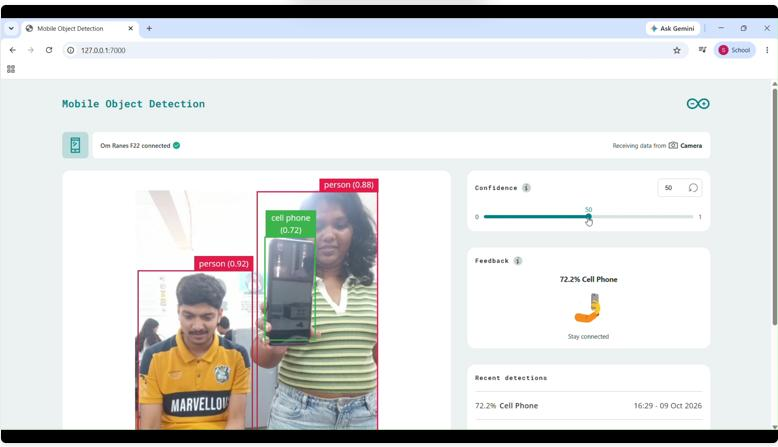 |
| Battery monitoring | Voltage, current, power and estimated charge displayed | |
| Text-to-speech | Selected message spoken | 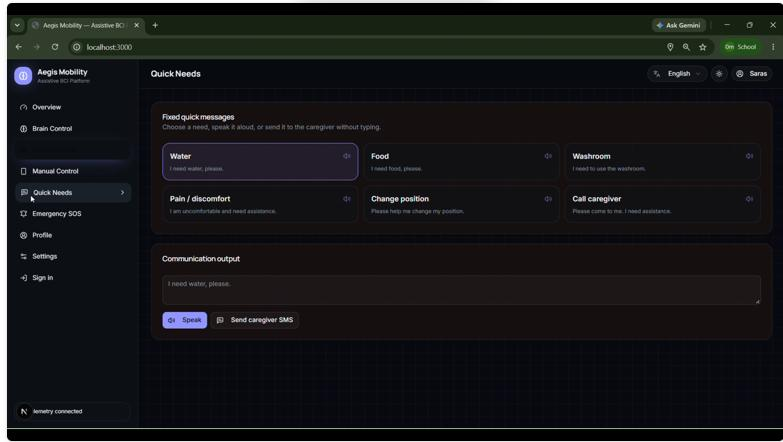 |
| Emergency stop button | Immediately stop wheelchair movement when pressed | 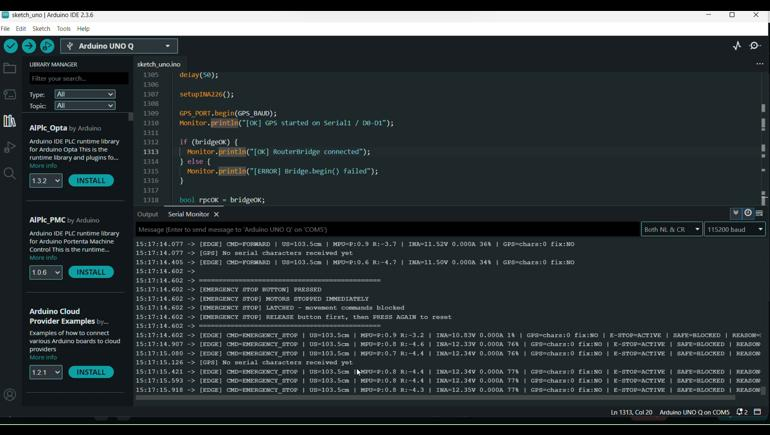 |
Schematics
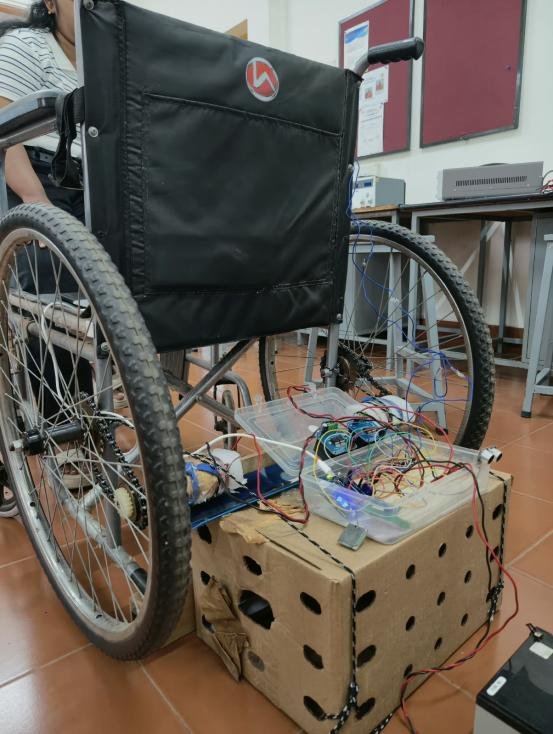
Project Photo
Code:
Source code (GitHub / Google Drive / Dropbox link with viewer access): click here
CAD Design (Wheelchair CAD/design files): click here
