




ColdGuard is an end-to-end, IoT-enabled medicine and vaccine cold-chain monitoring solution designed to monitor the safety, integrity and traceability of temperature-sensitive pharmaceutical shipments during transit.
The supplied project design combines an ESP32-S3-based M5Stack CoreS3 hardware monitor with environmental and physical-security sensing, local fail-safe storage, MQTT/HTTPS communication, a Node.js/Express backend, and a Flutter mobile application. The system is intended to provide continuous monitoring, local and remote alerts, magnetic lid-tamper detection, tilt monitoring, and automated compliance certificate generation.
The design emphasizes a key principle: loss of connectivity should not stop monitoring or erase the delivery history. Sensor data continues to be written locally to MicroSD storage, while an offline JSON outbox retains packets for synchronization after connectivity returns.
Project Checklist
| Item | ColdGuard Submission |
| Project Title | ColdGuard: IoT-Powered Medicine Cold Chain Monitor with Digital Certification |
| Cover Image | Included on the cover page |
| List of Components | Hardware, firmware, backend and mobile stack included |
| Detailed Project Description | Included |
| Schematics / Diagrams | Functional architecture, hardware block schematic, workflow, offline data path and verdict logic included |
| Code | Firmware/backend/frontend module structure documented; |
| Project Video | https://youtu.be/e2Gwtx67Wjs |
1. Project Overview & Executive Summary
ColdGuard is an end-to-end, IoT-enabled medicine and vaccine cold-chain monitoring solution designed to monitor the safety, integrity and traceability of temperature-sensitive pharmaceutical shipments during transit.
The supplied project design combines an ESP32-S3-based M5Stack CoreS3 hardware monitor with environmental and physical-security sensing, local fail-safe storage, MQTT/HTTPS communication, a Node.js/Express backend, and a Flutter mobile application. The system is intended to provide continuous monitoring, local and remote alerts, magnetic lid-tamper detection, tilt monitoring, and automated compliance certificate generation.
The design emphasises a key principle: loss of connectivity should not stop monitoring or erase the delivery history. Sensor data continues to be written locally to MicroSD storage, while an offline JSON outbox retains packets for synchronization after connectivity returns.
2. Problem Statement & Purpose
2.1 The Problem
- Temperature-sensitive pharmaceutical products require controlled storage and transport conditions.
- The supplied design identifies +2°C to +8°C as the standard operating range for the vaccine-monitoring use case.
- Passive loggers may only reveal a problem after delivery, limiting the ability to react while a shipment is in transit.
- Connectivity interruptions can create data gaps if a monitoring device depends entirely on cloud connectivity.
- Physical events such as unauthorised opening or significant orientation changes can be important to shipment integrity in addition to temperature.
2.2 Purpose & Objectives
- Real-time active telemetry: continuously monitor temperature, humidity, tilt and magnetic-field changes.
- Immediate localised and remote alerts: show warnings on the device and publish urgent MQTT events.
- Offline fail-safe operation: preserve readings locally and queue unsent JSON packets.
- Automated compliance verdicts: classify a completed delivery as SAFE, CAUTION, COMPROMISED or INCOMPLETE according to the supplied project rules.
- Digital handover: generate a QR-based receiver workflow and a vector PDF certificate containing delivery statistics, breach information and sensor trends.
3. System Architecture & Operational Workflow
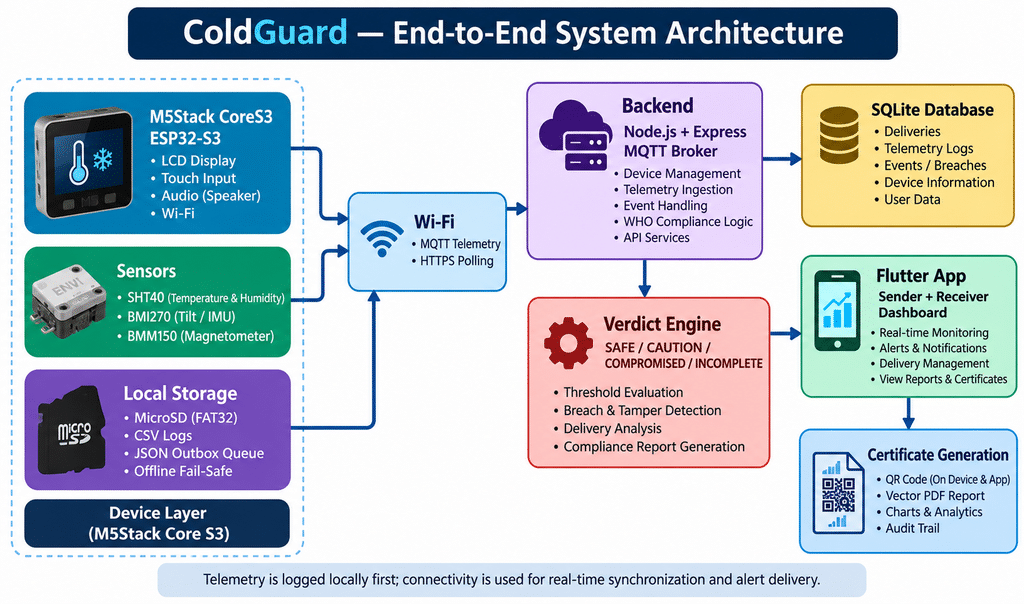
The architecture separates the system into four practical layers: the embedded monitoring device, the communication layer, backend services and the mobile application/certificate layer. Local storage sits alongside the network path so that monitoring can continue when Wi-Fi is unavailable.
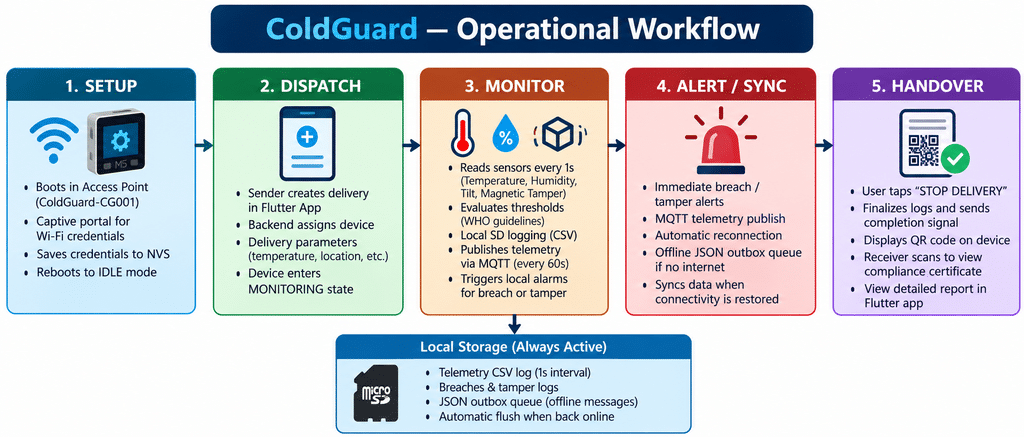
3.1 Operational Phases
- Device provisioning: on first boot or setup reset, the M5Stack CoreS3 creates the ColdGuard-CG001 access point and provides a captive portal at 192.168.4.1 for Wi-Fi configuration.
- Delivery dispatch: the sender creates a shipment in the Flutter app, specifies payload/recipient/destination information and temperature limits, and assigns the hardware device.
- Monitoring: the device reads the SHT40, BMI270 and BMM150 every second, writes readings to MicroSD, and publishes telemetry over MQTT at the configured interval.
- Breach and tamper detection: temperature excursions, tilt deviation and magnetic-field changes can trigger local LCD/audio alerts and immediate MQTT breach/tamper messages.
- Handover: the operator stops the delivery, the device presents a QR code, and the receiver scans it with the Flutter app to retrieve the delivery certificate and charts.
4. Functional Hardware Schematic
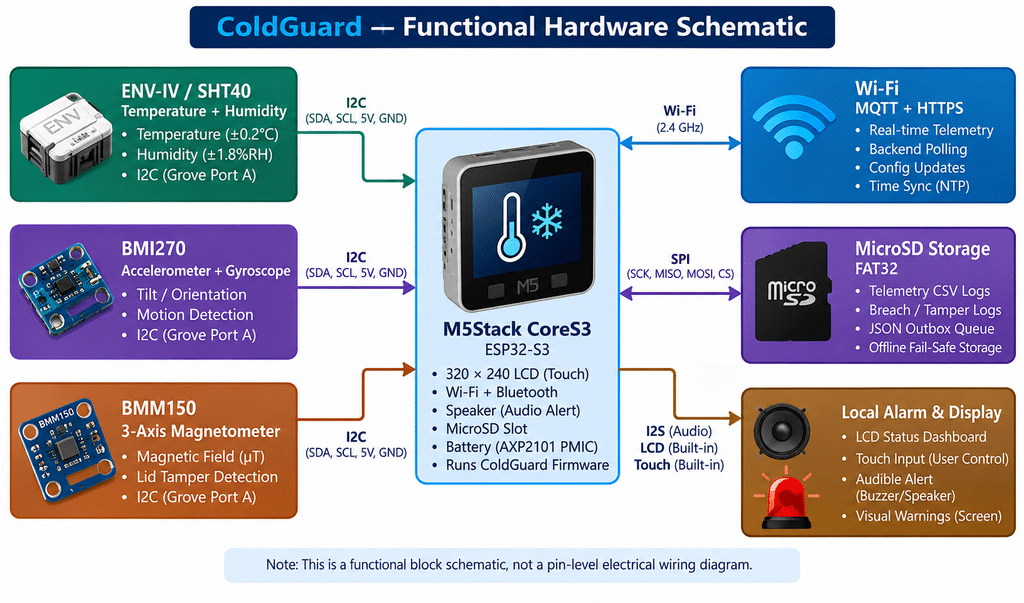
This diagram is a functional system schematic rather than a pin-level electrical drawing. The supplied materials specify the M5Stack CoreS3 as the central unit, an ENV-IV sensor unit containing SHT40 and BMP280, internal BMI270 and BMM150 sensors, and MicroSD storage.
The primary monitoring workflow explicitly uses SHT40 for temperature/humidity, BMI270 for tilt and BMM150 for magnetic-field-based tamper detection. The BMP280 is listed in the component inventory as part of the ENV-IV unit but is not used in the detailed one-second monitoring description.
5. Hardware Component List
| Component | Function / Specification | Interface / Notes |
| M5Stack CoreS3 | Main IoT host; ESP32-S3, 320×240 LCD, capacitive touch, speaker and MicroSD | Central unit |
| ENV-IV / SHT40 | Temperature and humidity sensing; SHT40 stated as ±0.2°C temperature and ±1.8%RH | Port A / Grove I2C |
| BMP280 | Barometric sensor listed in the ENV-IV inventory | Part of ENV-IV unit |
| BMI270 | 6-axis accelerometer + gyroscope for orientation/tilt detection | Internal I2C |
| BMM150 | 3-axis digital magnetometer for magnetic-field change / lid tamper detection | Internal I2C |
| MicroSD Card | Local CSV history and offline JSON outbox | Internal SD slot; FAT32 |
6. Monitoring, Alerting & Fail-Safe Operation
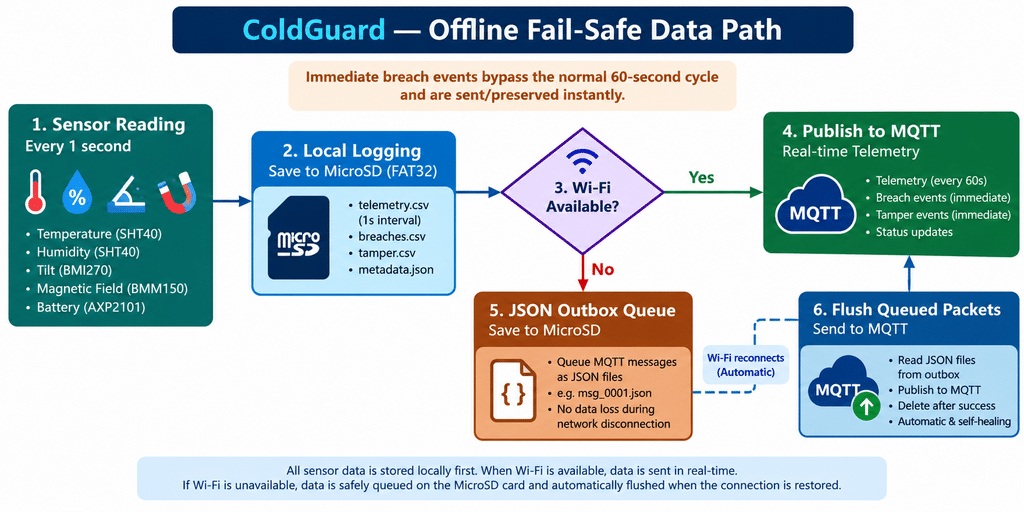
ColdGuard performs local sensing and logging independently of the availability of the backend. The design therefore treats connectivity as a synchronization and alerting channel rather than the sole source of truth.
6.1 Sensor Monitoring
- Temperature: TEMP_HIGH is generated when temperature exceeds 8°C; TEMP_LOW is generated below 2°C in the supplied rules.
- Tilt: orientation changes exceeding 45° are treated as a physical-handling event.
- Magnetic tamper: changes in magnetic flux are used to detect possible lid opening or removal.
- Sampling: the detailed workflow specifies sensor reads every 1 second.
6.2 Storage & Connectivity
- Every reading is appended to a delivery-specific CSV file on the FAT32 MicroSD card.
- Normal telemetry is published to coldguard/{SERIAL}/telemetry at the configured 60-second interval.
- Urgent breach/tamper events are published immediately to the corresponding MQTT topics.
- When Wi-Fi is unavailable, JSON packets are stored under the /coldguard/outbox/ path.
- When connectivity returns, queued packets are flushed automatically so the backend can reconstruct the delivery history.
7. Compliance Verdict Engine
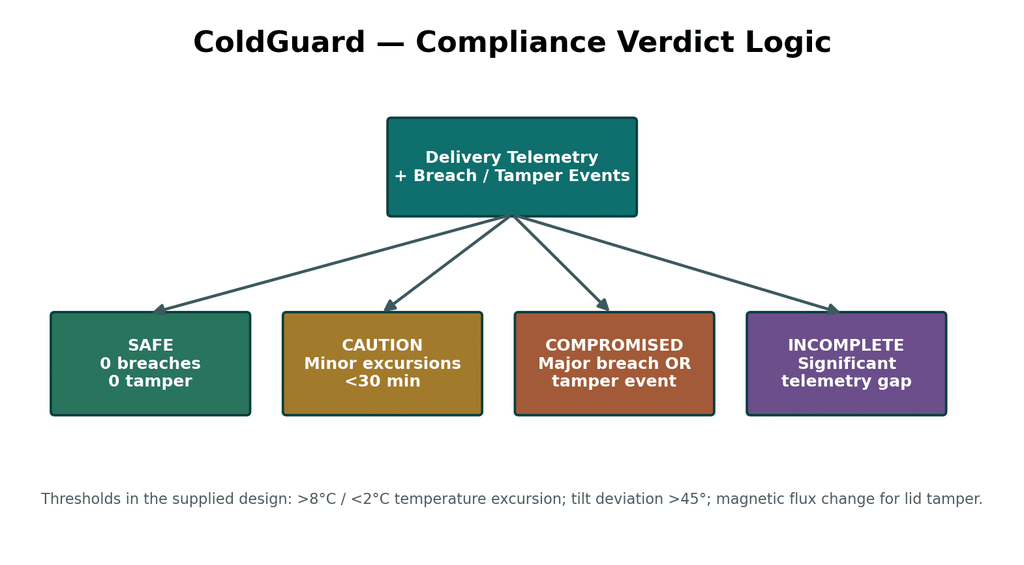
| Verdict | Supplied Project Rule |
| SAFE | 0 breaches and 0 tamper events |
| CAUTION | Minor temperature excursions only: <30 minutes, <2°C over threshold, maximum 2 occurrences |
| COMPROMISED | Any major breach (>30 minutes or >2°C over limit) OR any magnetic tamper event |
| INCOMPLETE | Significant telemetry data gaps; the supplied design specifies >5× the telemetry interval |
These classifications are the project’s stated decision rules. They should be treated as the implementation specification for ColdGuard rather than as an independent medical or regulatory certification by this report.
8. Receiver Handover & Digital Certificate
- The courier selects STOP DELIVERY on the device touchscreen.
- The device computes local delivery statistics and displays a QR code containing the delivery identifier.
- The receiver scans the QR code using the ColdGuard Flutter application.
- The application requests the corresponding certificate from the backend.
- The certificate screen presents the verdict, trip statistics, timeline charts and breach/tamper tables.
- The PDF service generates a printable/shareable multi-page vector certificate.
9. Technology Stack
9.1 Hardware & Firmware
| Layer / Component | Technology / Library | Purpose |
| MCU | ESP32-S3, dual-core Xtensa @ 240 MHz | Processing, sensing and Wi-Fi/BLE connectivity |
| Development | PlatformIO / C++20 | Firmware compilation and dependency management |
| Hardware SDK | M5Unified + M5GFX | Display, touch and speaker |
| Networking | PubSubClient + WiFiClientSecure | MQTT telemetry and HTTPS polling |
| Provisioning | DNSServer + WebServer | Captive-portal Wi-Fi setup |
| Storage | ArduinoJson 7 + SD/FatFS | CSV logging, JSON outbox and configuration |
9.2 Backend & Cloud
| Layer / Component | Technology / Library | Purpose |
| Runtime | Node.js v18+ / v20+ | Backend server execution |
| HTTP server | Express.js v4.21 | REST APIs for auth, deliveries, devices and certificates |
| MQTT | Eclipse Mosquitto + mqtt | Telemetry and alarm ingestion |
| Database | SQLite3 + Sequelize v6.37 | Users, deliveries, readings, breaches and tamper events |
| Security | JWT + bcryptjs | Authentication and route protection |
| File handling | Multer | Photo attachments and delivery proof uploads |
9.3 Flutter Application
| Component | Technology | Purpose |
| Framework | Flutter 3.x / Dart 3.2+ | Cross-platform UI |
| State management | Riverpod v2.5 | Reactive application state |
| Routing | GoRouter v13.2 | Navigation and authentication guards |
| HTTP | Dio v5.4 | REST API communication |
| Real-time | mqtt_client v10.0 | Live telemetry dashboard |
| Charts | fl_chart v0.68 | Temperature/humidity timelines |
| pdf + printing | Certificate generation and printing/sharing | |
| QR scanner | mobile_scanner v5.1 | Delivery QR scanning |
| Maps | flutter_map + latlong2 + geolocator | Route and location display |
| Local storage | Hive Flutter + Flutter Secure Storage | Offline cache and secure token storage |
10. Software Module Structure
10.1 Firmware
| Module | Responsibility |
| main.cpp | Finite state machine: SETUP → IDLE → MONITORING → COMPLETED |
| wifi_provisioning.cpp | SoftAP/captive-portal onboarding |
| sensors.cpp | SHT40, BMI270 and BMM150 drivers and baseline calibration |
| breach_detector.cpp | Temperature/tilt/tamper evaluation and alarms |
| mqtt_client.cpp | QoS 1 telemetry and alarm publishing |
| delivery_poller.cpp | HTTPS polling for delivery state transitions |
| sd_logger.cpp | CSV logging and JSON outbox management |
| display_ui.cpp | Gauges, status bars, alerts and QR code rendering |
10.2 Backend
- server.js initializes Express, Sequelize database synchronization and MQTT handling.
- broker.js subscribes to telemetry, breach, tamper and status topics and persists incoming events.
- verdictService.js implements the SAFE, CAUTION, COMPROMISED and INCOMPLETE decision rules.
- Sequelize models include User, Device, Delivery, SensorReading, BreachEvent, TamperEvent and DeliveryLog.
- REST routes cover authentication, deliveries, certificates, device registry/status and photo uploads.
10.3 Frontend
- Authentication: LoginScreen, RegisterScreen and AuthService.
- Sender workflow: SenderDashboardScreen, CreateDeliveryScreen and MapPickerScreen.
- Receiver workflow: ReceiverHomeScreen and ScannerScreen.
- Certificate workflow: CertificateScreen and PdfService.
- Device provisioning: WifiProvisioningScreen.
10. Detailed Firmware Architecture & Implementation
The ColdGuard M5Stack Core S3 firmware (ESP32-S3) is built using C++20 on PlatformIO with the M5Unified SDK. It uses an event-driven finite state machine (FSM) with non-blocking timed tasks to coordinate Wi-Fi provisioning, multi-sensor telemetry, breach and tamper alarms, offline fail-safe SD storage, MQTT publishing, HTTP delivery polling and an interactive capacitive-touch user interface.
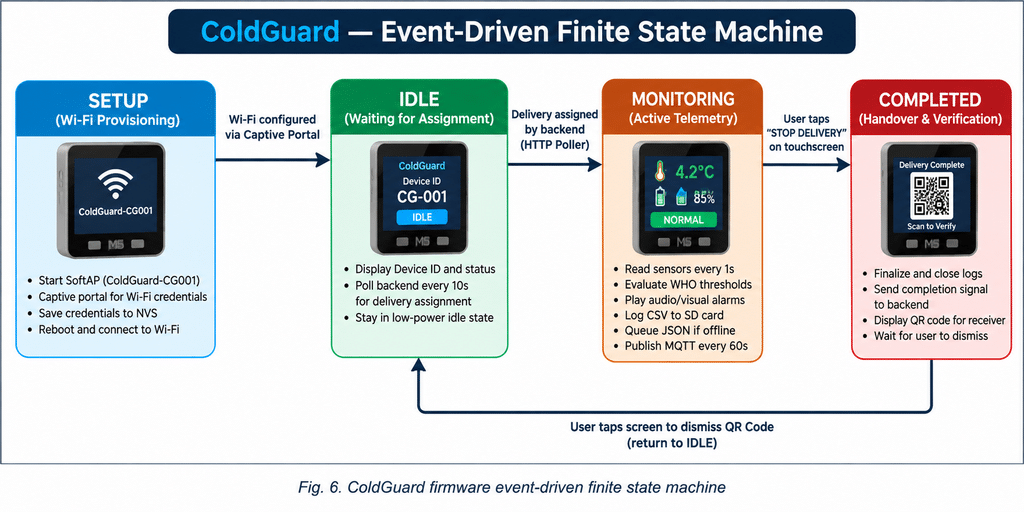
10.1 Firmware State Machine
- SETUP: boots the ColdGuard-CG001 Wi-Fi Access Point with a captive portal for entering local Wi-Fi credentials.
- IDLE: displays the Device ID and polls the cloud/backend every 10 seconds for a new delivery assignment.
- MONITORING: reads sensors every 1 second, evaluates active limits, drives audio/visual alarms, writes CSV logs to SD, queues offline JSON messages and publishes MQTT telemetry every 60 seconds.
- COMPLETED: finalizes logs, sends the delivery completion signal and renders an on-screen QR code for receiver verification. A screen tap dismisses the QR view and returns the device to IDLE.
10.2 Firmware Source Tree
firmware/src/
├── config.h
├── main.cpp
├── wifi_provisioning.h/.cpp
├── sensors.h/.cpp
├── breach_detector.h/.cpp
├── mqtt_client.h/.cpp
├── delivery_poller.h/.cpp
├── sd_logger.h/.cpp
└── display_ui.h/.cpp
10.3 Module-by-Module Breakdown
config.h — System Configuration
- Centralizes network, timing, safety-limit and SD-path constants.
- MQTT broker: 192.168.29.193:1883; backend API: http://192.168.29.193:3000.
- Timing: sensor 1,000 ms; display 1,000 ms; delivery polling 10,000 ms; MQTT telemetry 60,000 ms.
- Default limits: temperature 2.0°C–8.0°C; humidity 30%–65%; max tilt 45°; magnetic tamper threshold 2000 µT.
- SD paths: /coldguard/deliveries and /coldguard/outbox.
main.cpp — Main Engine & Loop
- setup() initializes M5 hardware, display, sensors and SD, loads NVS Wi-Fi credentials, synchronizes NTP time using pool.ntp.org and enters IDLE.
- loop() uses millis()-based non-blocking scheduling.
- Global tasks include outbox draining, RTC synchronization when Wi-Fi is available, and touch actions STOP DELIVERY, RESET WI-FI and DISMISS QR.
wifi_provisioning.cpp — Wi-Fi Captive Portal
- Uses ESP32 Preferences/NVS for persistent SSID/password storage.
- Starts SoftAP ColdGuard-CG001 when credentials are missing or provisioning is required.
- DNSServer redirects web traffic to 192.168.4.1 and a responsive configuration page stored in PROGMEM collects credentials.
- Credentials are saved to NVS and the device reboots with ESP.restart().
sensors.cpp — Multi-Sensor Hardware Abstraction
- SHT40 via Grove Port A provides temperature and humidity; the supplied specification states ±0.2°C and ±1.8%RH.
- BMI270 calculates pitch and roll from accelerometer data and derives tilt deviation relative to a calibrated delivery-start baseline.
- BMM150 calculates magnetic-field magnitude and its deviation from the delivery baseline, reducing sensitivity to simple device rotation while detecting significant magnetic changes.
- AXP2101/Power API reports battery percentage through M5.Power.getBatteryLevel().
breach_detector.cpp — Threshold & Alarm Engine
- Checks TEMP_HIGH (>8°C), TEMP_LOW (<2°C), HUMIDITY (<30% or >65%), TILT (>45° baseline shift) and TAMPER (>2000 µT magnetic deviation).
- Triggers a 2 kHz alarm tone via M5.Speaker.tone(2000, 200), updates the visual UI and publishes breach/tamper events.
- Uses a 10-second debounce guard for repeated breach/tamper publishing.
- Duration severity classes: MINOR (<1 min), MODERATE (>1 min), MAJOR (>10 min), CRITICAL (>30 min).
mqtt_client.cpp — PubSub Telemetry & Offline Fail-Safe
- Uses PubSubClient with a local Mosquitto broker over TCP.
- Publishing topics: coldguard/CG-001/telemetry, /breach, /tamper and /status.
- Subscribes to coldguard/CG-001/config for dynamic threshold updates.
- publishOrQueue() sends immediately when connected; otherwise it calls sdEnqueueMessage() so the payload is retained locally.
delivery_poller.cpp — HTTP REST Poller
- Requests GET /api/devices/CG-001/delivery every 10 seconds.
- Uses HTTPClient / WiFiClientSecure and includes the ngrok-skip-browser-warning header for tunneling support.
- Extracts delivery code and dynamic temperature, humidity and maximum-tilt parameters.
sd_logger.cpp — Local Log Persistence & Outbox Queue
- Uses Core S3 SD SPI pins SCK=36, MISO=35, MOSI=37, CS=4.
- Stores /coldguard/deliveries/{DEL_CODE}/telemetry.csv with timestamp, temperature, humidity, tilt, magnetic field and battery data every 1 second.
- Also stores breaches.csv, tamper.csv and metadata.json for each delivery.
- Unsent MQTT packets are stored as /coldguard/outbox/msg_0001.json and similar files. sdDrainOutbox() publishes queued packets after reconnection and deletes successfully sent files.
display_ui.cpp — M5GFX Dashboard & Touch UI
- Renders the 320×240 dashboard with Wi-Fi, MQTT, SD and battery status badges.
- IDLE shows device serial ID CG-001 and a Wi-Fi reset control.
- MONITORING shows temperature/humidity gauges, tilt, trip duration, target range and STOP DELIVERY; background indication changes for SAFE, CAUTION and active BREACH/TAMPER states.
- COMPLETED renders a high-contrast QR code for receiver scanning.
10.4 Sensor and Tamper Calculations
The supplied firmware description specifies the following calculations:
Pitch = atan2(-aₓ, √(aᵧ² + a_z²))
Roll = atan2(aᵧ, a_z)
|M| = √(mₓ² + mᵧ² + m_z²)
ΔM = ||M_current| − |M_baseline||
The magnetic-field magnitude method is described as reducing sensitivity to simple device rotation while retaining sensitivity to a significant magnetic-field disturbance such as lid removal.
10.5 Firmware Timing Model
| Task | Interval / Trigger | Action |
| Sensor sampling | 1 second | Read SHT40, BMI270 and BMM150; evaluate thresholds; log telemetry |
| Display refresh | 1 second | Refresh gauges, status, timers and alert state |
| Delivery poller | 10 seconds | Check backend for delivery assignment and dynamic parameters |
| MQTT telemetry | 60 seconds | Publish telemetry when connected |
| Breach / tamper | Immediate | Alarm locally and publish urgent event, subject to debounce |
| Outbox drain | On MQTT reconnection | Publish queued JSON packets and delete successful messages |
| RTC sync | When Wi-Fi is available | Synchronize M5.Rtc with NTP |
| Touch handler | Event-driven | STOP DELIVERY, RESET WI-FI and DISMISS QR |
10.6 Firmware Design Characteristics
- Event-driven state transitions separate the delivery lifecycle from continuous sensor and communication work.
- Non-blocking millis()-based timing allows monitoring, UI refresh, network handling and storage tasks to coexist.
- Dynamic delivery parameters can override the fallback limits defined in config.h.
- Local SD persistence provides an independent record when MQTT connectivity is unavailable.
- The MQTT configuration subscription allows backend-driven threshold updates without recompiling the firmware.
11. Beginner’s Step-by-Step Rebuild & Setup Guide
This section is intended for a beginner who has the ColdGuard source code and wants to reproduce the project from scratch. It follows the supplied rebuild guide and explains the order in which the hardware, MQTT broker, backend, firmware and Flutter application should be configured.
The rebuild is easiest when all devices are connected to the same local Wi-Fi network. In the supplied implementation, the developer computer acts as the local server and MQTT broker, while the M5Stack CoreS3 and mobile phone communicate with it over the LAN.
11.1 Prerequisites & Required Hardware
| Item | Required Component |
| 1 | M5Stack Core S3 (ESP32-S3 with LCD/touch) |
| 2 | ENV-IV Sensor Unit (SHT40 + BMP280) |
| 3 | Grove 4-pin cable |
| 4 | FAT32 MicroSD card, 8–32 GB |
| 5 | USB-C data cable |
| 6 | Windows, macOS or Linux computer connected to the local Wi-Fi |
11.2 Software to Install
| Software | Purpose |
| Visual Studio Code | Primary development environment |
| PlatformIO IDE extension | Build and flash ESP32-S3 firmware |
| Node.js v18/v20 LTS | Run ColdGuard backend |
| Flutter SDK v3.19+ | Build and run mobile application |
| Mosquitto MQTT Broker | Local telemetry and alarm message broker |
11.3 Step 1 — Find the Computer’s LAN IP
Before configuring the project, find the IP address of the computer that will run the backend and MQTT broker.
- Windows: open Command Prompt or PowerShell and run:
ipconfig
- Find the IPv4 Address of the active Wi-Fi adapter, for example 192.168.29.193.
- macOS/Linux: run ifconfig and identify the IPv4 address of the active network interface.
Keep this address available. It must be entered into both the firmware configuration and the Flutter application’s environment configuration.
11.4 Step 2 — Configure Mosquitto MQTT
Mosquitto must accept connections from the M5Stack and phone over the local network on TCP port 1883.
- Locate the Mosquitto configuration file. On Windows, the supplied guide uses C:\Program Files\mosquitto\mosquitto.conf.
- Add the following configuration:
listener 1883 0.0.0.0
allow_anonymous true- Start the Mosquitto service.
- Windows Administrator Command Prompt:
net start mosquitto- macOS/Linux:
mosquitto -c /path/to/mosquitto.conf -vFor a real deployment, replace the development-only anonymous MQTT configuration with authenticated and secured MQTT. The supplied rebuild guide uses anonymous access for local setup simplicity.
11.5 Step 3 — Set Up the Node.js Backend
- Open the ColdGuard project in VS Code.
- Open a terminal and enter the backend directory:
cd backend- Install dependencies:
npm install- Create backend/.env with the following development configuration:
PORT=3000
MQTT_BROKER_URL=mqtt://localhost
MQTT_PORT=1883
JWT_SECRET=coldguard_super_secret_key_2026
UPLOADS_DIR=./uploads- Initialize the SQLite test data:
npm run seed- Start the backend:
npm startA successful startup should report that the database was synchronized, MQTT connected to mqtt://localhost:1883 and the ColdGuard backend is running on port 3000.
Verification: open http://localhost:3000/api/health. The supplied guide expects a JSON health response indicating that the ColdGuard Backend is running.
11.6 Step 4 — Assemble the Hardware
Connect the ENV-IV sensor unit to Port A of the M5Stack Core S3 using the Grove cable.
| CoreS3 Port A | ENV-IV |
| SDA — G2 | SDA |
| SCL — G1 | SCL |
| 5V | VCC |
| GND | GND |
- Insert a FAT32-formatted MicroSD card into the CoreS3.
- Connect the CoreS3 to the computer using a USB-C data cable.
11.7 Step 5 — Configure firmware/src/config.h
Open firmware/src/config.h and replace the example IP address with the LAN IP found in Step 1.
#define MQTT_BROKER_IP "192.168.29.193"
#define API_BASE_URL "http://192.168.29.193:3000"
#define DEVICE_SERIAL "CG-001"
The DEVICE_SERIAL must match the device identifier registered/used by the backend and mobile application.
11.8 Step 6 — Build and Flash the Firmware
- Open the PlatformIO sidebar in VS Code.
- Select the M5Stack Core S3 environment.
- Click Build and wait for the firmware compilation to complete.
- Click Upload to flash the CoreS3.
The supplied command-line alternative is:
cd firmware
pio run -t upload
11.9 Step 7 — Provision Wi-Fi on the CoreS3
- On first boot, the device creates the Wi-Fi network ColdGuard-CG001.
- Connect a phone or laptop to ColdGuard-CG001.
- If the captive portal does not open automatically, browse to http://192.168.4.1.
- Enter the SSID and password of the local Wi-Fi network.
- Select Connect & Save.
- The device stores the credentials in non-volatile memory and reboots.
- After reboot, the IDLE screen should show Device ID CG-001 and status indicators such as W+, M+ and SD+ when the corresponding services are available.
11.10 Step 8 — Set Up the Flutter Application
- Open another terminal and enter the frontend directory:
cd frontend- Create or edit frontend/.env:
API_BASE_URL=http://192.168.29.193:3000
MQTT_BROKER_IP=192.168.29.193
MQTT_PORT=1883- Fetch Flutter packages:
flutter pub get- Run the application on a physical device:
flutter run- For an Android emulator, use API_BASE_URL=http://10.0.2.2:3000 in frontend/.env.
- For Chrome, use:
flutter run -d chrome11.11 Step 9 — Run the First End-to-End Delivery Simulation
Once the backend, MQTT broker, M5Stack and Flutter app are running, perform the following sequence.
- Open the ColdGuard mobile application.
- Log in using the seeded sender account from the supplied rebuild guide: [email protected] / password123.
- Select + Create Delivery.
- Enter a test payload, for example a vaccine shipment with a 2°C–8°C target range.
- Select device CG-001 and configure origin/destination.
- Dispatch the shipment.
- Wait for the CoreS3 to poll the backend. The supplied firmware polls every 10 seconds, so the device should transition from IDLE to MONITORING after detecting its assignment.
- Verify that the monitoring screen shows temperature, humidity, tilt, trip duration and the configured target range.
11.12 Step 10 — Test the Monitoring and Alarm Functions
| Test | Beginner Procedure | Expected Result |
| Temperature | Gently warm the SHT40 sensor using warm air or a warm finger. | Above the configured high limit, the device indicates a breach, sounds the alarm and publishes an event. |
| Tilt | Tilt the device beyond the configured 45° default threshold. | A tilt breach is generated. |
| Magnetic tamper | Move a small magnet near/away from the sensing area to create a magnetic-field change. | A tamper event is generated. |
| Offline mode | Temporarily disconnect Wi-Fi during monitoring. | Local SD logging continues and MQTT messages are queued in the outbox. |
| Reconnect | Restore Wi-Fi. | Queued messages are drained and published after reconnection. |
Use controlled test conditions. These tests are for demonstrating the firmware behaviour and should not be performed on actual medicines or vaccines.
11.13 Step 11 — Complete the Delivery and Verify the QR Workflow
- Tap STOP DELIVERY on the CoreS3 touchscreen.
- The device finalizes local delivery logs and displays a QR code.
- Open Receiver mode in the mobile application.
- Use Scan QR Code and point the camera at the CoreS3 display.
- The application retrieves the delivery record and displays the compliance certificate.
- Review the verdict, sensor graphs, breach/tamper events and delivery statistics.
- Use the PDF/share function to generate the certificate.
11.14 Important Files a Beginner Should Understand First
| File / Directory | Start Here Because… |
| firmware/src/config.h | Contains network addresses, timing values and default limits. |
| firmware/src/main.cpp | Shows the main FSM and non-blocking firmware loop. |
| firmware/src/sensors.cpp | Explains how the physical sensors are read. |
| firmware/src/breach_detector.cpp | Shows how threshold breaches and alarms are generated. |
| firmware/src/mqtt_client.cpp | Shows telemetry topics and offline publish/queue behaviour. |
| firmware/src/sd_logger.cpp | Shows local CSV storage and JSON outbox implementation. |
| firmware/src/display_ui.cpp | Shows the CoreS3 touchscreen/dashboard implementation. |
| backend/ | Runs the API, MQTT ingestion, database and compliance logic. |
| frontend/ | Provides sender, receiver, scanner and certificate workflows. |
11.15 Beginner Troubleshooting
| Problem | Likely Cause | First Check |
| SHT40 not found | ENV-IV connected to wrong port. | Connect ENV-IV to CoreS3 Port A. |
| Wi-Fi portal does not open | Phone remains on mobile data. | Turn off mobile data while connected to ColdGuard-CG001. |
| MQTT shows M- | Mosquitto stopped or firewall blocks port 1883. | Confirm broker is running and TCP 1883 is allowed. |
| App cannot connect | Incorrect LAN IP in environment configuration. | Update frontend/.env and firmware/src/config.h with the current computer IP. |
| SD shows SD- | Card not formatted/mounted correctly. | Format the MicroSD card as FAT32 and reinsert it. |
11.16 Recommended Rebuild Order
For a first-time builder, the least confusing order is:
- Install VS Code, PlatformIO, Node.js, Flutter and Mosquitto.
- Connect the computer and phone to the same Wi-Fi network.
- Find the computer’s LAN IP.
- Configure and verify Mosquitto.
- Start the backend and verify /api/health.
- Assemble the CoreS3 + ENV-IV + MicroSD hardware.
- Update firmware/src/config.h with the LAN IP and device ID.
- Build and flash the firmware.
- Provision Wi-Fi on the CoreS3.
- Configure frontend/.env and run the Flutter app.
- Create and dispatch a test delivery.
- Verify monitoring, breach, tamper and offline-queue behaviour.
- Stop the delivery and verify QR/certificate handover.
11.17 Rebuild Notes
The steps above reproduce the development/test architecture described in the supplied ColdGuard rebuild guide. The guide assumes a local development network, a local Mosquitto broker and the supplied project source tree. It does not provide complete production-security hardening, deployment instructions for a public cloud environment, or a complete pin-level PCB design; those items are outside the supplied rebuild material.
12. Key Innovations & Design Highlights
- Dual-channel synchronization: MQTT supports real-time telemetry while HTTPS polling handles delivery state transitions.
- Self-healing offline storage: local CSV logs and JSON outbox files preserve data through connectivity gaps.
- Multi-factor physical security: magnetic sensing addresses lid tampering while inertial sensing captures significant orientation changes.
- Automated audit trail: the system combines sensor history, breach/tamper events and a computed verdict into a digital certificate.
13. Testing & Demonstration Plan
The supplied ColdGuard material describes the intended workflow and software architecture but does not provide a completed laboratory test dataset. The following section therefore describes a demonstration plan aligned with the documented functionality rather than claiming measured performance.
| Test | Procedure | Expected System Behaviour |
| Temperature high | Expose the sensor to a condition above 8°C | TEMP_HIGH event, local alert and urgent MQTT event |
| Temperature low | Expose the sensor to a condition below 2°C | TEMP_LOW event and corresponding alert |
| Tilt | Rotate the monitored container/device beyond 45° | Tilt event and local/remote alert |
| Tamper | Change the magnetic relationship between lid and sensor | Tamper event and compromised-state input |
| Wi-Fi loss | Disconnect Wi-Fi during monitoring | Continue SD logging; queue JSON outbox packets |
| Wi-Fi recovery | Restore Wi-Fi | Queued packets are automatically flushed |
| QR handover | Stop a completed delivery and scan the device QR | Receiver app opens delivery certificate |
| Certificate | Open/export completed delivery report | Verdict, charts, event history and PDF output are available |
14. Project Deliverables & Media
| Deliverable | Status / Content |
| Project Title | ColdGuard — Smart Cold Chain Medicine Monitoring System |
| Functional Diagrams | Included: architecture, workflow, hardware, offline path, verdict logic |
| Schematics | Functional block schematic included; |
| Code | Module/file structure documented; https://drive.google.com/file/d/1Ch28nrl0_trd842RllVI7ZhTImsmqdeh/view?usp=sharing |
| Project Video | https://youtu.be/e2Gwtx67Wjs |
15. Conclusion
ColdGuard integrates embedded sensing, local storage, wireless communication, backend processing and mobile workflows into a single cold-chain monitoring platform. The supplied architecture is designed to move beyond passive post-delivery logging by providing active monitoring, local alarms, physical-security sensing and synchronized digital records.
The central engineering feature is resilience: the M5Stack CoreS3 can continue sensing and recording locally when network connectivity is unavailable, while the outbox mechanism provides a path for later synchronization. The backend verdict engine then turns the collected evidence into a clear delivery status, and the receiver workflow provides a QR-driven digital handover.
