




A camera-less room/building monitoring system for elderly care. This project implements an end-to-end system that is used for monitoring Elderly people who are living independently in villas, apartments, Senior Citizen homes etc. It can be used in hospitals too to observe the movement of patients, irrespective of age. End users will be caretakers and close relatives (Eg kids) of the senior citizens.
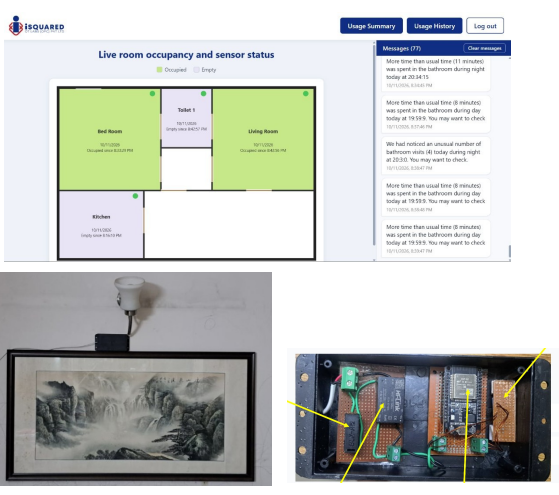
Component List
| ID | Name | Designator | Quantity |
|---|---|---|---|
| 1 | ESP32 Basic Dev Module | ESP32_Basic | 4 |
| 4 | LD2410c Presence Sensor | LD2410c | 4 |
| 5 | Hi Link 240V AC to 5V DC convertor | Power_supply | 4 |
| 6 | Vacuum Fuse | Vacuum Fuse | 4 |
| 7 | ESP32 S3 M5 Stack | M5_Stack | 1 |
| 8 | USB Power supply for ESP32S3- M5Stak | Power_supply_2 | 1 |
| 9 | Raspberry Pi | Rpi_1 | 1 |
| 10 | AWS Light Sail Instance | AWS | 1 |
Project Explanation Step By Step
This project implements an end to end system, that is used for monitoring Elderly people who are living independently in villas, apartments, Senior Citizen homes etc. It can used in hospitals too to observe the movement of patients, irrespective of age. End users will be care takers and close relatives (Eg kids) of the senior citizens The project aimed to find answers the following questions.
- How active are my parents who are living remotely.
- Where are they in the house at presents
- What are the movement patterns within the house
- How often they are waking up a night to use the bathroom.
- How often they are using bathroom during day.
- Are there any indications of dehydration
- What is the typical duration they are spending the bathroom
- How are they sleeping, are they restless during sleep or getting a sound sleep ?
- How long are they sleeping during day and night.
- How often they go out of house.
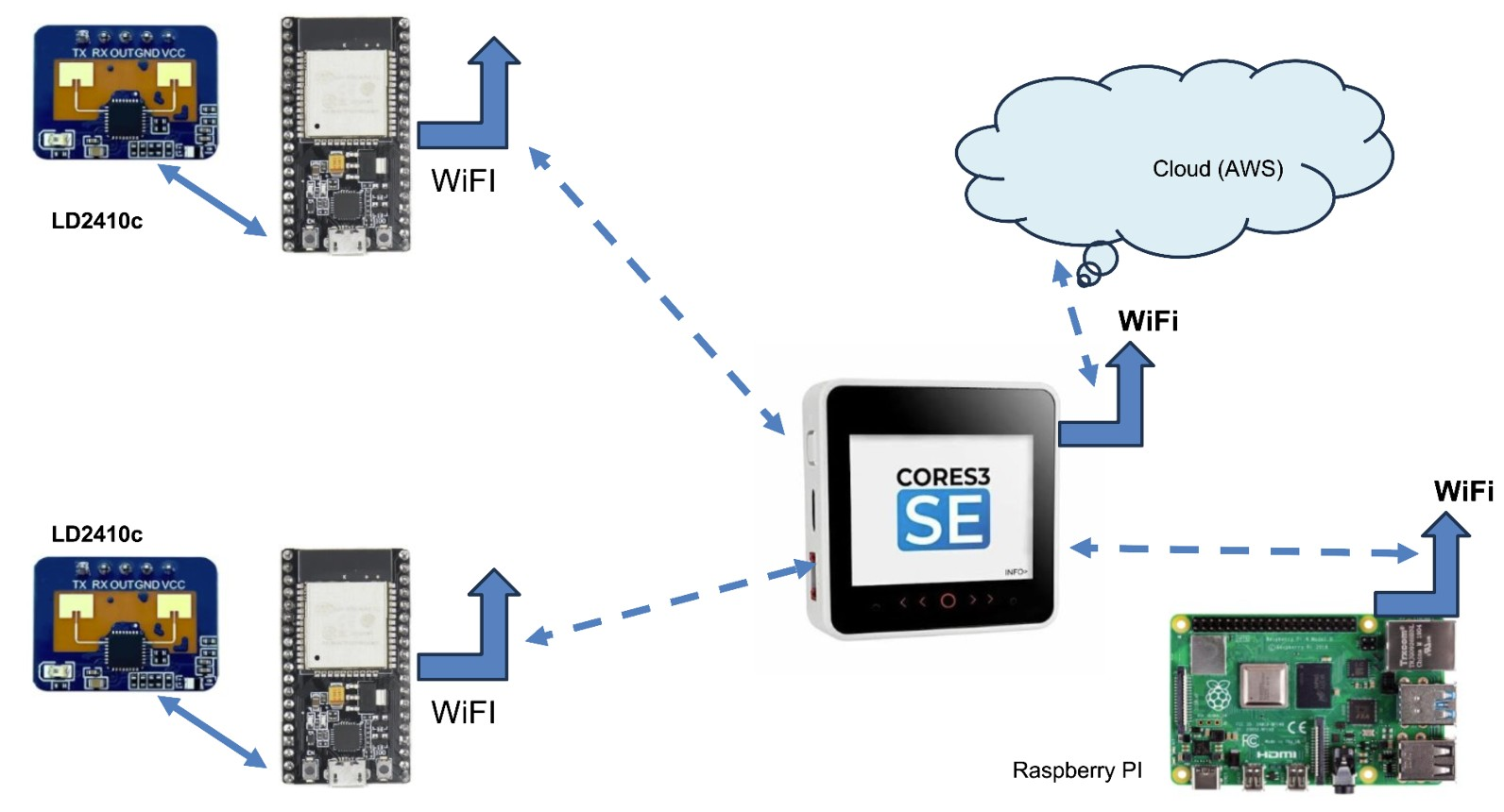
All these questions can be answered by, installing a simple presence sensor (LD2410c) connected with ESP-32 inside the room. This sensor collects a whole lot of information about the human presence inside room LD 2410c can collect the following information about the human presence
- Human presence YES/NO
- Is the Human stationary of moving
- At what distance the human presence was detected from the sensor.
When these three piece of information (coming from each room) is combined with time stamp, we can find answers to all the above questions and beyond. This is the exactly the objective of this project.
The data collected from each room is aggregated at a Central unit and processed with the help of Machine Learning algorithms, it provides a lot of insights into dynamics of the people living in the house.
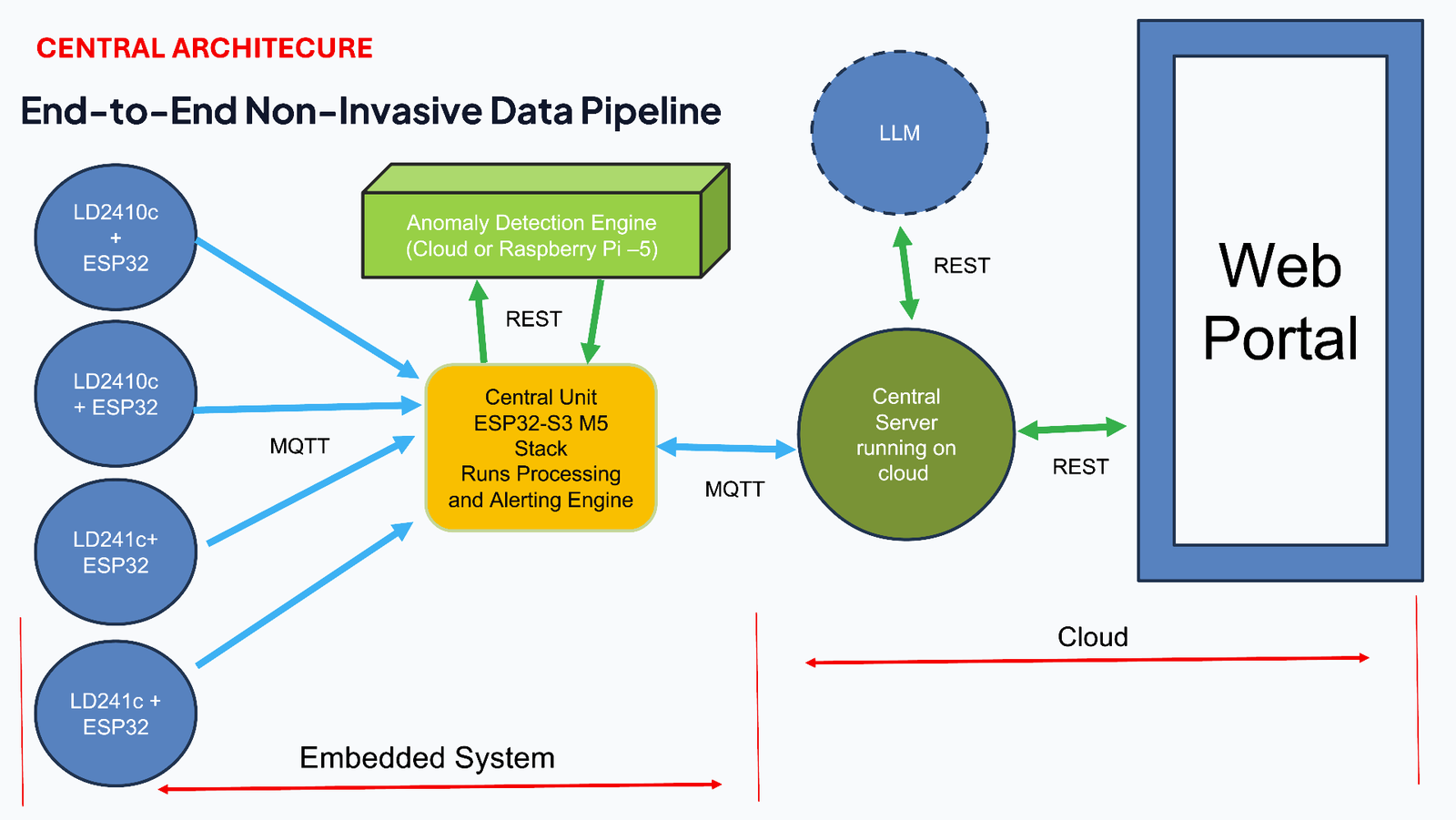
Following is the overall Architecture or design of the system:
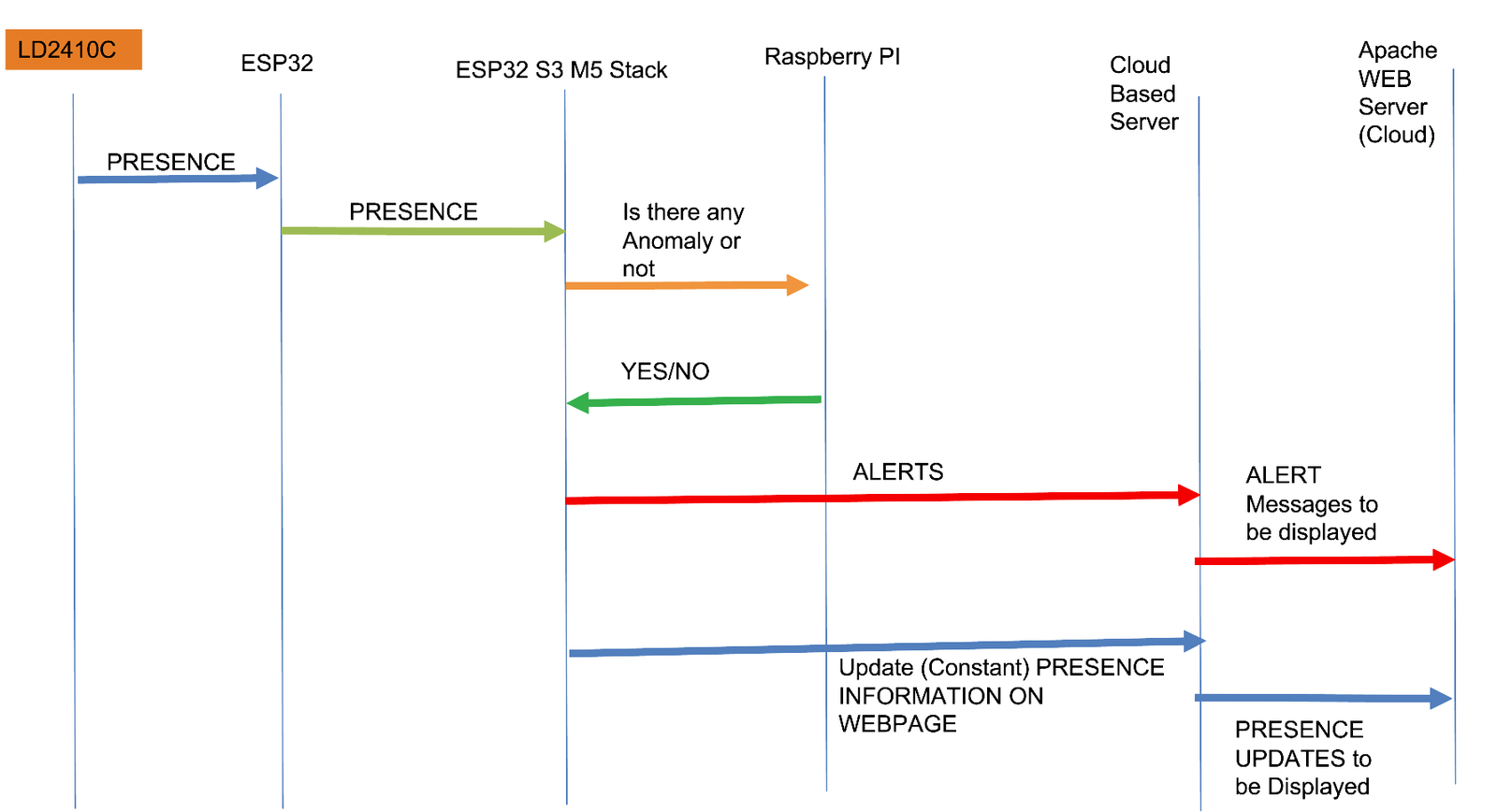
Flow of Information between various Components (Message Sequence Diagram)
Coding Explanation and Configuration
First and foremost, we need to install the necessary library to the Arduino IDE. To do this, navigate to the Sketch menu and click on “Manage Library.” Next, search for the library name and click on the “Install” button.
There are two independent sketches
- The sketch for the basic ESP32 unit which collects data from LD2410c and send it to the Central Unit for processing and Alert Generation running on ESP32 S3 M5 Stack
- The Central Unit which collects data from various Sensors (ESP32 + LD2410C) and processes it and update Web Server
The following are the list of libraries that need to be installed for compiling the sketch for Central Unit that runs on ESP32 S3 M5 Stack
Go to Tools > Manage Libraries… and install:
ArduinoJsonWebSerialM5UnifiedESP32MQTTClient
The following are the list of libraries that need to be installed for compiling the sketch for Sensir Unit (ESP32 + LD2410C) Unit.
Go to Tools > Manage Libraries… and install:
ArduinoJsonWebSerial- MyLD2410
(github) ESP32MQTTClient
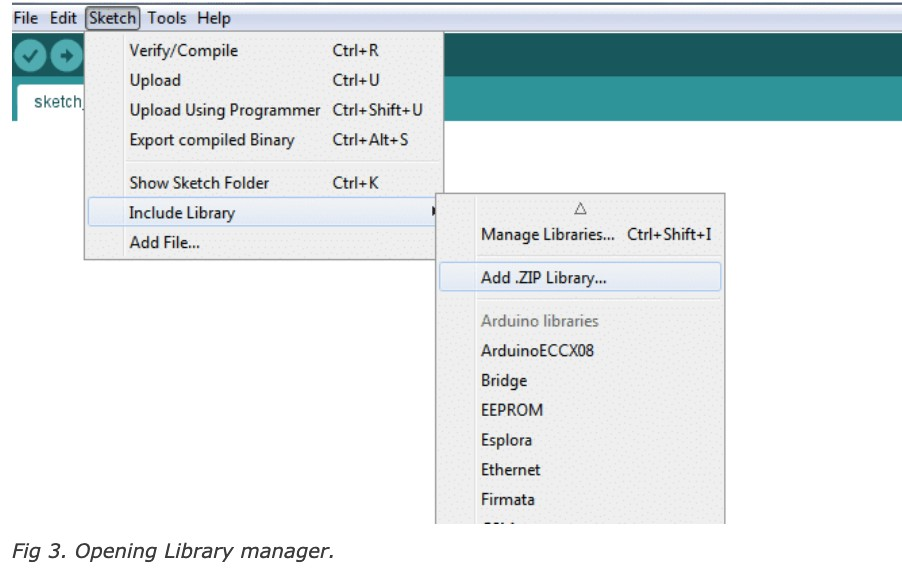
The two sketches has to be kept in to difference folders and each of them has to complied and flashed separately.
(I) The source code the Central Unit can you found in the GitHUB Repository.
(ii) The source code for the Sensor Unit can be found in the GITHUB Respository.
Details of Sensor Unit (ESP 32 + LD2410c)
Important part of the source code for the Sensor Unit
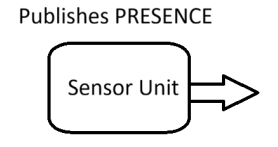
  while (true)
  {
     if (sensor.check() == MyLD2410::Response::DATA)
     {
        if (sensor.presenceDetected())
        {
           currentPresenceState =  PRESENSE_DETECTED;
          presence = "DETECTED"
        }
        else
        {
           currentPresenceState = NO_PRESENCE;
           presence = "NOT_DETECTED" ;
        }
        if (lastStateOfPresence != currentPresenceState)
        {
            statusChanged = true;
            lastStateOfPresence = currentPresenceState;
        }
  // Reflect current reading each pass instead of latching forever
  StationaryTargetDetected = sensor.stationaryTargetDetected();
  StationaryTargetDistance = StationaryTargetDetected ? sensor.stationaryTargetDistance() : -1;
  MovingTargetDetected = sensor.movingTargetDetected();
  MovingTargetDistance = MovingTargetDetected ? sensor.movingTargetDistance() : -1;
  // Publish ONLY on a genuine state transition (NO_PRESENCE <-> PRESENCE_DETECTED)
  bool shouldPublish = mqttClient.isConnected() && statusChanged;
     if (shouldPublish)
      {
        long rssi = WiFi.RSSI();
        lastIdleMessage = millis();
        int written = snprintf(mqttMessage, sizeof(mqttMessage),
          "{\"sensor_room\":\"%s\",\"status\":\"%s\","
          "\"Moving Target\":%s,\"Moving Target Dist\":%d,"
          "\"Stationary Target\":%s,\"Stationary Target Dist\":%d, \"Wifi\":%ld}",
          ConfigData.wifiDeviceName,
          presence.c_str(),
          MovingTargetDetected     ? "true" : "false",
          MovingTargetDistance,
          StationaryTargetDetected ? "true" : "false",
          StationaryTargetDistance,
          rssi
        );
Details of Central Unit (ESP32 S3 M5 Stack)
The following are the Details of code running on Central Unit (ESP32 S3 M5 Stack)
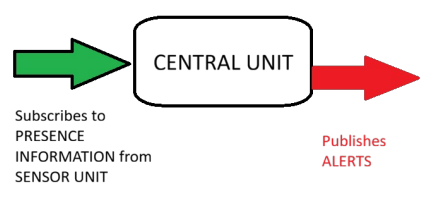
Central Unit has two jobs
- Central Unit acts as MQTT Subscriber, subscribing to message from Sensor Unit
- Acts as publisher Publishing ALERTS.
void onDataReceived(const std::string &topic, const std::string &payload)
{
char message[200]; JsonDocument doc; bool detected ;
DeserializationError error = deserializeJson(doc, payload); if (xSemaphoreTake(bathroom_mutex, pdMS_TO_TICKS(500)) == pdTRUE) { if (error) { Serial.print("JSON parse failed: "); Serial.println(error.c_str()); return; } noOfMQTTMessages++ ;
 const char* room   = doc["sensor_room"];
 const char* status = doc["status"];
 bool movingTarget     = doc["Moving Target"];
 bool stationaryTarget = doc["Stationary Target"];
 char event[10] ; // To be incorportated later
 int movingDist     = doc["Moving Target Dist"];
 int stationaryDist = doc["Stationary Target Dist"];
 int idx = findRoomIndex(room);
 if (idx < 0)
 {
 DEBUG_PRINTF(" Wrong room name received %s \n",room ) ;
 return;
 }
 time_t now = getEpochTime();
 roomState[idx].lastMsgEpoch = now;
 if ((strcmp(status, "DETECTED") == 0) && (roomState[idx].occupied == false))
  {
    //Serial.printf("%s :status == DETECTED and occupied == False\n",room) ;
      roomState[idx].occupied = true;
      roomState[idx].occupiedSinceEpoch = now;
      DEBUG_PRINTF("%s , roomState[idx].occupiedSinceEpoch = %d\n ",room, now) ;
        if (strcmp(room, "Toilet-1")==0)
        {
              DEBUG_PRINTF("Presence detected in Toilet-1\n");
          SetNewDataArrivedFlag() ;
              if (IsDayOrNight(getEpochTime()) == true)
              {
             IncrementBathRoomDayVisits() ;
             PrintEpochToHumanReadableFormat(now) ;
             RecordtimeOfBathroomDayVisit(now) ;
             PrintEpochToHumanReadableFormat(GetTimeOfBathroomDayVisit());
             DEBUG_PRINTF("IncrementBathRoomDayVisits\n") ;
              }
              else
              {
             IncrementBathRoomNightVisits() ;
             PrintEpochToHumanReadableFormat(now) ;
             RecordtimeOfBathroomNightVisit(now) ;
             PrintEpochToHumanReadableFormat(GetTimeOfBathroomNightVisit());
             DEBUG_PRINTF("IncrementBathRoomNightVisits\n") ;
              }
          PrintBathRoomUsageData();
   }
     if (strcmp(room, "BedRoom")==0)
     {
              DEBUG_PRINTF("Presence detected in BedRoom\n");
             if (IsDayOrNight(getEpochTime()) == false)
             {
                DEBUG_PRINTF("Presence detected in BedRoom at night\n");
                /* Track movements only during night */
                   if (movingTarget == true)
                   {
                      incrementBedRoomMovementCounter() ;
                   }
              }
    }
}
else if ((strcmp(status, "NOT_DETECTED") == 0) &&
         (roomState[idx].occupied == true))
{
    //Serial.printf("%s: status == NOT_DETECTED and occupied == true\n",room) ;
    roomState[idx].occupied = false;
    WhenRoomIsEmpty(room, roomState[idx].occupiedSinceEpoch, now);
}
else if ((strcmp(status, "KEEP_ALIVE") == 0))
{
    struct tm currentTimeDate ;
    int hour ;
    int minutes ;
    roomState[idx].lastMsgEpoch = time(nullptr);
    //Get current time,
    currentTimeDate = convertEpochToHumanReadableFormat(getEpochTime()) ;
    hour =  currentTimeDate.tm_hour ;
    minutes = currentTimeDate.tm_min ;
    if (hour == 11)
    {
      if (minutes > 55)
      {
          char message[100];
          /* Generate room wise break up report */
          int TimeSpendinLivingRoom = roomState[0].timeSpend;
          int TimeSpendinBedRoom    = roomState[1].timeSpend ;
          int TimeSpendinToilet     = roomState[2].timeSpend ;
          int TimeSpendinKitchen    = roomState[3].timeSpend ;
          int totalTime = TimeSpendinLivingRoom + TimeSpendinBedRoom + TimeSpendinToilet + TimeSpendinKitchen ;
          float percentageSpendLivingRoom  = (TimeSpendinLivingRoom/totalTime)/100 ;
          float percentageSpendBedRoom     = (TimeSpendinBedRoom/totalTime)/100 ;
          float percentageSpendToilet      = (TimeSpendinToilet/totalTime)/100 ;
          float percentageSpendKitchen     = (TimeSpendinKitchen/totalTime)/100 ;
          snprintf(message,sizeof(message),
                   "%d-%d-%d , %f , %f , %f , %f", currentTimeDate.tm_mday,
                                                   currentTimeDate.tm_mon,
                                                   currentTimeDate.tm_year,
                                                   percentageSpendLivingRoom,
                                                   percentageSpendBedRoom,
                                                   percentageSpendToilet,
                                                   percentageSpendKitchen) ;
          mqttClient.publish(ConfigData.REPORT_TOPIC, message, 0, false);
          /* Clearing the collected data once in a day */
          /* After the statistics are geneared */
          InitBathRoomUsageData() ;
          InitBedRoomData() ;
          ReSetNewDataArrivedFlag() ;
      }
    }
}
xSemaphoreGive(bathroom_mutex);
}
else
{
   DEBUG_PRINTF("Unable to get mutex to update Room status\n") ;
}
}
void WhenRoomIsEmpty(const char* room, time_t startEpoch, time_t endEpoch)
{
  int timeSpendinRoom = (int)(endEpoch - startEpoch);
  int idx = findRoomIndex(room);
  roomState[idx].timeSpend =  roomState[idx].timeSpend + timeSpendinRoom ;
if (strcmp(room, "Toilet-1") == 0)
{ // Real-time per-visit duration check. // NOTE: the bathroom sensor on the leaves is named "Toilet-1" (there is // no "BathRoom" room); this branch was previously dead because the // string never matched.
if (IsDayOrNight(getEpochTime()) == true)
  {
   if (timeSpendinRoom < 2)
   {
      // if time spend in any room is less that 5 secs then
      // it is noise from a stray signal or reflection
      // Found this during testing
      DEBUG_PRINTF("Time Spend in Toilet-1 is %d\n",timeSpendinRoom);
      DecrementBathRoomDayVisits();
   }
   else
       {
     UpdateBathRoomDayVisitDuration(timeSpendinRoom);
   }
  }
  else
  {
   if (timeSpendinRoom < 5)
   {
      // if time spend in any room is less that 5 secs then
      // it is noise from a stray signal or reflection
      // Found this during testing
      DEBUG_PRINTF("Time Spend in Toilet-1 is %d\n",timeSpendinRoom);
      DecrementBathRoomNightVisits();
   }
   else
   {
         UpdateBathRoomNightVisitDuration(timeSpendinRoom);
   }
  }
PrintBathRoomUsageData();
}
if (strcmp(room, "BedRoom") == 0)
{
}
if (strcmp(room, "LivingRoom") == 0)
{
}
if (strcmp(room, "Kitchen") == 0)
{
}
}
There are two main functions in the Central Unit which keep tracks of entry and exit into each room
- onDataReceived(), the MQTT callback which gets executed when each time a PRESENCE message arrives from the sensor unit.
- WhenRoomIsEmpty() this function is called by onDataReceived() When a room becomes empty.
With the entry and exit timestamp,we can calculate the duration of time spend in each room and number of times the room was occupied during a day/night. This is the information which is used for checking whether there are any anomalies with the pattern on usage.
Anomaly Detection
The Central Unit run on the ESP32 S3-M5 Stack. This unit does not have enough RAM to run a very basic anomaly detection based on Isolation forest Algorithm. For Isolation forest algorithm to be executed we need a machine which at least 512MB to 1 GB of RAM. This is exactly where a Raspberry Pi comes into picture. The anomaly detection program was developed in Python. Central Unit Interacts with this Python code using REST APIs. The isolation forest implementation for anomaly detection is trained separately. The code which does anomaly detection and code which is used to create models for anomaly detection can be found on GitHub at the following repository: click here
Since the anomaly detection module is written in python it is platform independent. It can be executed on any hardware which supports Python. So this unit for anomaly detection can be executed on machine hosted on cloud too.
Front End Design
The front end of the web page is designed using React.JS. The graphical features of React.js is used to draw the layout display messages.
There are two web servers running on cloud. The first one is an Apache web server responsible for displaying the front end and other activities. Second webserver interacts with the Central Unit and receives message and send and send it to apache web server for displaying . The Second web server listen to port no 5000 and act as a MQTT Subscriber, which receives messages from Sensor Unit and Central Unit.
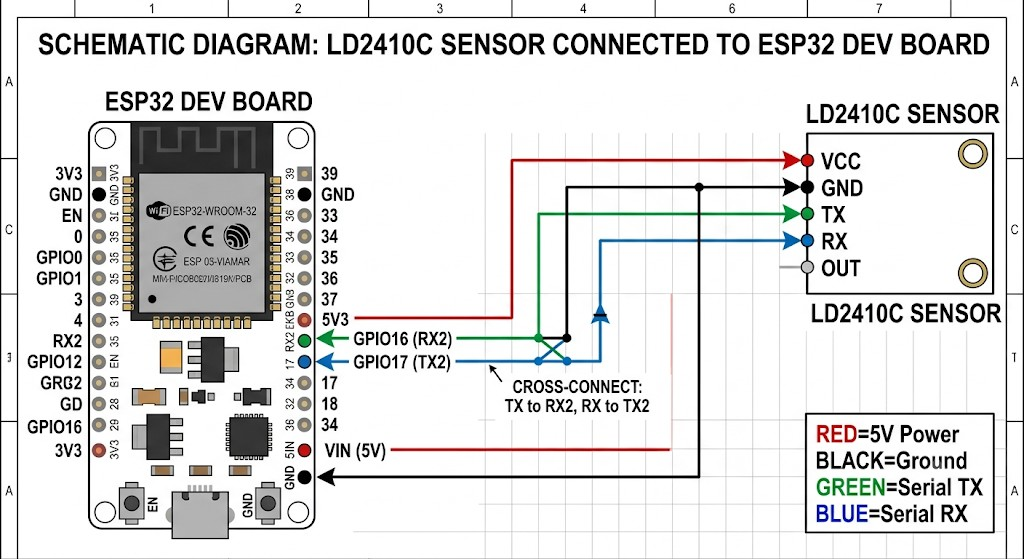
Schematics for the Sensor Unit
Testing
Testing of the whole unit is done in three steps.
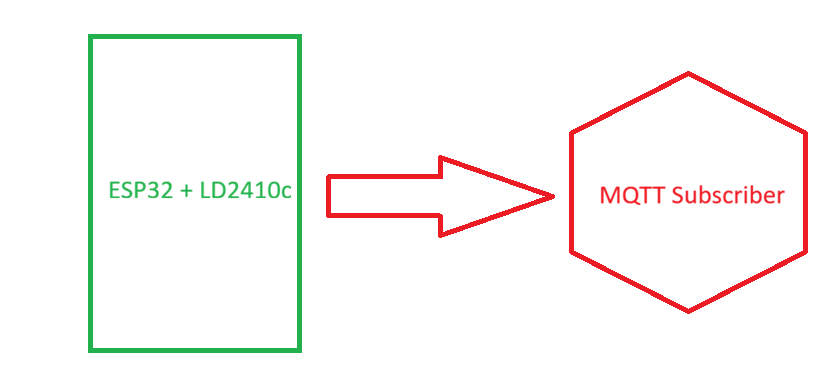
1. Testing of LD2410c Sensor + ESP32 (Sensor Unit)
The Sensor unit was tested as a stand alone by keeping it in a room and observe human movements. Each time when there is change in PRESENCE the sensor unit send out a MQTT Message. This message was received by a MQTT subscriber Written in python. We verify the message manually. In addition to subscriber written in python, another Windows based application called MQTT Explorer was also used to receive and examine the messages.
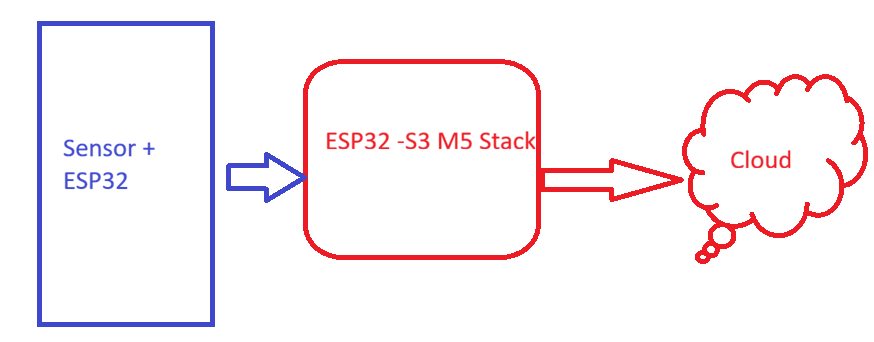
2. Testing with real sensor installed across rooms
The objective of this activity is to integrate Sensor Unit with Central Unit and see how Central Unit is responding the data coming from sensor unit. This is a time consuming process as we need some one who can enter each room and exit after some time.
3. System testing with simulator
Since testing with real sensor need resources and time a Simulator which simulate the PRESENCE information message from the Sensor Unit was developed in python. With this simulator the product was tested for long time to check the long time endurance of the system.
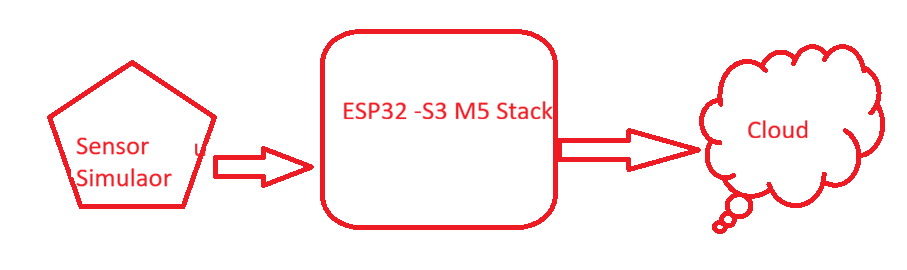
The source of the simulator developed in Python can be found in the GitHub repository
PCB Files
There are no PCB files, as the project was done using a general-purpose PCB
Project Presentation slides
Code
(All the following repositories are public)
(I) The source code for the Central Unit can be found in the GitHub repository
(ii) The source code for the Sensor Unit can be found in the GitHub repository
(iii) Source code for Anomaly detection: click here
(iv) Source code for System Test code: click here
(v) Source code for the Web portal (Frontend): click here
