




‘qSafe’ AIoT-Powered Quality, Safety and Predictive Maintenance Platform for Indian SME Manufacturing with ERP (SAP) integration and Automation., qSafe is designed as the only AIoT device targeting a retail price under Rs 15,000 at production scale that simultaneously delivers three capabilities that no existing product combines: edge AI anomaly detection running locally on the device without cloud dependency; direct ERP integration with SAP Business Technology Platform or any ERP, for automated work orders and maintenance notifications; and multilingual worker safety alerts in English, Hindi, Marathi, and Kannada displayed on the device itself within milliseconds of hazard detection without internet connectivity. Most comparable industrial IoT products address only one of these three areas, cost three to ten times more, and require separate gateways, cloud subscriptions, and IT personnel to operate.
The fail-safe relay architecture for machine power is cut by the STM32 microcontroller directly in hardware no cloud, no network, no latency. The dual-script alerting tier local multilingual OLED display (Devanagari script for Hindi and Marathi; Kannada script for Kannada) for the floor worker and rich contextual guidance via Claude API for the supervisor’s phone addresses the real-world gap where English-only alerts on a distant panel fail to reach the workers who need them most, fast enough to matter.
Component List
All parts were bought or are commonly available in India. The DigiKey part numbers below are the ones added to the project’s DigiKey MyList BOM; where the exact module used was bought locally (Robu.in), the DigiKey line is the closest equivalent.
| ID | Name | DigiKey part no. | Designator | Qty |
|---|---|---|---|---|
| 1 | Arduino UNO Q 2 GB (ABX00162) – Qualcomm QRB2210 Linux processor + STM32U585 microcontroller | 1050-ABX00162-ND | U1 | 1 |
| 2 | MPU-6050 6-axis accelerometer/gyroscope module (GY-521) – vibration + chip temperature | 1738-1070-ND (equiv.) | U2 | 1 |
| 3 | ACS712ELCTR-05B Hall-effect current sensor module (5 A, 185 mV/A) | 2183-5240-ND (equiv.) | U3 | 1 |
| 4 | MQ-2 flammable gas/smoke sensor module | 4411-ST0252-ND | U4 | 1 |
| 5 | MQ-135 air-quality (fumes/vapour) sensor module | 1188-SNS-MQ135-ND | U5 | 1 |
| 6 | MAX4466 electret microphone amplifier module | 1528-1013-ND | U6 | 1 |
| 7 | 5 V relay module JQC3F-05VDC-C (with driver transistor) | 1597-114993555-ND (equiv.) | K1 | 1 |
| 8 | Newhaven NHD-C12864A1Z-FSW-FBW-HTT 128×64 graphic LCD (ST7565P, 3.3 V) | NHD-C12864A1Z-FSW-FBW-HTT-ND | LCD1 | 1 |
| 9 | Active buzzer, 5 V | 668-1470-ND | BZ1 | 1 |
| 10 | 5 mm LED – red (alarm) and green (normal) | – | LED1, LED2 | 2 |
| 11 | 12 V geared DC motor GM 500R (the ‘machine’ being monitored) | – | M1 | 1 |
| 12 | 12 V / 2 A DC adapter (motor supply) | – | PS1 | 1 |
| 13 | 10 kΩ ¼ W resistor (5 V monitor + two gas-sensor dividers) | – | R1–R6 | 6 |
| 14 | 330 Ω ¼ W resistor (LED current limit) | – | R7, R8 | 2 |
| 15 | 100 nF ceramic capacitor (MPU-6050 supply, across motor terminals) | – | C1, C2 | 2 |
| 16 | 220 µF / 16 V electrolytic capacitor (5 V rail) | – | C3 | 1 |
| 17 | 33 µF electrolytic capacitor (LCD 3.3 V) | – | C4 | 1 |
| 18 | Breadboards, jumper wires, wooden motor box | – | – | – |
| 19 | Tool: digital multimeter (9205B) for voltage and continuity checks | 1528-2034AD-ND | – | 1 |
Not used in this build: an HX711 amplifier with a load cell for weighing products (the planned ‘QualityEdge’ module). It is described under Next Steps as future work; its two pins (D2, D3) are left free on the board.
Project Explanation Step By Step
The problem. India’s MSME factories live with everyday risks that nobody measures in real time: machines that break down without warning (a loose part, an unbalanced rotor or a dragging shaft shows up first as extra vibration and extra current), and worker-safety hazards such as a gas leak, solvent fumes or a sudden bang that are invisible to a supervisor in another room. Industrial monitoring systems that cover even one of these cost tens of thousands of rupees and need IT staff, so small units go without.
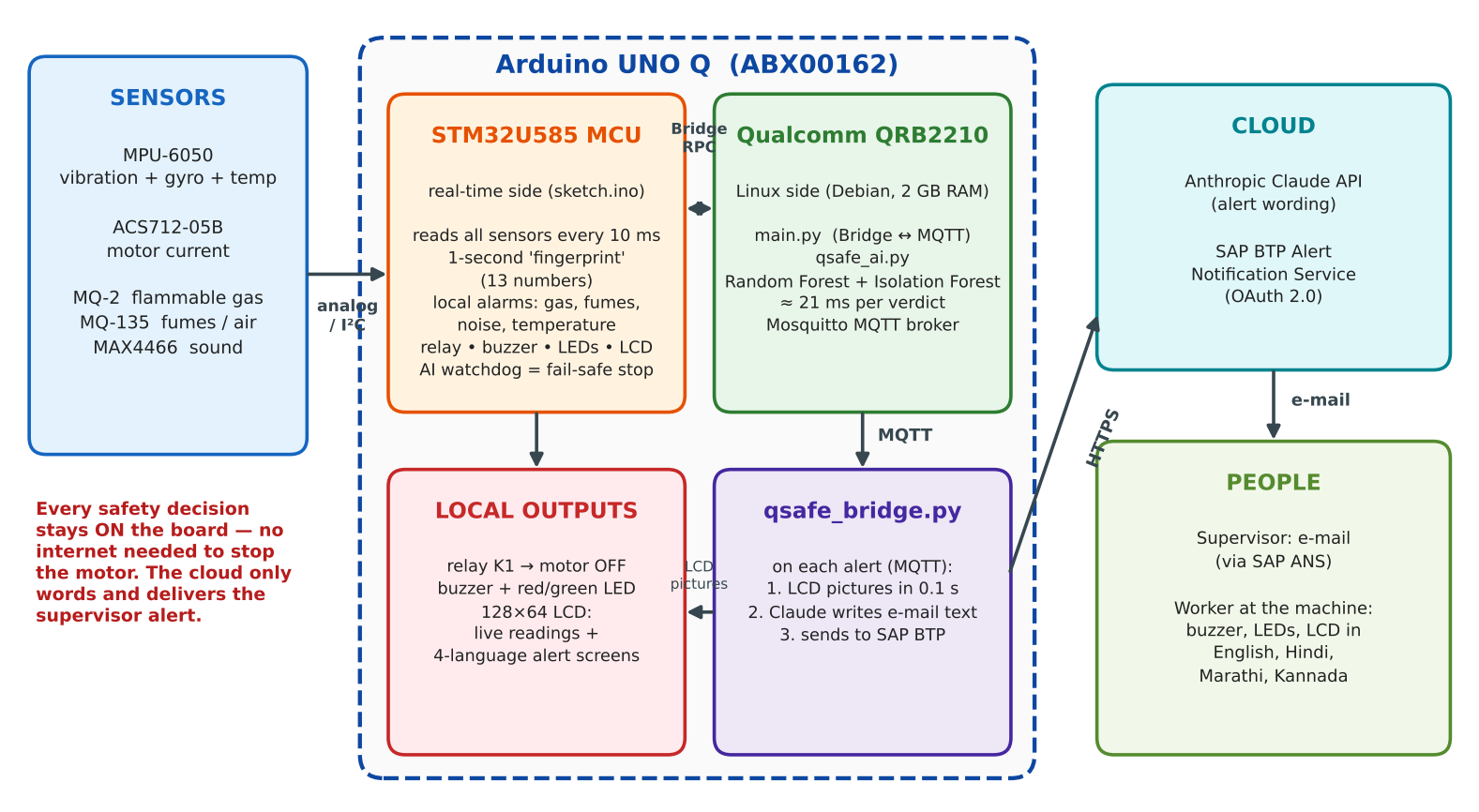
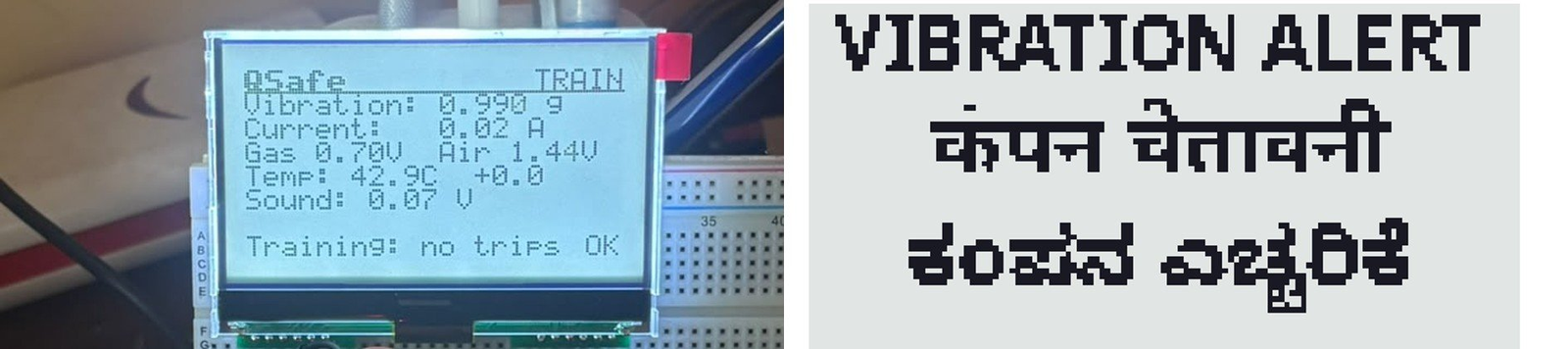
What qSafe does. qSafe is one compact device, built on the Arduino UNO Q, that watches a running machine and the air around it. An on-board AI learns the machine’s normal ‘vibration + current fingerprint’ and recognises faults such as imbalance and friction. When a fault or a gas leak is confirmed it switches the machine off through a relay, sounds a buzzer, lights a red LED and shows the alarm on the machine’s own screen in English, Hindi, Marathi and Kannada – within about a second, with no internet needed. At the same time the supervisor receives an e-mail through SAP BTP Alert Notification Service, with alert text written by the Claude AI model. The sensors are grouped into two working modules:
- PredictMaint – vibration (MPU-6050) + motor current (ACS712) → an on-device AI that names the machine condition (OFF, NORMAL, IMBALANCE or FRICTION) plus an ‘unusual pattern’ detector for faults it has never seen.
- SafetyWatch – MQ-2 (flammable gas/vapour), MQ-135 (fumes/air quality), MAX4466 microphone (loud bangs) and motor temperature (from the MPU-6050’s built-in thermometer).
A third module, QualityEdge (weighing products with a load cell to catch underweight items), was planned in the abstract. It was not built in this version so that the time could go into making the safety and AI paths reliable; it is the first item in Next Steps.
Why the Arduino UNO Q. The board has two processors that map exactly onto qSafe’s two jobs. The STM32U585 microcontroller does the time-critical work – reading every sensor every 10 ms, deciding the local gas/noise/temperature alarms, driving the relay, buzzer, LEDs and LCD – and keeps doing it even if Linux or Wi-Fi is down. The Qualcomm QRB2210 runs full Linux with 2 GB of RAM, which is what the machine-learning models, the MQTT message broker, the font rendering for Indian scripts and the cloud connection need. A plain microcontroller could not run the AI and the Indian-script rendering; a plain Linux board could not guarantee the hard real-time safety loop. The two halves talk through the board’s built-in Bridge (RPC) link.
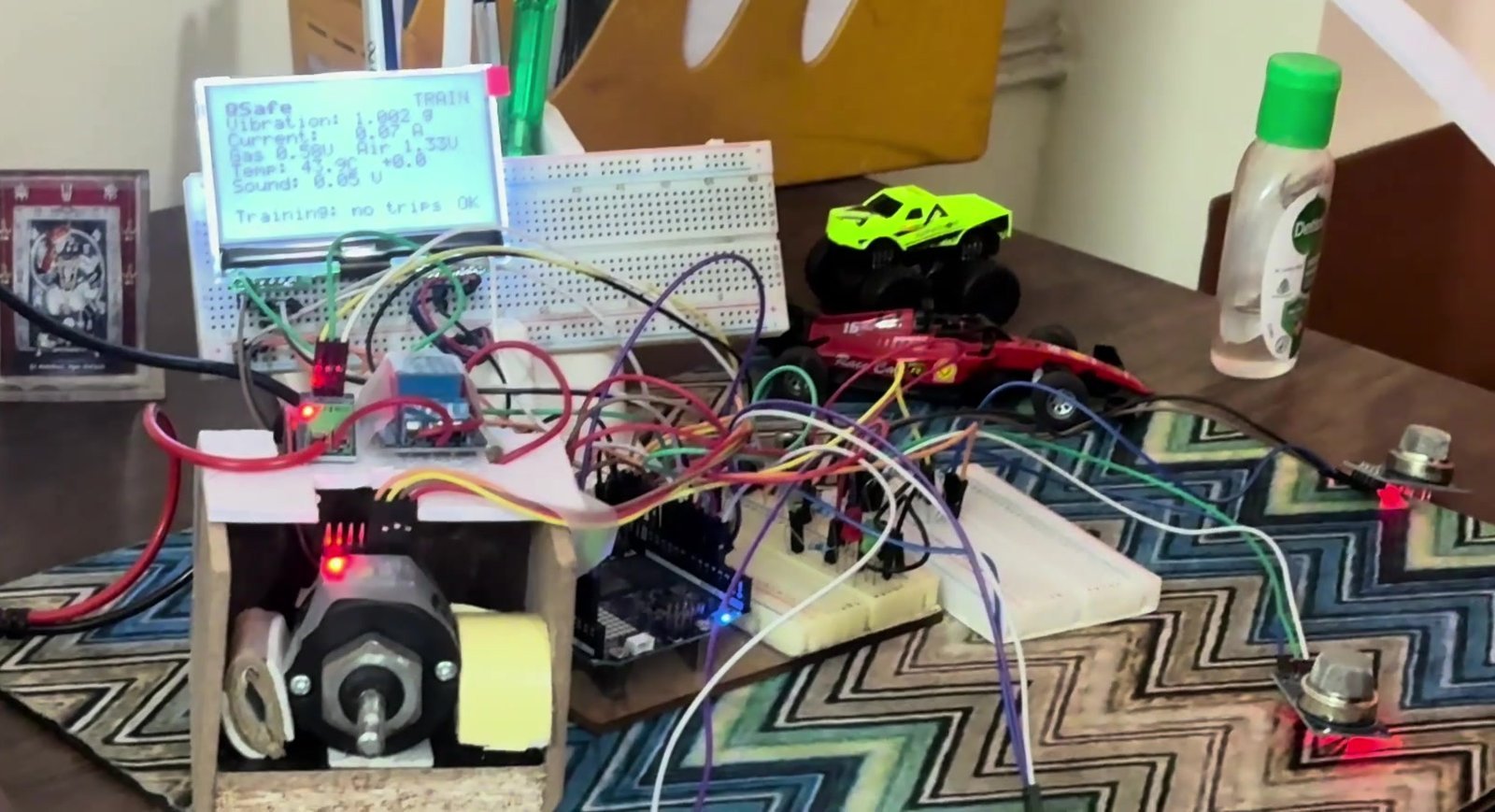
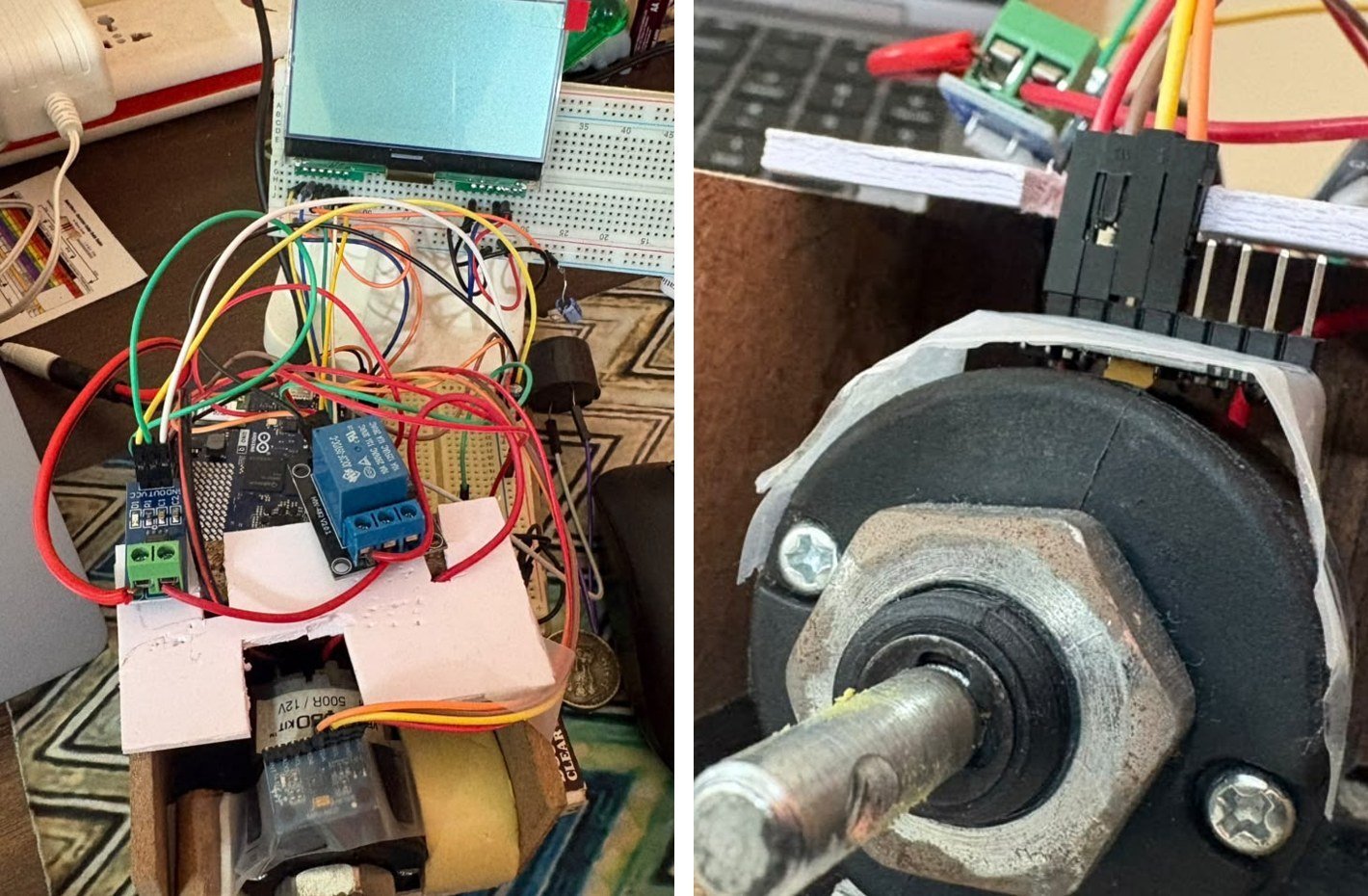
How it works – step by step
Step 1 – Sense every 10 ms (STM32 microcontroller)
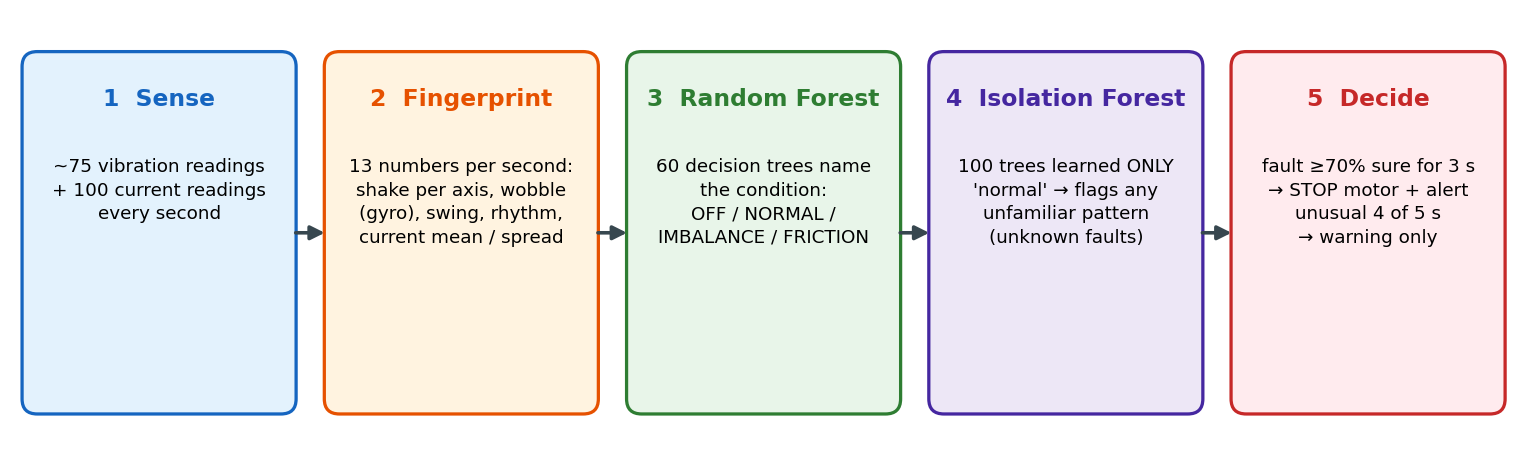
The sketch reads the MPU-6050 over I²C (accelerometer + gyroscope + chip temperature), the ACS712 current sensor on A0, the supply monitor on A1, both gas sensors on A2/A3 and the microphone on A4. Once per second it condenses the raw vibration and current readings into a 13-number fingerprint: how much the machine shakes on each axis, how much it wobbles (gyroscope spread on X, Y and Z), the biggest swing, how often the shaking repeats, and the average and spread of the motor current. The fingerprint is handed to Linux over the Bridge.
Step 2 – Keep the measurements honest
Most of the engineering time went here, because an AI is only as good as its data. Three problems found during testing were solved in firmware:
- Sensor drop-outs. The vibration sensor occasionally ‘dropped’ one axis to half its value, and motor electrical noise corrupts some I²C reads while the motor runs. The sketch now checks every second, withholds a faulty second from the AI and fully resets the chip after two bad seconds (proven to self-repair in about 2 s).
- Calibration. The replacement MPU-6050 read 24.5 % high, so it is calibrated in software (÷ 1.245), giving 1.00 g at rest.
- Current drift. The ACS712 output moves with its own 5 V supply, which made the current drift by ±0.1–0.2 A. The 5 V rail is now measured on A1 through a 10 kΩ/10 kΩ divider and the current is computed ratiometrically, bringing the zero error down to about ±0.01 A. The zero point is learned at start-up with the 12 V motor supply off.
Step 3 – Two AI models decide (Qualcomm Linux)
qsafe_ai.py receives each fingerprint over MQTT and runs two small machine-learning models trained on this very motor: a Random Forest (60 decision trees) that names the condition, and an Isolation Forest (100 trees) that was trained only on healthy running and flags anything that looks unfamiliar – a way to catch faults that were never recorded. Both together take 21.6 ms (median) per verdict in the training benchmark and about 45 ms in the live loop, including MQTT handling.
Step 4 – Confirm before acting
To avoid stopping a healthy machine on one noisy second, a fault must be the AI’s answer for 3 seconds in a row, each time with at least 70 % confidence. ‘Unusual pattern’ needs 4 of the last 5 seconds and only raises a warning – the motor keeps running. This rule proved its worth in the final tests: when the healthy motor’s current reading shifted (see Testing), the AI wavered between NORMAL and FRICTION at 40–60 % confidence for minutes, and the machine was never stopped by mistake.
Step 5 – Act locally, fail-safe
On a confirmed fault, Linux sends a stop command; the microcontroller opens the relay, beeps, turns the LED red and shows ‘MOTOR STOPPED’ with the reason. The motor is wired through the relay’s normally-open contact, so a powered-down or crashed system leaves the motor OFF. Two further safety nets live on the microcontroller itself: an AI watchdog stops the motor if no AI verdict arrives for 20 seconds (for example, if the AI program is closed), and a violent shock (more than 2 g away from rest) trips the relay directly without waiting for Linux. In the demo, the motor restarts automatically after 30 s; if the fault is still there, it is stopped again.
Step 6 – SafetyWatch: gas, fumes, noise and temperature alarms
These alarms are decided entirely on the microcontroller, so they work even with Linux busy or the network down. Each gas sensor is compared with its own slowly-updated clean-air level (its baseline), so normal drift and warm-up do not cause false alarms.
| Alarm | Sensor | Trigger (on the MCU) | What happens | Supervisor e-mail |
|---|---|---|---|---|
| Flammable gas/vapour | MQ-2 | Above baseline + 33 % (at least +0.20 V) for 1.5 s – about 0.62 V for a 0.47 V clean-air level | Motor cut at once, 3 long beeps every 5 s, fast red blink, LCD alert; motor stays off until the reading is back near baseline for 5 s | Yes |
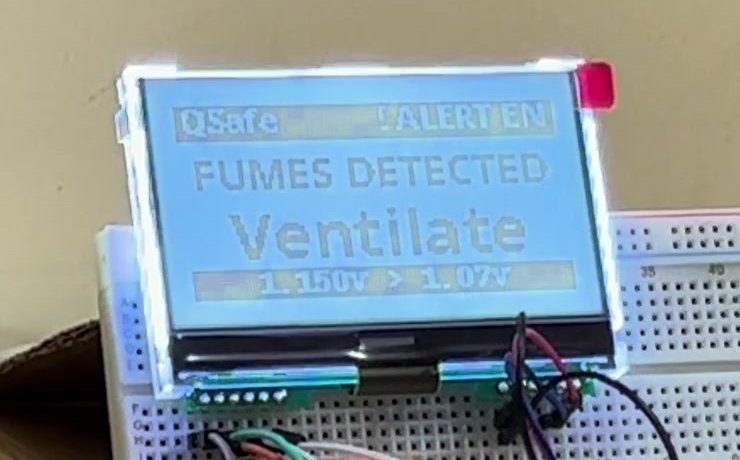
| Fumes/vapour | MQ-135 | 0.40 V above baseline for 3 s | Warning: 2 short beeps, red LED, LCD ‘FUMES DETECTED – Ventilate’; motor keeps running | Yes |
| Loud noise | MAX4466 | Peak-to-peak swing ≥ 0.60 V within 0.1 s (ignored for 2 s after the relay clicks) | Warning: 3 long beeps once, LCD alert; motor keeps running | Yes |
| Motor hot | MPU-6050 temp. | 10 °C above its start-up temperature for 5 s | Warning: 2 short beeps, LCD alert | Yes |
| AI fault | MPU-6050 + ACS712 | Imbalance or friction, ≥ 70 % sure, 3 s in a row | Motor stopped, buzzer, red LED, ‘MOTOR STOPPED’ + 4-language screens | Yes |
| Unusual pattern | MPU-6050 + ACS712 | Isolation Forest: 4 of the last 5 s unfamiliar | Warning only; motor keeps running | Yes (max 1 per 5 min) |
| AI silent / shock | MCU watchdog | No AI verdict for 20 s, or a > 2 g shock | Motor stopped (fail-safe) | – |
The noise and fumes alarms are deliberately warnings only: a microphone cannot tell a hand-clap from a machine fault, and the MQ-135 cannot tell hand sanitiser from a solvent leak – so they tell a person to look, while the MQ-2 flammable-gas alarm and the AI faults stop the machine.
Step 7 – Explain the alarm to people
Every alarm is published on MQTT topic qsafe/alerts. qsafe_bridge.py then does two things:
- Machine screen first (≈ 0.1 s). It picks the ready-made, pre-rendered alert for that alarm type – two short lines per language in English, Hindi, Marathi and Kannada, drawn on Linux into 128×64 pictures with Noto fonts (the LCD itself cannot draw Indian scripts) – and sends them back to the microcontroller, which shows each language for 3 s, once. The fixed phrases appear 0.1 s after the alert and do not depend on the internet; the picture transfer to the microcontroller takes about 1.5 s more.
- Supervisor e-mail second. It sends the reading, the AI verdict and confidence to the Claude API (claude-haiku-4-5), which writes a short, specific alert (‘Flammable gas detected… the motor has been shut down… evacuate and check for leaks’). The text, the readings and the action taken are posted to SAP BTP Alert Notification Service, which e-mails the supervisor. If the internet is down, a built-in fallback text is used so the alert is never lost on the board side. E-mails are limited to one per alarm type per minute.
Coding Explanation and Configuration
All development was done with Arduino App Lab (which builds the microcontroller sketch and runs a Python app in a Docker container on the UNO Q) plus two Python services started over SSH on the board’s Linux. No extra Arduino libraries are needed – the LCD driver and the 5×7 font are written directly in the sketch.
| File | Runs on | What it does |
|---|---|---|
| firmware/sketch.ino (C++) | STM32U585 MCU | Sensor reading every 10 ms, 1-second fingerprint, sensor self-check and auto-reset, calibration, ratiometric current, gas/fumes/noise/temperature alarms with baselines, LCD driver (ST7565P), relay/buzzer/LEDs, AI watchdog, Bridge functions for fingerprints, AI status, LCD pictures and motor commands |
| app/main.py | Linux (App Lab container) | Bridge ↔ MQTT: publishes fingerprints on qsafe/features and alarms on qsafe/alerts; forwards AI status, motor commands and LCD pictures to the MCU. Finds the MQTT broker by itself at start-up, so changing Wi-Fi needs no code change |
| board/qsafe_ai.py | Linux (SSH) | check / record / list / train / run / motor commands; leave-one-run-out training report; live Random Forest + Isolation Forest verdicts; stop and warning rules |
| board/qsafe_bridge.py | Linux (SSH) | Alert → LCD pictures in 0.1 s → Claude e-mail text → SAP BTP Alert Notification Service (OAuth 2.0); one e-mail per alarm type per minute |
| board/qsafe_display.py | Linux (imported) | Renders the 4-language alert pictures (Pillow + Noto fonts); pre-renders all messages at start-up (≈ 1 s) so alerts are instant |
Libraries used: Arduino_RouterBridge and Wire (sketch); paho-mqtt (callback API v2), scikit-learn, numpy, joblib, Pillow, anthropic (pinned below 1.0 – version 1.8.0 crashed on the board’s Python 3.13) and requests (Python); Mosquitto MQTT broker on the board.
Secrets stay out of the code. The Claude API key and the SAP client credentials live only in a private file ~/qsafe.env on the board (owner-only permissions, never committed). The repository contains a template, board/qsafe.env.example:
ANTHROPIC_API_KEY='<your Anthropic API key>'
ANS_CLIENT_ID='<client_id from the SAP service key>'
ANS_CLIENT_SECRET='<client_secret from the SAP service key>'
ANS_URL='https://clm-sl-ans-live-ans-service-api.cfapps.<region>.hana.ondemand.com'
ANS_OAUTH_URL='https://<subaccount>.authentication.<region>.hana.ondemand.com/oauth/token?grant_type=client_credentials'
Setting up the board from scratch:
sudo apt install -y python3-sklearn python3-pil fonts-noto-core libraqm0 mosquitto
pip3 install --user --break-system-packages "anthropic<1" paho-mqtt requests
scp board/*.py arduino@<board-ip>:~/          # copy the three Python services
nano ~/qsafe.env  &&  chmod 600 ~/qsafe.env   # paste your own keys
Start order (keep the 12 V motor supply off until step 1 has finished, so the current sensor learns a true zero):
1. App Lab: open the qSafe app (sketch.ino + main.py) and press Run; wait for ‘MQTT connected’ in the log.
2. python3 qsafe_ai.py motor train_off – arms the relay protection.
3. python3 qsafe_bridge.py – LCD pictures + Claude + SAP e-mail (second terminal).
4. python3 qsafe_ai.py run – the live AI (third terminal). Switch on the 12 V motor supply.
Training the AI on your own machine. With the motor running in each condition, one command records labelled fingerprints, e.g. python3 qsafe_ai.py record imbalance 60. Faults were simulated safely: an off-centre arm on the shaft (imbalance) and a rubber pad pressed on the shaft (friction). python3 qsafe_ai.py train then tests the AI fairly – every recorded run is hidden once from training and used as the exam (‘leave-one-run-out’) – and writes a plain-English report. The core of the live decision rule is only a few lines:
# qsafe_ai.py - a fault must be confirmed before the motor is stopped
label, conf = rf_model.predict(fingerprint)          # e.g. 'friction', 0.91
history.append(label if conf >= 0.70 else 'unsure')  # weak answers do not count
stable = len(history) >= 3 and len(set(history[-3:])) == 1
if label not in ('off', 'normal') and stable:
    send_motor_command('stop')                       # MCU opens the relay
    publish_alert(label, conf)                       # LCD + Claude text + SAP e-mail
elif iforest_unusual_in(last_5_seconds) >= 4:
    publish_warning('UNUSUAL PATTERN')               # warn, keep running
AI Model Training and Results
The final model (11 Oct 2026) was trained on 1,500 seconds from 20 recorded runs of the real rig: off ×3, normal ×7 (including runs with a warm motor), imbalance ×6 (a broken off-centre arm and a milder stiff arm with a coin) and friction ×4. Two clues that drift over time (number of readings per second and the resting acceleration level) are ignored, which made the model robust to the sensor being re-seated. Results on runs the AI had never seen:
| Measure | Result |
|---|---|
| Overall accuracy (Random Forest, leave-one-run-out, 3 rounds) | 98.3 % (rounds 99.0 / 97.3 / 98.7 %) |
| OFF / NORMAL recognised correctly | 180 of 180 s (100 %) / 359 of 360 s (99.7 %) |
| IMBALANCE recognised correctly | 180 of 180 s (100 %) |
| FRICTION recognised correctly | 166 of 180 s (92 %; 10 s called normal, 4 s imbalance) |
| Isolation Forest, never shown a fault – live 4-of-5 rule | flags 95 % of imbalance and 33 % of friction seconds; 0 % false alarms on normal |
| Time for one verdict on the UNO Q (both models) | 21.6 ms median, 29.7 ms worst (training benchmark); ≈ 45 ms median in the live loop |
| Strongest clues used by the AI | gyroscope wobble Z (20 %), motor current (19 %), wobble Y (15 %), wobble X (14 %) |
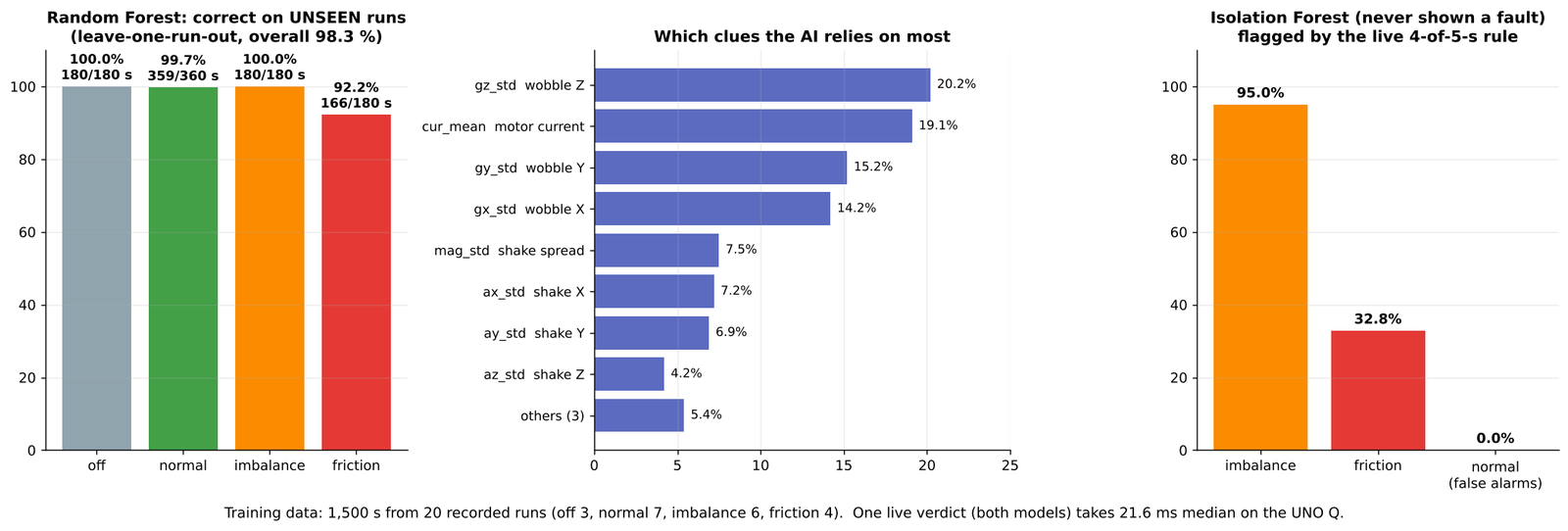
Friction is the hardest class because a light rub changes the current more than the vibration; the 8 % of friction seconds it misses are the first seconds of a light touch. In live use this does not matter much: a real rub lasts long enough to give 3 confident seconds, and the friction tests below were all stopped at 91–99 % confidence.
Cloud Alerts: Claude AI + SAP BTP Alert Notification Service
qSafe keeps every safety decision on the board; the cloud is used only to word and deliver the supervisor alert. Claude (claude-haiku-4-5) receives the alarm type, the reading against its limit, the AI confidence and the action already taken, and returns a two-sentence message a supervisor can act on. The message is posted to SAP BTP Alert Notification Service (ANS), which e-mails it. In a production plant the same ANS event could also open a maintenance notification in SAP; units without SAP can point the MQTT stream to an open-source dashboard instead.
Setting up SAP BTP and Alert Notification Service – step by step
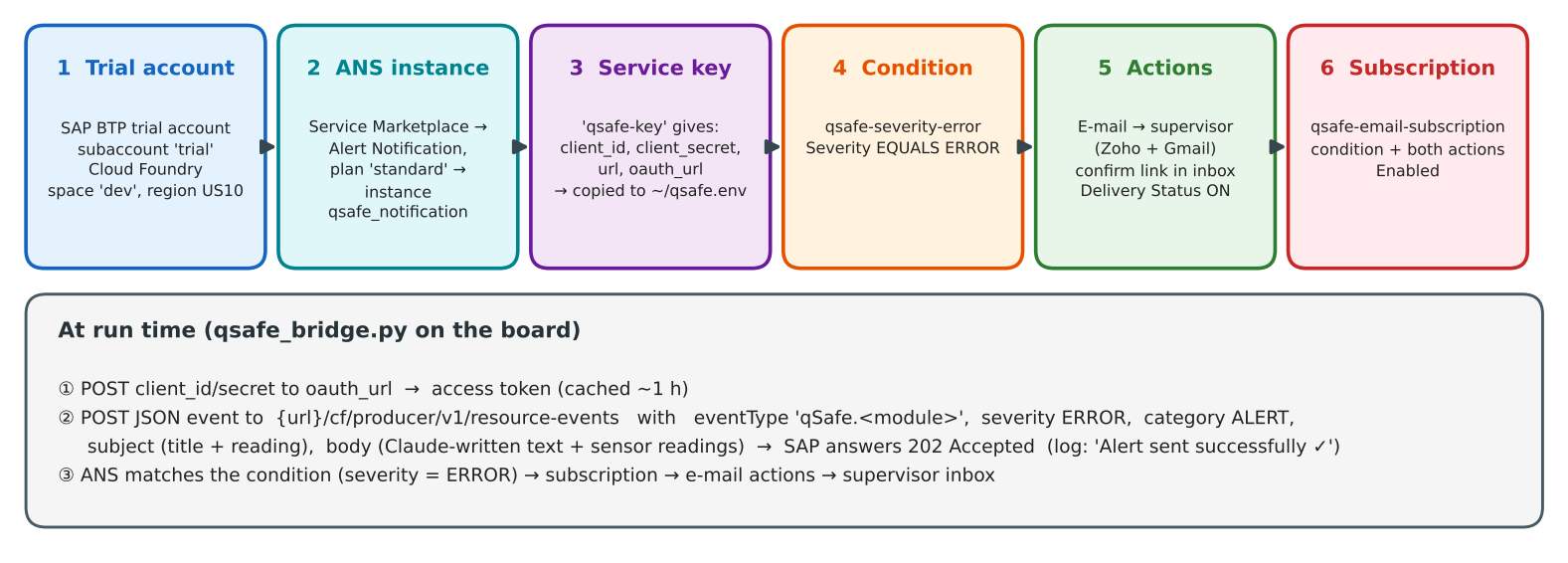
Everything below is free on an SAP BTP trial account and takes about 20 minutes. The names are the ones used for qSafe.
1. Create the trial account. Sign up at the SAP BTP trial page (account.hanatrial.ondemand.com) and open the BTP Cockpit. The trial creates a global account with a subaccount called trial, a Cloud Foundry environment and a space called dev (region US10 for qSafe).
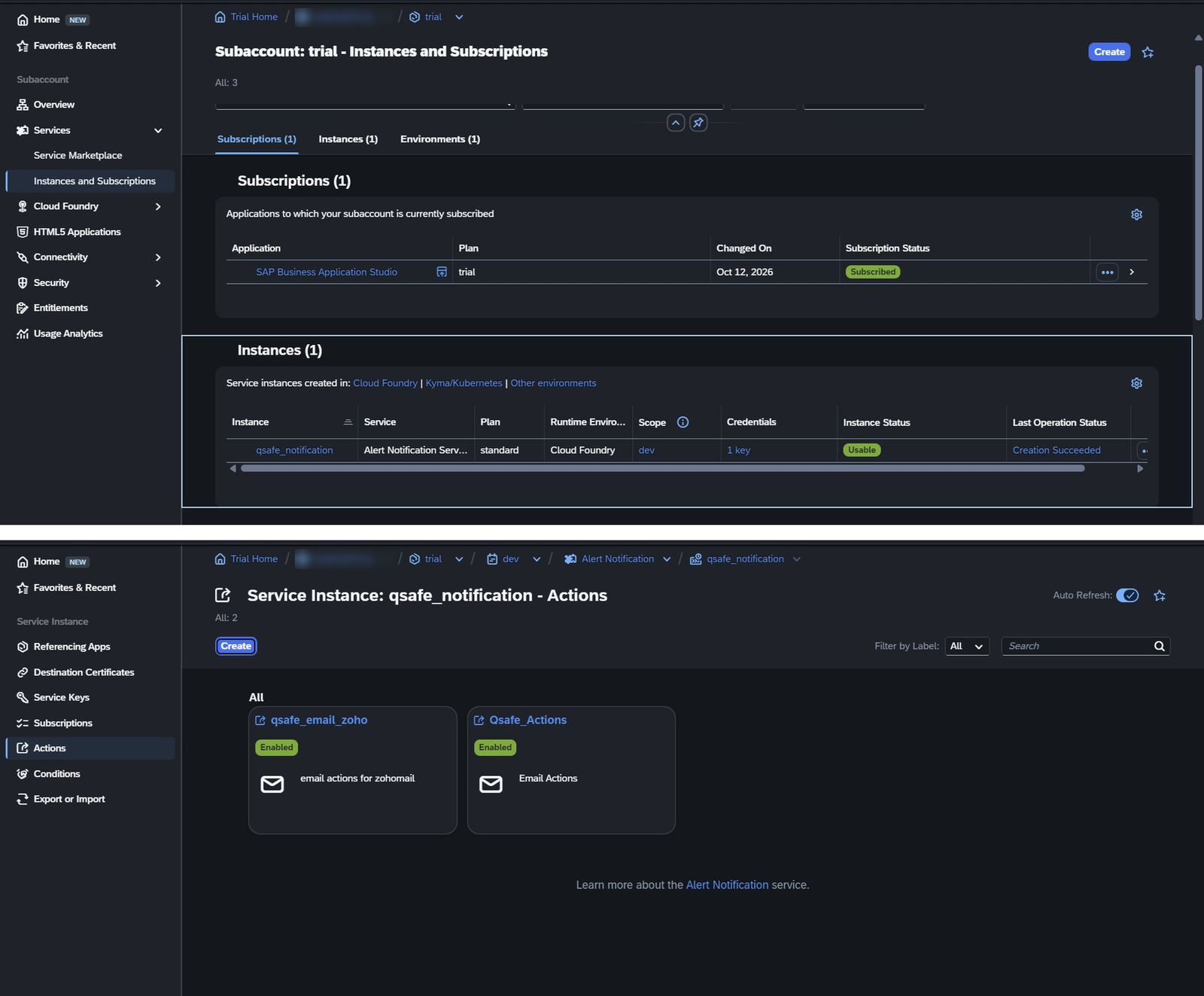
2. Create the Alert Notification instance. In the subaccount open Services → Service Marketplace, search for Alert Notification, click Create, choose plan standard, runtime Cloud Foundry, space dev, and name the instance qsafe_notification (Fig 9). Wait until its status shows Usable.
3. Create a service key (the board’s login). Open the instance → Service Keys → Create Service Key, name it qsafe-key. The key shows four values: url, oauth_url, client_id and client_secret. Copy them into ~/qsafe.env on the board as ANS_URL, ANS_OAUTH_URL, ANS_CLIENT_ID and ANS_CLIENT_SECRET, each in single quotes (the client ID contains ‘|’ and the secret contains ‘$’). Nothing is typed back into SAP.
4. Check the login from the board. A 10-line Python test posts the client ID and secret to the oauth_url; the answer ‘200 True’ means the board can obtain an access token from the new account.
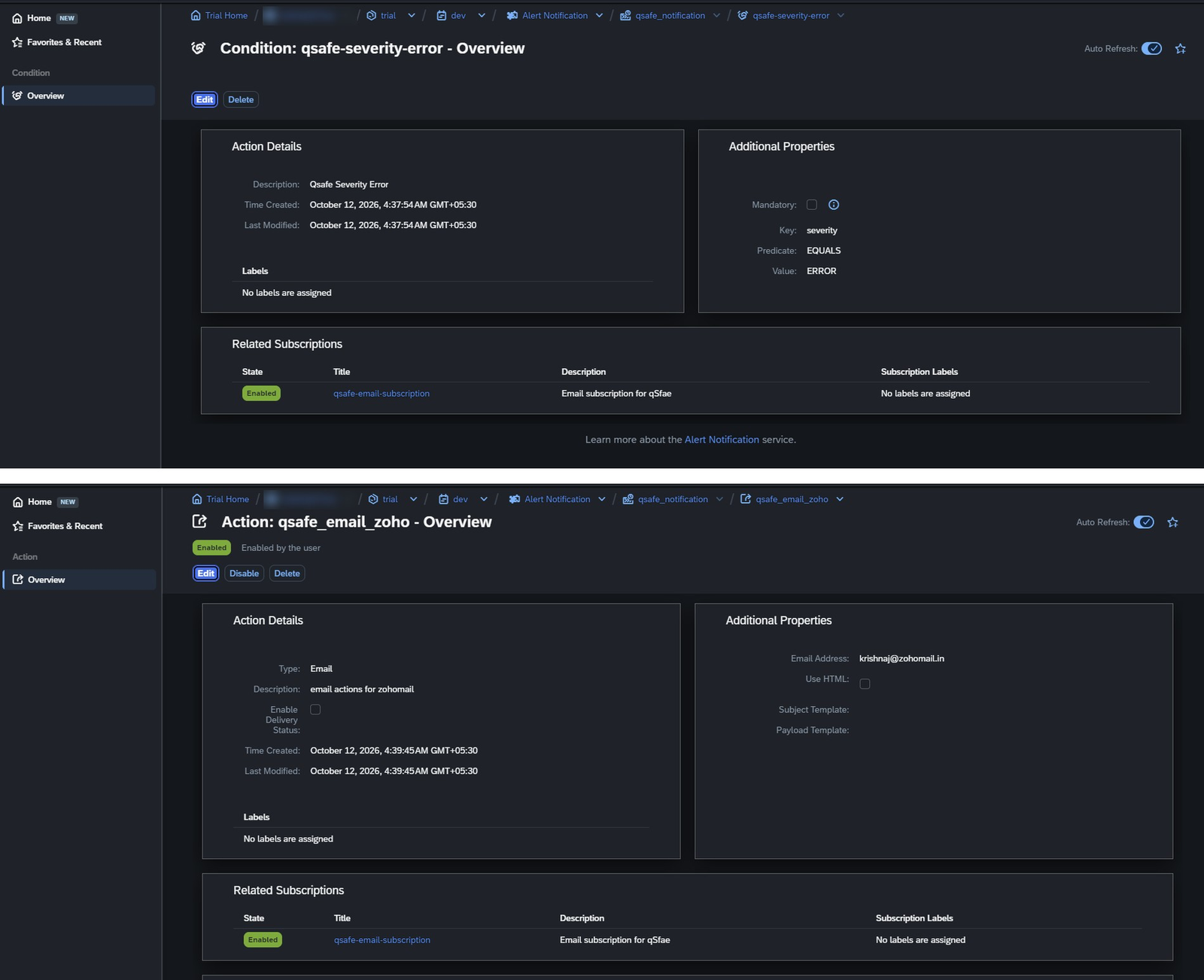
5. Create the Condition (which events to e-mail). Open the instance dashboard → Conditions → Create: name qsafe-severity-error, condition severity EQUALS ERROR, ‘Mandatory’ left unticked (Fig 10). qSafe sends every alarm with severity ERROR.
6. Create the Actions (where to send). Actions → Create → E-mail: one action for the supervisor’s Zoho address (qsafe_email_zoho) and one for a Gmail address (Qsafe_Actions), ‘Use HTML’ unticked (Fig 9, Fig 10). SAP sends a confirmation e-mail to each address – the link in it must be clicked before the action delivers. Ticking Enable Delivery Status makes SAP keep a delivery report per e-mail, which helps when an e-mail does not arrive.
7. Create the Subscription (connect condition to actions). Subscriptions → Create: name qsafe-email-subscription, choose the condition qsafe-severity-error, attach both e-mail actions, state Enabled. The condition and action pages then list this subscription under ‘Related Subscriptions’ (Fig 10).
8. Test from SAP’s side first. On the subscription use Send Test Event with severity ERROR – the test e-mail should arrive in both inboxes. This separates SAP set-up problems from board problems.
9. Run qSafe. Start qsafe_bridge.py; on every alarm it prints ‘Token refreshed’ (about once an hour) and ‘Alert sent successfully ✓’ when SAP has accepted the event (HTTP 201/202/204).
What the board sends to SAP
For each alarm qsafe_bridge.py first obtains an OAuth 2.0 access token (client-credentials grant, cached for about an hour), then posts one JSON event to {ANS_URL}/cf/producer/v1/resource-events:
{
  "eventType": "qSafe.SafetyWatch",          # qSafe.<module>
  "severity":  "ERROR",                      # matches the condition
  "category":  "ALERT",
  "subject":   "⚠ qSafe ALERT | SafetyWatch | FLAMMABLE GAS / VAPOUR DETECTED (MQ-2: 1.35 V)",
  "body":      "=== qSafe FACTORY ALERT ===  <Claude text>  SENSOR READINGS ...  action taken ...",
  "resource":  { "resourceName": "qSafe-Device-01", "resourceType": "IoT-Edge-Device",
                 "resourceInstance": "factory-floor-1" }
}
Connection Explanation
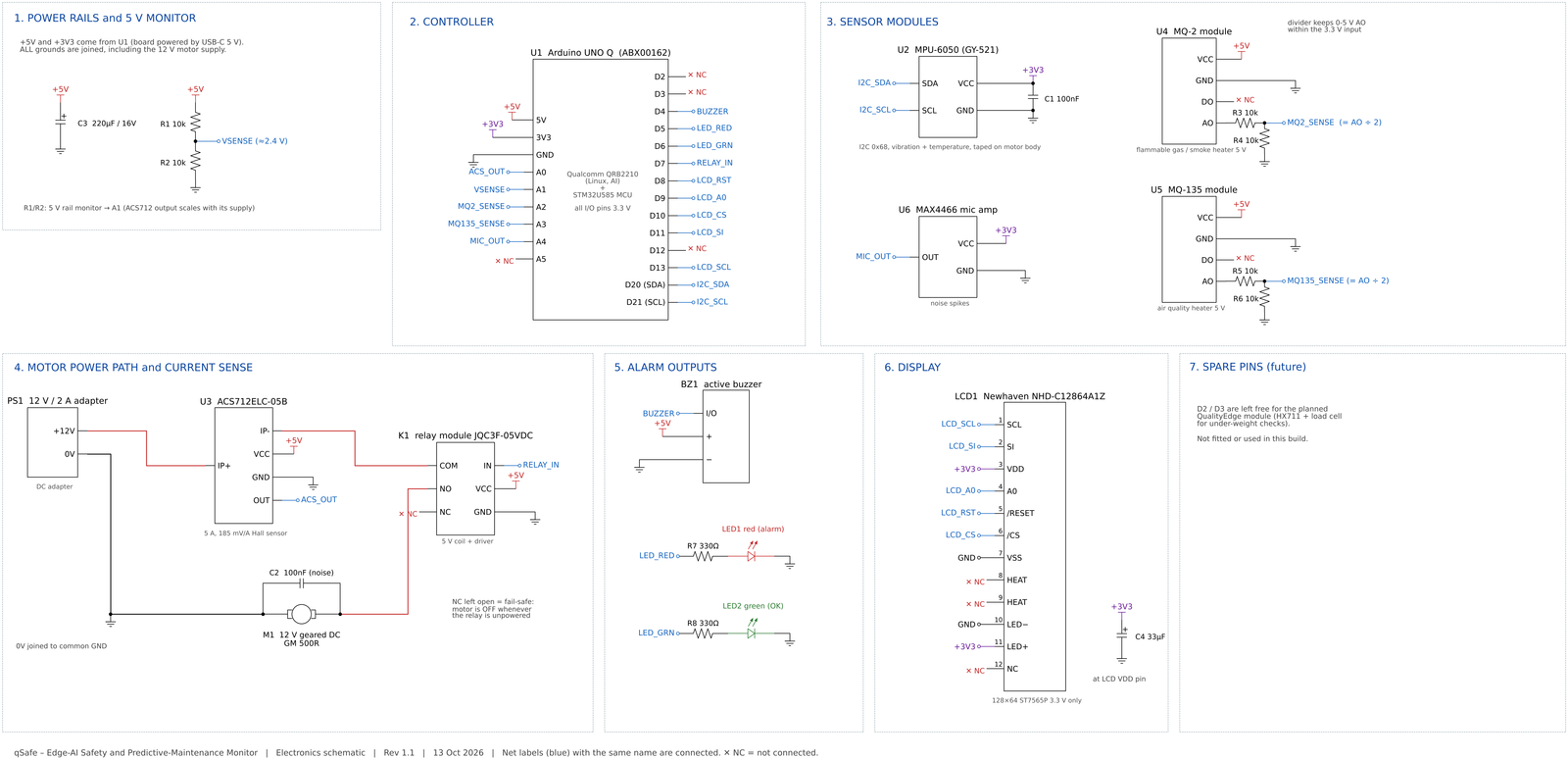
All grounds are common, including the 12 V motor supply. 3.3 V parts (MPU-6050, LCD, MAX4466) are powered from the board’s 3V3 pin; the relay module, buzzer, ACS712 and the MQ heaters use the 5 V rail. Every signal that goes into the UNO Q stays below 3.3 V – which is why the two MQ outputs pass through 10 kΩ/10 kΩ dividers. The motor’s +12 V runs through the ACS712, then the relay’s COM→NO contact; NC is left open so the motor is OFF whenever the relay is not energised.
| UNO Q pin | Connected to | Notes |
|---|---|---|
| A0 | ACS712 OUT | motor current |
| A1 | 5 V rail via R1/R2 (10k/10k) | Measures the supply so the current reading stays accurate |
| A2 / A3 | MQ-2 AO / MQ-135 AO via 10k/10k dividers | DO pins not used |
| A4 | MAX4466 OUT | VCC on 3V3 |
| D2 / D3 | free | Reserved for the future HX711 load-cell module |
| D4 / D5 / D6 | Buzzer / red LED (330 Ω) / green LED (330 Ω) | |
| D7 | Relay module IN | Motor ON/OFF |
| D8, D9, D10, D11, D13 | LCD /RESET, A0, /CS, SI, SCL | LCD VDD and backlight on 3V3 (never 5 V) |
| D20 / D21 | MPU-6050 SDA / SCL | I²C address 0x68, VCC on 3V3, 100 nF across VCC–GND |
Noise control turned out to matter: a 100 nF capacitor across the motor terminals, a 220 µF capacitor on the 5 V rail and a 33 µF capacitor at the LCD cut rejected sensor readings from 10–25 per second to about 5 per second while the motor runs. The complete schematic (Fig 14) is in the Schematics section at the end.
Testing
Every test was logged with its settings and conclusion (the full log, 30+ entries, is in the repository as docs/qSafe_Test_Log.xlsx). The main milestones:
| Test | What was checked | Result |
|---|---|---|
| Sensor health | Vibration sensor at rest and running; replaced a faulty MPU-6050, calibrated the spare; automatic chip reset | PASS – 1.00 g at rest; faults self-repair in ~2 s; 7 h powered run with zero sensor faults |
| Current sensor | Rubber pad pressed on the shaft; 5 V supply drift | PASS – friction raises current by ~0.25 A; zero error ±0.01 A after the ratiometric fix |
| AI training (final, 11 Oct) | Leave-one-run-out on 20 runs / 1,500 s | PASS – 98.3 % on unseen runs; 0 % unusual-pattern false alarms on normal; 21.6 ms per verdict |
| Armed end-to-end #1 (1 Oct) | Faults → relay stop → LCD → e-mail | PARTIAL – chain worked; found 3 bugs (false ‘AI offline’ stops from a timer bug, shared e-mail timer, current drift) – all fixed |
| Armed end-to-end #2 (2 Oct) | Friction, imbalance, normal running, unknown knock | PASS – friction stopped at 91 %, imbalance at 90 %; separate e-mails; 4-language LCD; no false stops on normal |
| Imbalance – two strengths (11 Oct) | Broken off-centre arm vs stiff arm with a coin | Broken arm: stopped at 96–99 % confidence. Stiff coin arm (a much milder imbalance): recognised at 50–76 % – shown on the LCD and flagged, but below the 70 %/3 s stop rule, so the motor kept running (by design) |
| Friction + unusual (13 Oct) | Rubber pad on the shaft; then a changed rig | PASS – motor stopped at 97–99 % confidence with alert and e-mail; later an ‘UNUSUAL PATTERN’ warning (motor kept running), as designed |
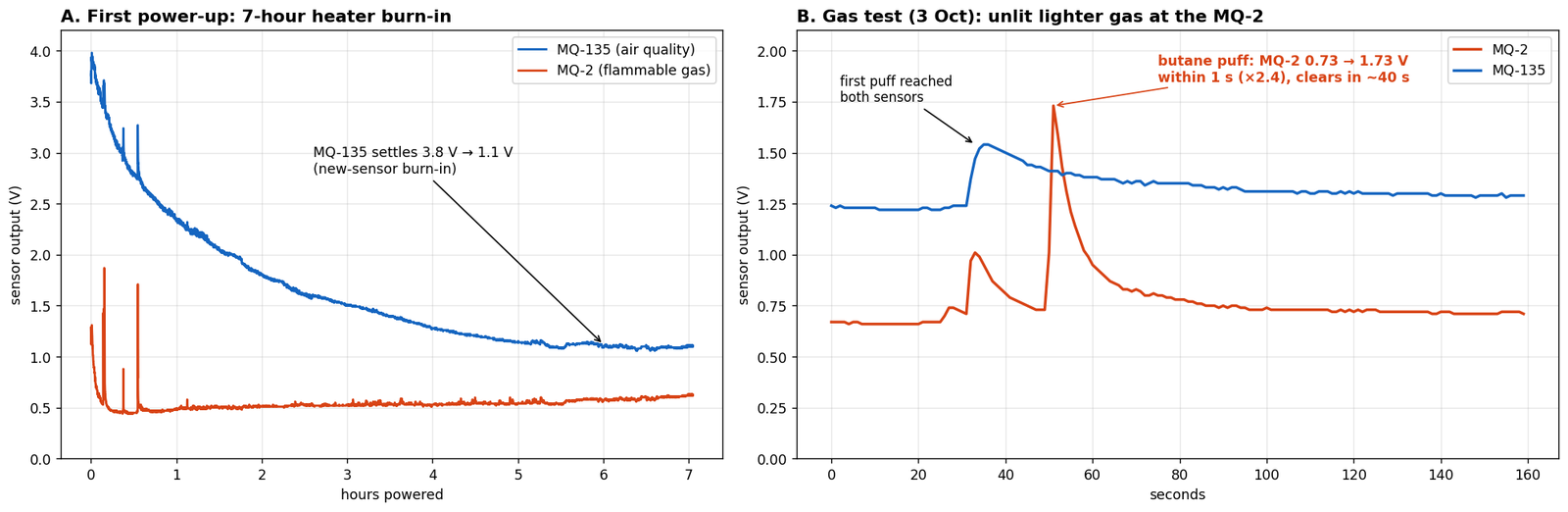
| Gas sensors (2–3 Oct) | 7-hour burn-in; sanitiser (alcohol) and unlit-lighter butane | PASS – both sensors react within 1 s and recover in ~40 s (Fig 12) |
| Gas alarm (11 & 13 Oct) | Unlit lighter pressed 3–4 s about 2 cm from the MQ-2 | PASS – MQ-2 1.35 V vs 0.62 V trip: motor cut at once, repeating long beeps, 4-language LCD, e-mail; restart only after the gas cleared |
| Fumes alarm (13 Oct) | Tissue with hand sanitiser near the MQ-135 | PASS – 2.08 V reading: warning beeps, ‘FUMES DETECTED – Ventilate’ screen (Fig 6), e-mail; motor kept running |
| Noise alarm (11–13 Oct) | Hand claps near the microphone; threshold raised to 0.60 V after motor/relay noise caused false alarms | PASS – claps of 0.63–3.3 V gave a warning and one e-mail per minute; no false alarms from the running motor |
| Screen speed (12 Oct) | Time from alarm to the 4-language screen | PASS – alert pictures published 0.1 s after the alarm (was ~8 s when Claude wrote the screen text); each language shown once, 3 s each |
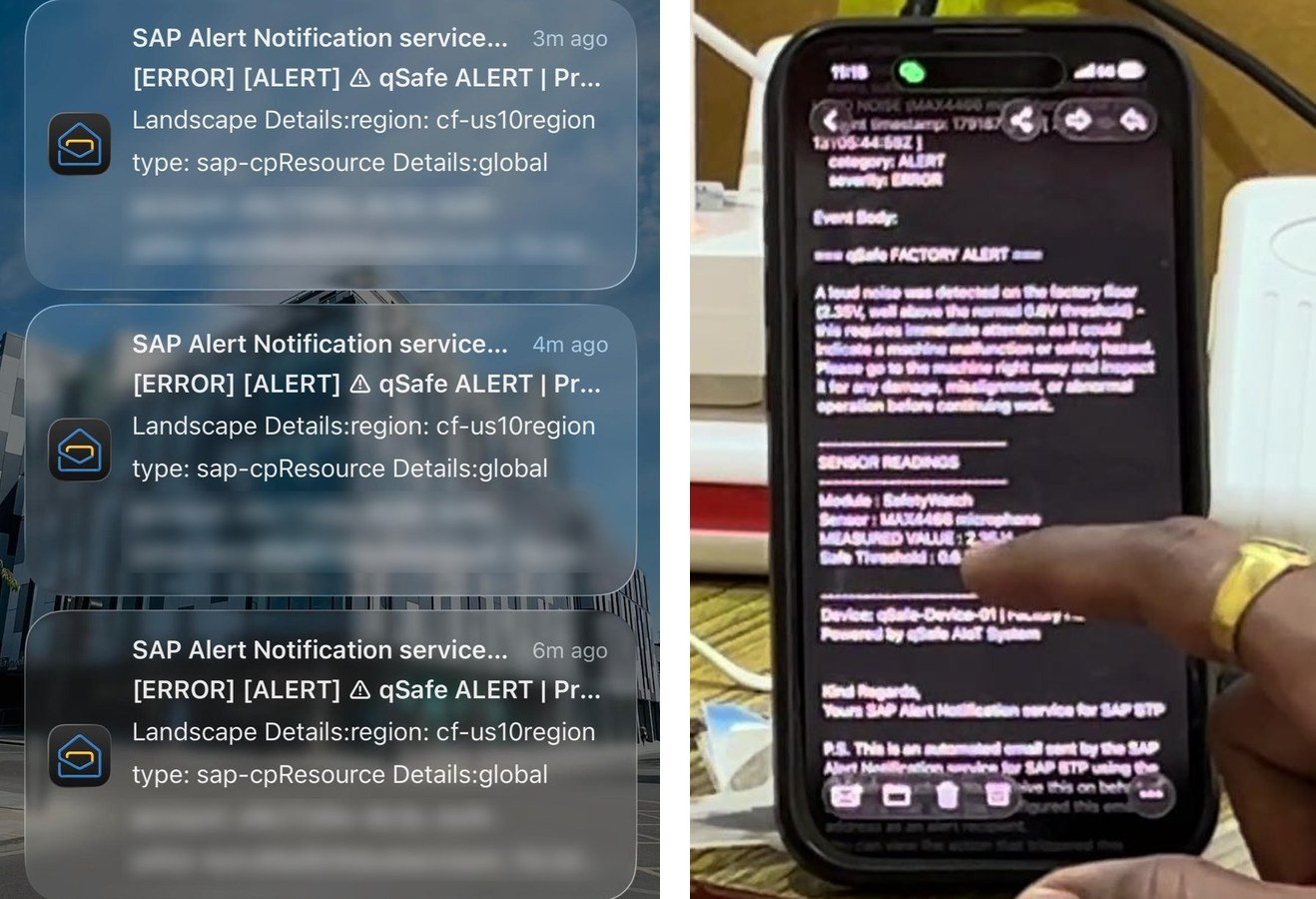
| Supervisor e-mail via SAP (11–13 Oct) | Real alarms and SAP ‘Send Test Event’; new trial account set up on 12 Oct | PASS – e-mails with Claude text received on Zoho and Gmail (Fig 11, demo video). Note: on the trial service some later e-mails were accepted by SAP (HTTP 202) but not delivered – see Lessons |
| Network independence (13 Oct) | Board moved between three Wi-Fi hotspots; one with no internet | PASS – local alarms, relay and LCD kept working with no internet (fallback text used); App Lab app now finds the MQTT broker itself |
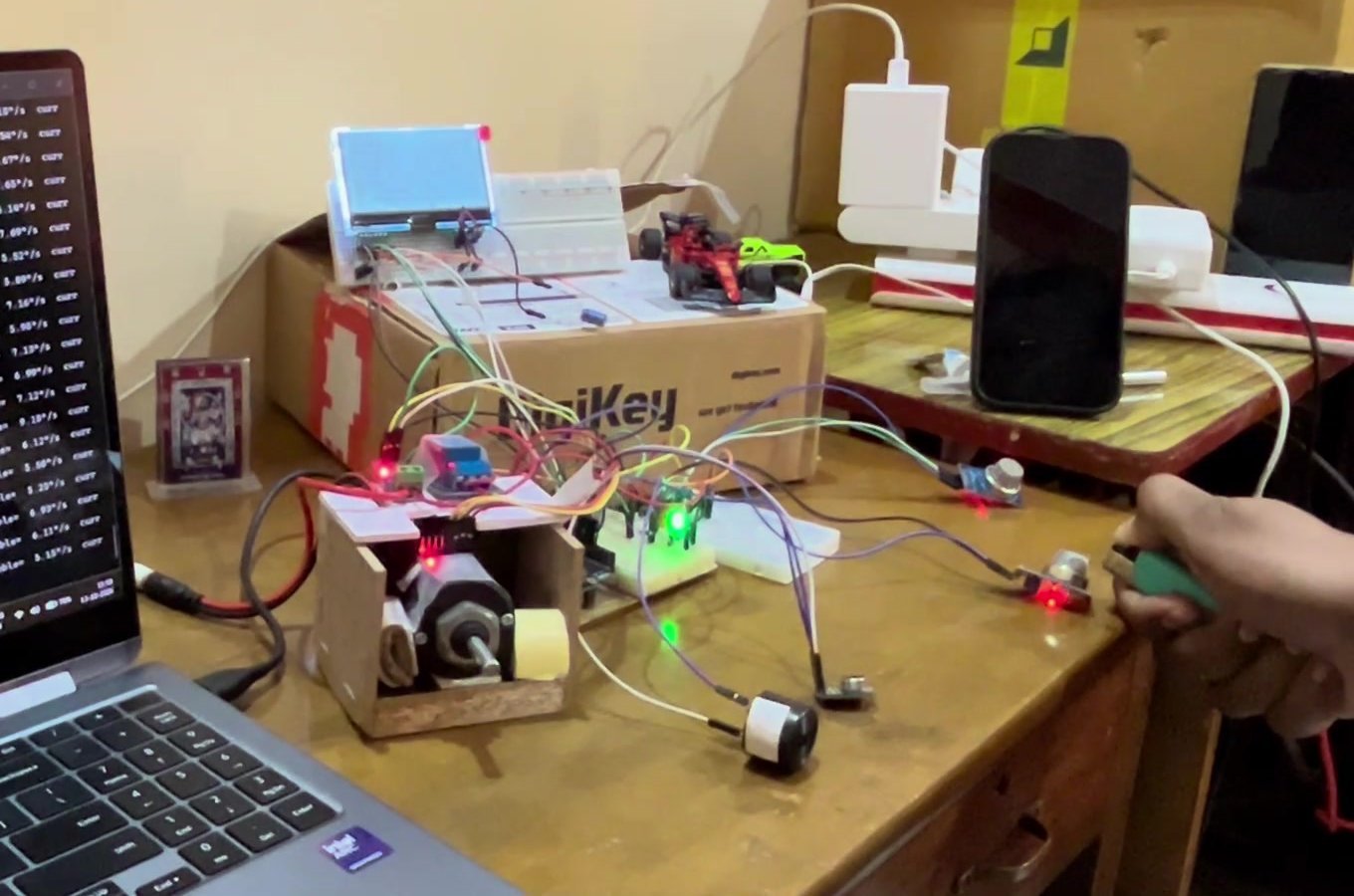
How to test it yourself: power the board and let the gas sensors warm up for 15 minutes; follow the start order above; run the motor normally (screen shows ‘AI: NORMAL’), then hold a rubber pad on the shaft for 5–8 s (friction) or fit the off-centre arm (imbalance): within about 3 s the relay cuts the motor, the buzzer sounds, the LCD shows the four-language alert and the supervisor e-mail follows. For the gas alarm press an unlit lighter (do not light it – a flame burns the gas before the sensor sees it) for 3–4 s about 2 cm from the MQ-2.
Design Decisions – What Changed from the Submitted Abstract, and Why
Building and testing the real device led to a few deliberate changes from the abstract submitted at the idea stage. Each was made either because the original choice would not have worked on the real hardware, or because testing showed a better option.
| Abstract said | What was built | Why the change was made |
|---|---|---|
| Qualcomm APQ8016 Linux processor, 1 GB RAM | Qualcomm Dragonwing QRB2210, 2 GB RAM (the chip on the ABX00162 board) | A correction of the specification: the board bought and used (DigiKey 1050-ABX00162-ND) carries the QRB2210 with 2 GB RAM, which lets the AI, the MQTT broker and the font rendering run side by side. |
| TensorFlow Lite network trained on the CWRU bearing dataset, >97 % accuracy | Random Forest + Isolation Forest trained on qSafe’s own motor: OFF, NORMAL, IMBALANCE, FRICTION; 98.3 % on unseen runs | CWRU was recorded at 12,000 readings per second with industrial accelerometers; the MPU-6050 gives about 60–75 clean readings per second here, so the bearing-fault frequencies a CWRU model relies on do not exist in this signal. Training on the real machine gives an honest accuracy with faults that can be shown on camera. Tree models are small, fast and explainable, and the Isolation Forest flags faults it has never seen. |
| Vibration sampled at 500 Hz | About 60–75 clean vibration readings per second, summarised every second | The same 10 ms loop also reads current, gas, sound and the supply, drives the LCD and talks to Linux, and motor noise corrupts some I²C reads (detected and discarded). This is still far faster than the geared motor’s shaft rotation, which is what imbalance and friction change. |
| Relay cuts power within 5 ms of a threshold breach | Gas and shock trip on the next 10 ms loop (gas after 1.5 s confirmation); AI faults need 3 s at ≥ 70 % confidence | The first armed test showed that stopping on one noisy second produced false stops – and a system that stops machines for no reason gets switched off. Confirmation removed false stops while still stopping real faults within about 3 s. No millisecond figure is claimed because it was not measured with a logic analyser. |
| 1.3-inch SH1106 OLED with Indian-script bitmap fonts in flash | Newhaven 128×64 graphic LCD (67 × 33 mm); four-language alert pictures rendered on Linux with Noto fonts | The larger LCD is readable at the machine. Indian scripts need proper shaping of conjuncts and vowel signs, which Linux fonts handle. In testing, having Claude write the screen text took ~8 s, so the screen now uses a fixed, checked phrase per alarm (shown in 0.1 s, works offline) and Claude writes the supervisor e-mail. |
| Zephyr RTOS with VS Code / west tools | Arduino App Lab (sketch.ino on the STM32 – the UNO Q’s Arduino core is itself built on Zephyr – plus Python on Linux) | App Lab is the official UNO Q toolchain and provides the Bridge link between the two processors out of the box. |
| DS18B20 waterproof temperature probe | Motor temperature from the MPU-6050’s built-in thermometer | The DS18B20’s 1-Wire timing did not work on the UNO Q’s current software core. The MPU-6050 already sits on the motor body, so the temperature rise is measured with no extra part. |
| MQTT over TLS 1.2; SAP Integration Suite iFlow; Service and Asset Manager; ThingsBoard dashboard | MQTT broker on the device (local); Claude API and SAP BTP Alert Notification Service over HTTPS with OAuth 2.0; e-mail to the supervisor | Within the contest timeline, Alert Notification Service was the shortest reliable path to a real SAP BTP service that reaches a supervisor’s phone. Sensor data leaves the board only through encrypted HTTPS calls. TLS on the local broker, iFlow work orders and a dashboard are Phase 2 items. |
| QualityEdge: 5 kg load cell + HX711 for under-weight products | Not built in this version; pins D2/D3 reserved | The time went into making the safety and AI paths dependable (sensor faults, current drift, false stops, screen speed). Weighing is independent of the rest of the design and is the first Phase 2 item. |
| SRD-05VDC relay; 470 Ω LED resistors | JQC3F-05VDC-C relay module; 330 Ω resistors | Readily available locally and functionally equivalent; 330 Ω gives clearly visible LEDs from 3.3 V outputs. |
Results, Lessons Learned and Next Steps
What works today: one UNO Q watches a motor and its surroundings, recognises imbalance and friction with 98.3 % accuracy on unseen runs, stops the motor on a confirmed fault or a gas leak within seconds, warns about fumes, noise and heat, shows the reason at the machine in four languages within 0.1 s, and e-mails the supervisor through SAP BTP – while every safety decision stays on the board and keeps working without internet.
- Clean data beats model tuning. Sensor self-checks, calibration and supply-independent current measurement mattered more than any model setting.
- Test honestly. An early score of 98.9 % fell to 89.6 % once whole unseen runs were used as the exam; better data and a stronger fault rig brought it to 98.3 % on the honest test.
- Train the machine in all its normal states. A warm motor wobbles about twice as much as a cold one and once caused a false friction stop until warm runs were added.
- Confirm before acting. The 70 %/3 s rule means a mild fault (the stiff coin arm) is flagged rather than stopped, and an uncertain AI never stops a healthy machine. On 13 Oct the healthy motor’s current reading rose from about 0.02 A to 0.13 A after a stop; the AI wavered at 40–60 % for minutes but never stopped the motor. The fix is simply two more ‘normal’ recordings and a retrain – the kind of re-calibration a factory would do after maintenance.
- Put the safety loop where the network is not. Moving between Wi-Fi networks and losing internet changed nothing for the worker at the machine; only the e-mail waits.
- Cloud delivery needs its own monitoring. On the free trial service, a few alerts that SAP accepted (HTTP 202) did not reach the inbox. A production version would read SAP’s delivery-status report and retry or escalate (for example by SMS) when an e-mail is not delivered.
Next steps (Phase 2):
- QualityEdge module – HX711 + load cell on the free D2/D3 pins to weigh each product and raise an under-weight alert through the same LCD and SAP path.
- Custom PCB with an opto-isolated relay output, shielded sensor cables and an IP-rated enclosure (also cures the motor-noise drop-outs).
- TLS-encrypted MQTT, automatic SAP maintenance notifications, and a dashboard for units without SAP.
- More fault classes (bearing wear, misalignment) recorded on real factory machines; native-speaker review of the Hindi, Marathi and Kannada phrases.
Schematics
Project Video:
Demo video (Google Drive): click here
Repository contents: firmware/sketch.ino (MCU), app/main.py (App Lab), board/qsafe_ai.py, qsafe_bridge.py, qsafe_display.py (Linux services), board/qsafe.env.example (secrets template – real keys are never committed), hardware/ (schematic PDF/PNG/SVG and its Python source), data/ (training recordings and report), docs/ (test log and screen previews), requirements.txt.
