




SmartAbode: An Embodied Agentic AI-Based Smart Home Automation System is designed to transform conventional home automation into an intelligent, context-aware environment by integrating Artificial Intelligence, IoT, and physical device control. The system uses an Arduino UNO Q, combining a Google ADK-based AI agent with edge-level sensing and actuation to enable both manual and autonomous home management. PIR, LDR, and DHT11 sensors provide occupancy, ambient light, temperature, and humidity information for adaptive lighting and environmental monitoring. Users can control LED switching and brightness through an Android application, while sensor readings and device states are synchronized bidirectionally through Firebase Firestore. In Agentic AI mode, users can interact with the system using text or voice commands, allowing the AI agent to control lighting, retrieve sensor data, and make context-aware decisions based on environmental conditions and user preferences. The system also provides explanations for its automated actions and supports manual overrides, ensuring transparency and user control. By combining intelligent reasoning, real-time sensing, wireless communication, and physical actuation, SmartAbode aims to improve energy efficiency, comfort, and convenience while reducing reliance on rigid rule-based automation.
Component List
| ID | Name | Designator | Quantity |
| 1 | Arduino UNO-Q | Arduino UNO-Q | 1 |
| 4 | DHT11 Digital Humidity and Temperature sensor module | DHT11 | 2 |
| 5 | Light Dependent Resistor Module | LDR Module | 1 |
| 6 | Passive Infrared Motion Sensor | PIR | 1 |
| 7 | LEDs | Bedroom LED, Hall LED | 2 |
| 8 | Jumper Wires (M-M, F-F, M-F) | JW | 1 |
| 9 | Breadboard (Big) | BBB | 1 |
| 10 | 10 Breadboard (Small) | BBS1, BBS2 | 2 |
Project Explanation Step By Step
The SmartAbode project is an Embodied Agentic AI system that transforms traditional home automation into a proactive, intelligent environment. Rather than relying on rigid, deterministic “if-else” triggers, SmartAbode utilizes a hybrid architecture where a cloud-based Google ADK agent performs cognitive reasoning, while an Arduino UNO-Q ecosystem manages real-time sensor telemetry and physical actuation at the edge. The system senses the physical home environment through sensors like PIR (for occupancy), LDR (for ambient light), and DHT11 (for climate), processing this data to make context-aware decisions regarding energy optimization and user comfort. For instance, it implements adaptive lighting by balancing ambient light levels with user preferences and occupancy states. By maintaining a bidirectional link with a mobile app via Firestore, the agent provides “Cognitive Transparency,” explaining the reasoning behind its autonomous actions (e.g., dimming lights for energy efficiency) while allowing for graceful manual overrides. This approach solves “automation fatigue” by creating a seamless, user-centric living space that acts as a partner rather than a simple device.
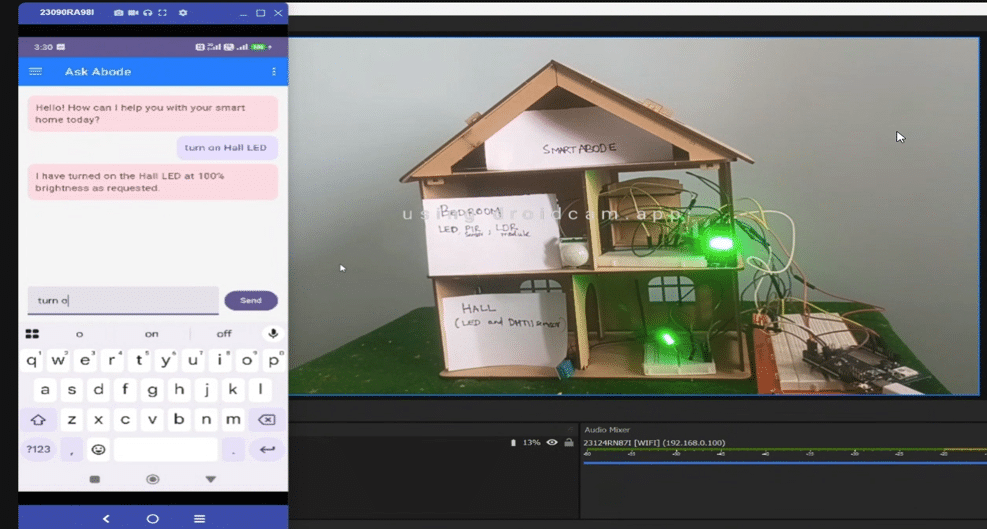
As a form of Physical AI, the system bridges digital reasoning with real-world physical action to create a truly smart, responsive home. SmartAbode operates in two modes: Manual Control and Agentic AI Control. In Manual Control, users can switch LEDs ON or OFF and adjust their brightness using the Android app. These actions update Firebase Firestore, which is continuously monitored by the Linux MPU running on the Arduino UNO-Q. When a change is detected, the MPU communicates with the MCU through the Router Bridge to control two LEDs installed in the bedroom and hall. A DHT11 sensor connected in the hall is also read every five seconds by the MPU, and the latest temperature and humidity values are synchronised to Firestore for real-time display in the Android app.
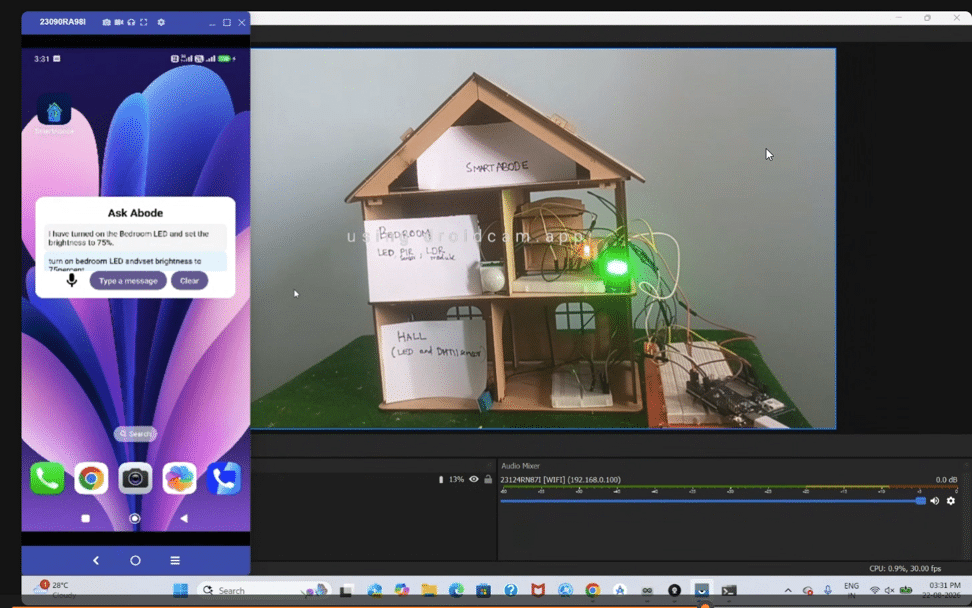
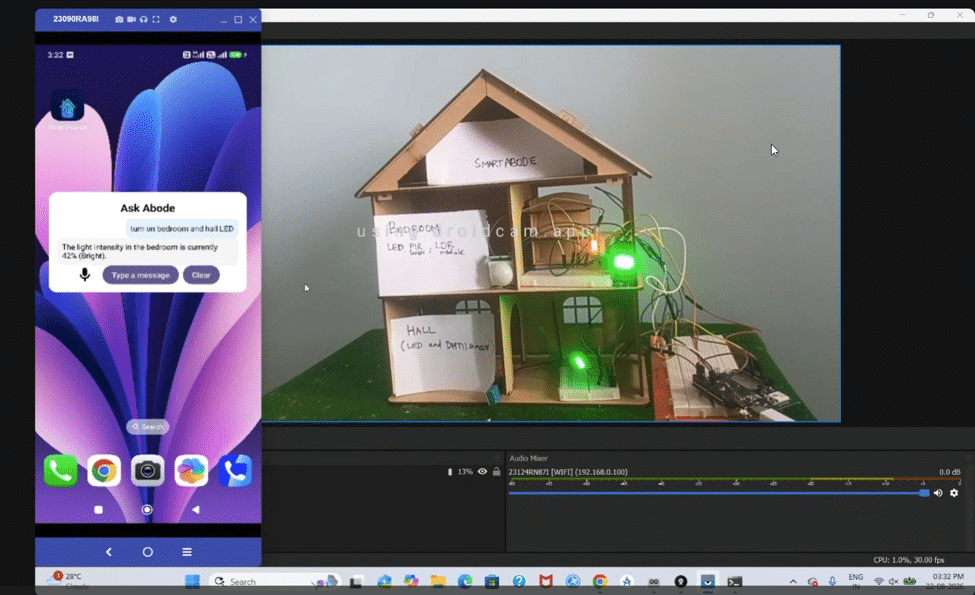
In Agentic AI Control, users interact with a Google ADK agent running on the Arduino UNO-Q through the app or the Ask Abode home-screen widget using text or voice commands. The ADK agent invokes tools to control LEDs, adjust brightness, and retrieve DHT11 sensor readings. Device states are synchronised with Firestore while preventing update loops. SmartAbode also includes adaptive lighting using LDR and PIR sensors, enabling intelligent, occupancy-aware lighting automation.
Coding Explanation and Configuration
(sketch.ino)
● setup() → Initializes LEDs, DHT11, LDR and PIR sensors, and registers Arduino–Python RPC endpoints.
● loop() → Keeps the Arduino running while preventing thread starvation.
● set_room_led() → Parses LED control commands and sets the appropriate room LED brightness using PWM.
● get_dht_readings() → Reads temperature and humidity from the DHT11 sensor. ● get_ldr_digital_reading() → Reads the LDR’s digital light/dark status.
● get_ldr_analog_reading() → Reads the LDR’s analog light intensity.
● get_pir_status() → Detects motion using the PIR sensor.
Python (main.py)
● ensure_session() → Creates or retrieves the ADK agent session.
● run_adk_agent_runner() → Sends sensor context to the Google ADK agent, allowing it to autonomously determine LED activation and brightness.
● hardware_sync_worker() → Synchronizes LED state from the software state to the physical LEDs through the Arduino Bridge.
● on_device_update() → Listens for Android app LED-control changes from Firestore.
● on_config_update() → Synchronizes adaptive-lighting and occupancy-timeout settings.
● monitor_hardware_sensors() → Continuously monitors DHT11, LDR and PIR sensors, updates Firestore,
detects occupancy, and triggers the agentic lighting workflow.
● uvicorn.run() → Starts the SmartAbode FastAPI/ADK application server.
Agent(tools.py)
··initialize_virtual_env() → Configures logging, dynamically discovers and injects the Python virtual environment path, safely loads environment variables, and initializes Firebase Firestore bindings.
··get_system_status() → Returns the current cached state of the home lighting system.
··control_room_led() → Controls room lighting by interacting with the Arduino hardware via Bridge RPC, updating local cache, and syncing changes to Firestore.
··set_contextual_lighting() → Evaluates the current time of day in IST, room type preferences, and ambient light levels to calculate and set optimal LED brightness.
··get_dht11_data() → Fetches live temperature and humidity sensor readings from the hardware bridge with a fallback to the Firestore database.
··get_ldr_data() → Reads ambient light conditions, converts raw analog values into percentage-based daylight harvesting metrics, and supports Firestore caching.
··send_push_notification() → Sends automated push notifications via Firebase Cloud Messaging to the SmartAbode Android app when actions or threshold adjustments occur.
··set_adaptive_lighting() → Enables or disables autonomous adaptive lighting features by updating system settings within the Firestore database.
SmartAbode Android App Making
The SmartAbode Android app is the primary user interface for interacting with the SmartAbode system.
This android app was developed entirely using Kotlin, with Jetpack Compose used to build the user interface. Jetpack Compose allowed me to create a modern, responsive UI using a declarative approach while keeping the application architecture modular and easy to extend.
The SmaryAbode app provides users with two primary ways to interact with SmartAbode:
● Manual control of smart-home devices
● AI-powered interaction through the AskAbode chatbot
Through the app, users can control devices such as the Bedroom Light and Hall Light, adjust their brightness, and monitor sensor information such as temperature, humidity, light intensity, and occupancy-related data.
Firebase Integration
Firebase acts as an important communication and synchronisation layer between the Android app and the SmartAbode hardware.
The Android app reads and writes the required device states and sensor data through Firebase. For example, when a user changes the brightness of a light from the app, the corresponding state is synchronised through Firebase, allowing the SmartAbode system running on the Arduino UNO-Q to receive and act upon the updated state.
Similarly, sensor data collected by the hardware can be synchronised to Firebase and displayed in the Android application, providing users with a real-time view of their home environment.
This architecture also helps decouple the Android application from the hardware, allowing the app and the physical devices to communicate through a common cloud-based data layer.
AskAbode AI Chatbot
One of the key features of the app is the AskAbode chatbot, which provides a natural-language interface for interacting with the SmartAbode system.
Instead of requiring users to manually operate individual controls, they can communicate with AskAbode using natural-language commands. For example, a user can ask the system to control a light or retrieve information from the connected sensors.
The Android app communicates with the Google ADK Agent running on the Arduino UNO-Q. The agent interprets the user’s request and uses the appropriate SmartAbode tools of the ADK Agent to retrieve sensor information or control connected devices.
This creates a conversational interface between the user and the physical smart-home environment:
User → AskAbode Android App → Google ADK Agent on Arduino UNO-Q → SmartAbode Devices/Sensors
The approach allows the Android application to act as the user’s conversational interface while the agent provides the intelligence required to interact with the physical environment.
AskAbode Home Screen Widget
To make SmartAbode accessible without opening the complete application, I also developed an AskAbode home-screen widget using Jetpack Compose Glance.
Jetpack Compose Glance allows Android widgets to be created using concepts familiar from Jetpack Compose while targeting the Android App Widget framework.
The AskAbode widget provides a convenient entry point to the SmartAbode experience directly from the Android home screen. This reduces the number of steps required for users to access AskAbode and interact with their smart-home system.
Overall Android Architecture
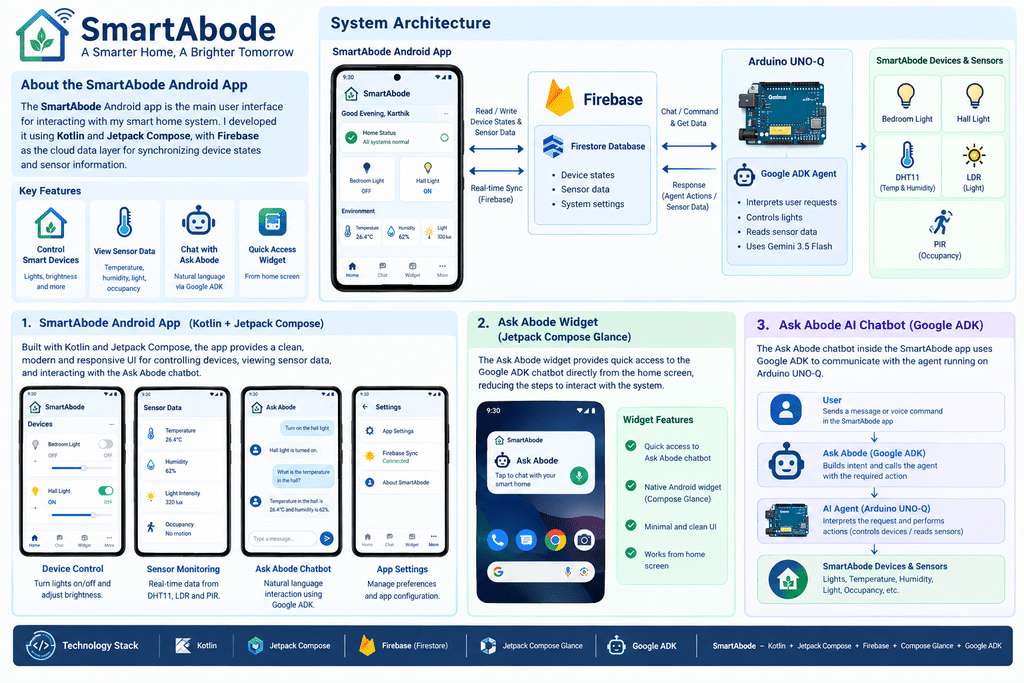
The Android side of SmartAbode can therefore be viewed as three main components:
1.SmartAbode Android App – Developed using Kotlin and Jetpack Compose for device control, sensor monitoring, and user interaction.
2.Firebase Integration – Provides synchronisation of device states and sensor data between the application and SmartAbode.
3.AskAbode Widget – Developed using Jetpack Compose Glance to provide quick access from the Android home screen.
Together, these components provide a unified Android experience for interacting with the SmartAbode ecosystem, while the Google ADK Agent running on the Arduino UNO-Q bridges the conversational interface with the physical devices and sensors.
Photos
Connection Explanation
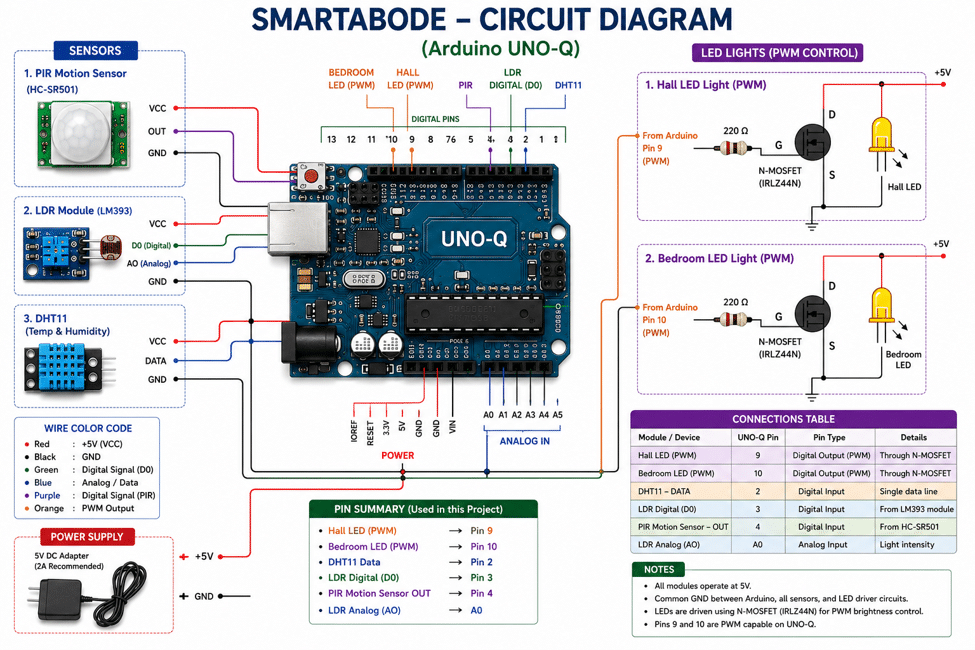
The SmartAbode hardware is built around the Arduino UNO-Q, which acts as the central controller for the connected sensors and lighting system. The circuit consists of a PIR motion sensor, LDR module, DHT11 temperature and humidity sensor, and two PWM-controlled LED lights.
- PIR Motion Sensor: The PIR sensor is connected to digital pin 4. It detects motion/occupancy in the room and provides a digital signal to the Arduino UNO-Q.
- LDR Module (LM393): The LDR module provides both digital and analog light-intensity information. Its digital output is connected to pin 3, while the analogue output is connected to A0. This allows SmartAbode to determine the surrounding light level and support adaptive lighting.
- DHT11 Sensor: The DHT11 is connected to digital pin 2 and provides temperature and humidity readings.
- Hall LED: The Hall LED is controlled through PWM pin 9. An IRLZ44N N-MOSFET is used as the switching device, allowing the UNO-Q to control the LED’s brightness using PWM. A 220 Ω gate resistor is used between the Arduino output and MOSFET gate.
- Bedroom LED: The Bedroom LED follows the same PWM control arrangement and is connected to PWM pin 10, with an IRLZ44N MOSFET and a 220 Ω gate resistor.
- Power Supply: The sensors and LED circuits are powered from a 5 V DC supply, with a common ground shared between the Arduino UNO-Q, sensors, and LED driver circuits.
Testing
- End-to-end testing: Tested the complete flow from sensor detection → Python processing → Google ADK agent → Firestore → LED control.
- Sensor testing: Verified PIR motion detection, LDR light-level sensing, and DHT11 temperature/humidity readings.
- Adaptive lighting: Confirmed that when motion is detected, the ADK agent evaluates ambient light and controls LED activation and brightness.
- Manual control: Tested Android app controls for switching LEDs ON/OFF and changing brightness through Firestore.
- Occupancy timeout: Verified that lights automatically turn OFF after the configured timeout when no motion is detected.
- Edge cases: Tested no-motion conditions, changing light levels, invalid sensor readings, and malformed LED-control payloads.
- Response time: The system responded near real-time to sensor and app events, with some additional latency observed during ADK agent invocation.
