





Robots are amazing, but building them yourself is even more exciting. When multiple robots can be controlled as a mesh through hand gestures, the possibilities become even more interesting. Imagine controlling hundreds or even thousands of robots using a single hand, with each robot replicating the same movement in real time to perform repetitive tasks more efficiently. If the same concept is extended to robotic arms, a single human hand gesture could be translated into coordinated movements across multiple robotic systems. Although robotic-arm replication is not the focus of the current design, it demonstrates the potential of this concept for future automation applications.
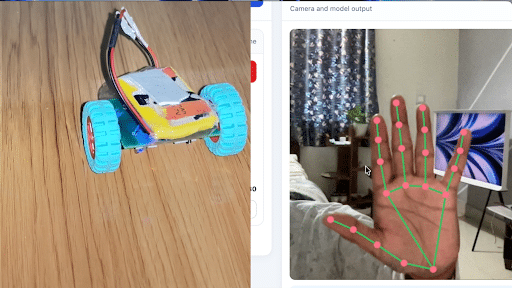
Demo Video Tutorial:
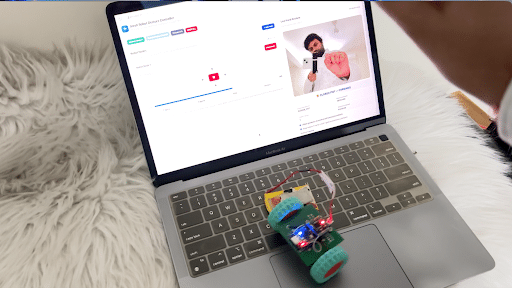
In this project, we develop a tiny, battery-powered mobile robot equipped with a microcontroller and Wi-Fi connectivity. The robot connects to a web application through a WebSocket connection, allowing it to receive movement commands in real time. Users can control the robot through on-screen buttons or use AI-based hand gesture recognition to control its movement naturally. The web application supports multiple robot nodes, allowing each robot to be controlled individually or several robots to be controlled simultaneously over the same network. This makes it possible to coordinate multiple small robots using a single dashboard and a single hand gesture, creating an interesting platform for robotics, automation, education, and experimental swarm behaviour.
We are building a simple, miniature, battery-powered Wi-Fi robot that can be controlled through a browser-based dashboard. Each robot connects to the web application using its own WebSocket address, such as ws://ROBOT_IP:81/ws. The dashboard allows users to add more robot nodes whenever required, enter their IP addresses, establish individual connections, and send movement commands to one robot or broadcast commands to all connected robots.
The system provides two main control methods. The first is manual control through the dashboard, where directional buttons allow the user to move each robot forward, backward, left, or right, rotate it, and stop it. The second is real-time hand gesture control, where a camera captures the user’s hand motions, and an AI vision model recognises predefined gestures. The recognised gesture is converted into a movement command and transmitted through the WebSocket connections of the selected robots. As all the robots share the same network, a single gesture can control multiple connected robots simultaneously, while individual controls remain available for tasks requiring independent movement.
The current design focuses on a basic micro robot rather than a robotic arm. Its main objective is to demonstrate a practical, expandable multi-robot control system using compact hardware, a web interface, wireless communication, and AI-based gesture recognition. The same architecture can later be adapted for coordinated robot arms, educational robot fleets, laboratory experiments, and repetitive tasks where multiple machines need to perform similar actions.
What will you learn?
- How to design and assemble a compact, battery-powered mobile robot using an ESP32-C3 microcontroller and N20 geared motors.
- How to interface a DRV8833 dual H-bridge motor driver with the ESP32-C3 to control motor direction and movement.
- How to develop robot firmware using the Arduino integrated development environment (IDE) and establish wireless communication over Wi-Fi.
- How to implement WebSocket communication for real-time control of multiple robots using their individual IP addresses.
- How to develop a web-based robot control interface using HTML, CSS, and JavaScript, with manual movement buttons and multi-robot connectivity.
- How to integrate MediaPipe Hand Landmarker for real-time hand gesture recognition and map gestures to robot movement commands.
- How to control individual robots or multiple connected robots simultaneously through hand gestures or the web interface.
- How to test the hardware, troubleshoot Wi-Fi and WebSocket connectivity, and verify reliable gesture-based robot operation.
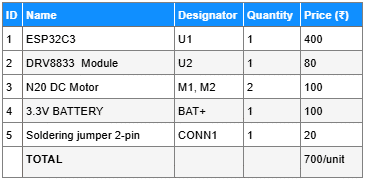
Bill of materials
Build vs Buy :: ₹700 per unit vs ₹5000 to buy mini AI robot for learning
Working principle