




 In this project, an ultrasonic detector is mounted on top of a tank for the detection of liquid level. Monitoring the liquid level in tanks and vessels is one of the most important parameters in process industries.
In process plants, tanks contain various liquids that are often quite expensive. Some of the liquids are inflammable and corrosive as well. Hence, it is better to monitor and control the level of liquid in tanks so that it does not overflow.
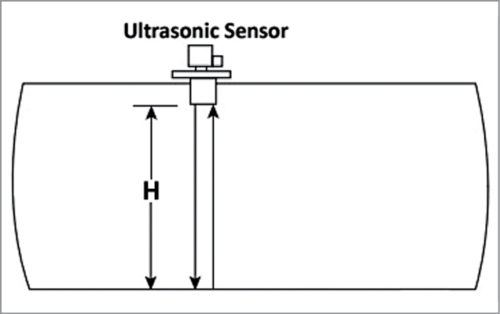
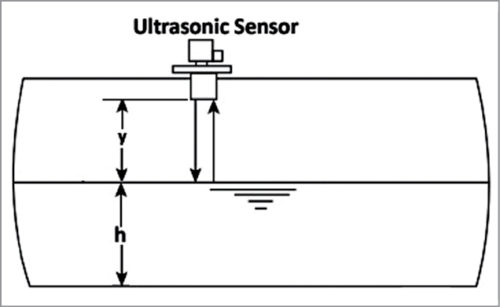
The ultrasonic level detector proposed here is a popular non-contact type level detector. It operates by generating an ultrasonic pulse and measuring the time it takes for an echo to return. The travelling time indicates the depth of the empty space above the liquid in the tank. If the detector is mounted on top of the tank, the pulse travels in air at a speed of 331m/sec at 0°C.
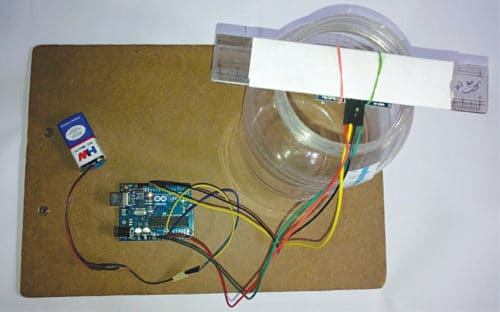
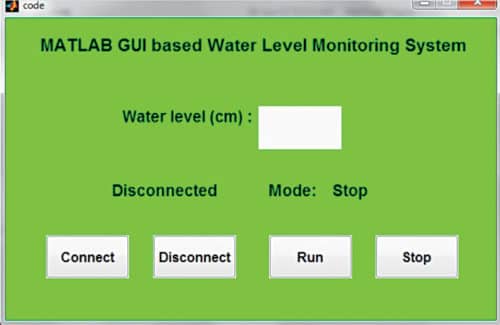
The authors’ prototype is shown in Fig. 1. A screenshot of MATLAB based GUI used for level monitoring is shown in Fig. 2. The block diagram of the project is shown in Fig. 3.
In this project, an ultrasonic detector is mounted on top of a tank for the detection of liquid level. Monitoring the liquid level in tanks and vessels is one of the most important parameters in process industries.
In process plants, tanks contain various liquids that are often quite expensive. Some of the liquids are inflammable and corrosive as well. Hence, it is better to monitor and control the level of liquid in tanks so that it does not overflow.
The ultrasonic level detector proposed here is a popular non-contact type level detector. It operates by generating an ultrasonic pulse and measuring the time it takes for an echo to return. The travelling time indicates the depth of the empty space above the liquid in the tank. If the detector is mounted on top of the tank, the pulse travels in air at a speed of 331m/sec at 0°C.
The authors’ prototype is shown in Fig. 1. A screenshot of MATLAB based GUI used for level monitoring is shown in Fig. 2. The block diagram of the project is shown in Fig. 3.

Circuit and working
The major components used in this project are:Arduino Uno
Arduino Uno is an AVR ATmega328P microcontroller based development board with six analogue input pins and 14 digital I/O pins. The microcontroller has 32kB ISP flash memory, 2kB RAM, and 1kB EEPROM. The board provides the capability of serial communication via UART, SPI, and I2C. The microcontroller can operate at a clock frequency of 16MHz. In our project, digital I/O pins 11 and 12 of Arduino are connected to echo and trigger pins of the ultrasonic sensor module, respectively.HC-SR04 ultrasonic sensor module
Ultrasonic ranging module HC-SR04 provides excellent non-contact range detection from 2cm to 400cm, with an accuracy of up to 3mm. The module includes an ultrasonic transmitter, receiver, and control circuit. The module used here has four pins—echo, trigger, Vcc, and GND. The basic principle of operation of the module is as follows: Trigger pin is an input pin. It is made for a high pulse of at least 10µs duration, on receipt of which it automatically sends eight sonic bursts of 40kHz (ultrasonic signals). This signal, after reflecting from the object, is received by the echo pin. The echo pin is an output pin that goes high for a period of time that is equal to the time taken for the ultrasonic wave to return to the sensor. The echo pin provides the travelling time of the sound wave in microseconds. The connections diagram for the project is shown in Fig. 4.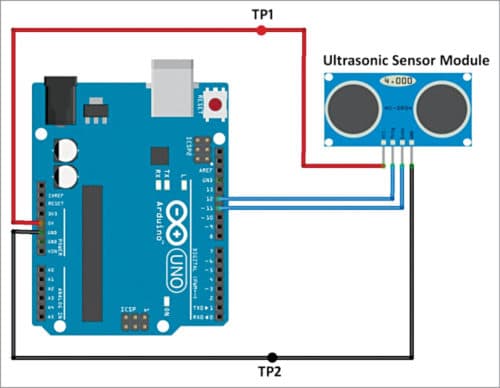
Software
The GUI application program has been developed in the R2014a version of MATLAB. For the Arduino code, the ‘NewPing’ library has been used. The steps for programming Arduino board are:- Open Arduino IDE.
- Go to Sketch->Include Library->Add .ZIP Library.
- Browse and select NewPing_v1.7. (The library is provided with the source code.)
- Connect the Arduino board and select the proper board and COM port from the Tools menu.
- Upload the code ‘Arduino_code.ino’ to the board.
Download Source Code
Construction and testing
Make the connections as shown in Fig. 4. Place the ultrasonic sensor at top of the tank. You can test the project using a suitable plastic water container. The ultrasonic module can be fixed on top of the container, as shown in Fig. 1. If the reading shows 0, it means the tank is empty. When the water level rises, readings will also keep increasing. If the reading shows that the water is up to the maximum level, it’s time to close the water inlet of the tank (or stop the water pump).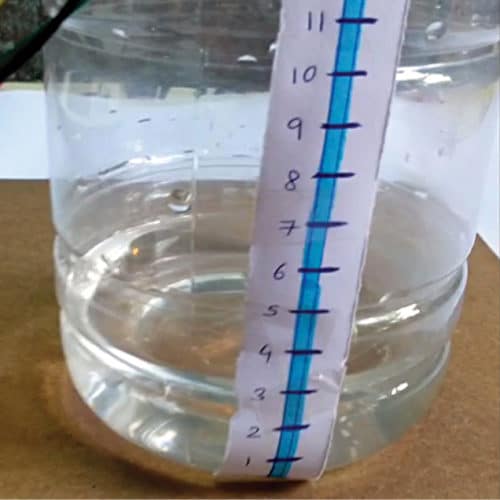
Water Level Monitoring and Control Projects
- Simple Overflow Stopper For Water Tanks
- Stop Tank Overflow With Wireless Water Level Indicator and Controller
- Water Level Indicator Circuit (LED based)
- Water Level Indicator using 7-Segment Display
- Water Tank Overflow Indicator
- Wireless Water Level Monitoring and Pump Control System
- Automatic Water Pump Controller
- Smart Water Meter To Help Control Water Wastage
- Water Level Detection and Alert System Using Arduino
Loading form…


How the Program will be install in the Aurdino; we required the software
First, download Arduino IDE from the link https://www.arduino.cc/en/software. Install it in your system. Download the code from the Arduino source code link given in the article above. Run Arduino IDE, open Arduino_code.ino, compile/verify it and upload it to Arduino board.
while trying to connect arduino with matlab .matlab shows like… Error while evaluating UIControl Callback.How can i rectify this
when i try to connect matlab with arduino its show error like…(error while call back UI control) how can i rectify this
May be your are using another MATLAB version. You may try R2104a and see if its giving same error