





This project consists of a compact computer, a USB Wi-Fi adapter and an AI model that detect poor connectivity, crowded channels and network improvements.
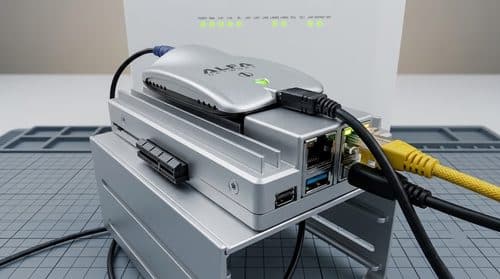
Every house has a corner where the Wi-Fi signal becomes weak or drops out. Roni Bandini’s JEV Wi-Fi Analyser is a DIY project that helps identify these areas by scanning nearby wireless networks and assessing signal strength, channel congestion and possible fixes. It uses a small computer to collect network data and an online AI model to interpret the results.

The project is built around a ZimaBoard 2 single-board computer paired with an Alfa AWUS036H USB WiFi adapter. Wireless scanning and data gathering are performed by Python, whereas the decision process carried out on the collected data is performed by a web-based decision model named Jev by Typesafe. The decision model generates numerical outputs and pre-defined recommendations rather than verbose outputs.
The hardware configuration includes the: ZimaBoard 2, Alfa AWUS036H USB WiFi adapter, a 16 GB USB flash disk, HDMI monitor, USB keyboard, and an Ethernet cable. The monitor, keyboard and Ethernet connection are mainly required during initial setup. Also, an OpenRouter account and API key are required for accessing the Jev model. A full hardware price is not specified within the project; the final cost will depend on the component costs and API fees.
Python and the Scapy packet library handle the actual wireless measurements. Jev considers three factors on the basis of the collected data and they are signal coverage, channel congestion, and the course of action that should be followed. Signal coverage varies from dead zone to excellent whereas channel congestion is classified as low, moderate, high, and critical. Actions that could be taken include taking no action, modifying power transmission, switching to another channel and adding hardware. This is to assist the user in diagnosing network issues.
Building the analyser involves these processes: Users need to download an image of Ubuntu Desktop and use the Balena Etcher to load it on a USB drive. Then, the USB drive will be plugged to the ZimaBoard 2 together with a monitor, keyboard, and Ethernet cable. After booting the board and choosing the USB drive from its boot menu, users can install Ubuntu.
The software installation involves installing the required Python modules of Scapy and http requests. Users will be needed to plug in the Alfa WiFi adapter and ensure that it is recognised by the system through the commands like ip link, iw dev, and lsusb. Then, the adapter will be put into the monitoring mode for capturing wireless communication. OpenRouter API key will be inserted into scan.py for communicating with the Jev model via ~typesafe/jev-latest.
The analyser can be run using the terminal command, which indicates the wireless channels and duration of the scanning session, as well as the observation period. The default example runs a scan for channels 1 to 13, with one second on each channel within 30 seconds total. The results are stored in JSON format inside the folder called surveyExports.
The terminal dashboard provides details like the current channel, frames per second, access points that have been found, average signal strength, and clients. The three machine learning assessments are shown on the dashboard, and the cost of using the models is monitored. More access point analyses are provided in the exported files. According to the project documentation, Python handles the actual measurements and data aggregation, while the AI model interprets the collected information.
The complete source code, README and setup instructions are available in Roni Bandini’s GitHub repository under the GPL-3.0 licence. Users can modify the scanning interface, select different Jev models and change the export directory through command-line options.
Nevertheless, there are certain drawbacks associated with this version. First of all, it works only at 2.4 GHz and scans the channels one by one instead of checking all of them at once. Thus, short pulses of activity might be overlooked if the adapter is tuned to another channel. Signal strength is also measured only at the analysis location, so a single reading cannot represent coverage throughout an entire house. The project is not intended to replace a professional spectrum analyser.
For homes, hostels and apartment buildings where several routers share the same wireless channels, the project offers a way to examine local network conditions. Users can carry the analyser between rooms and compare signal measurements to identify weaker areas. However, building it requires Ubuntu installation, Python configuration and command-line operations, making it more suitable for users with some Linux and networking experience.
For more information, click here.
