




A free Arduino library turns a Raspberry Pi Pico 2 W or ESP32-S3 development board into a USB network adapter.
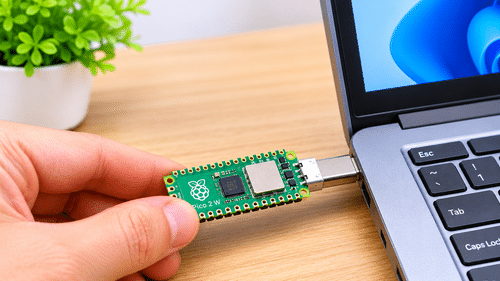
A Raspberry Pi Pico 2 W or ESP32-S3 development board can be converted into a USB Wi-Fi adapter using TinyWifiDongle, a free Arduino library developed by Phil Schatzmann. Once programmed and connected to a laptop’s USB port, the board appears as a network adapter and connects the computer to a wireless network. The project offers a workaround for laptops with faulty internal Wi-Fi hardware, without requiring users to open the machine or install a dedicated wireless card.

The library makes use of the USB CDC-NCM network protocol for transporting network packets from the laptop to the Wi-Fi interface of the board. The router directly allocates an IP address to the laptop as would have been done for a normal wireless adapter. The project can be done using the Raspberry Pi Pico 2 W board that utilizes the RP2350 microcontroller and ESP32-S3 boards with USB-OTG capability. Other boards such as the regular ESP32, ESP32-C3, ESP32-C6 and Pico board without Wi-Fi capabilities are not compatible.
This setup needs the board to be suitable along with a USB data cable, the Arduino IDE, and the TinyWifiDongle library, which has an open-source license from MIT. The user downloads and sets the required board support package, USB configurations, and uploads an Arduino sketch with network credentials. The library also gives an alternative set up through a browser: the board establishes a temporary Wi-Fi network that users can access using their smartphone or another computer and provide network credentials for their home network. The set up has been tried successfully on Pico 2 W, but not yet on ESP32-S3.
The performance is constrained by the USB full-speed connection used by the boards and theoretically allows for transferring data at up to 12Mbps. According to the test performed by the developer, the ESP32-S3 managed to transfer data at a speed of 530–615 KB/s while the Pico 2 W worked at an average speed of 250KB/s (110 to 325KB/s). The speed of the inbuilt Wi-Fi on the computer was 1.5–3.8 MB/s.
The project still has some reliability limitations. On the ESP32-S3, the developer reports occasional USB stalls during large transfers, linked to a race condition in the Arduino core’s TinyUSB implementation. A watchdog restarts the connection, requiring the laptop to reconnect. The Pico 2 W has also experienced an unexplained reboot during extended downloading, along with occasional dropped frames. These issues make the project a developing alternative rather than a direct replacement for a conventional Wi-Fi adapter.
The library can be found in GitHub under the MIT licence, along with installation instructions, sample sketches, and notes. It is possible to change the firmware by putting the development board in bootloader mode and uploading a new sketch. Even though it is necessary to have knowledge of how to work with Arduino and configure USB, this project shows that it is possible to use cheap microcontrollers as external network adapters when laptop wireless hardware breaks down.
For more information, click here.