




An open-source Raspberry Pi project uses RFID cards to launch games and educational apps, giving children a simpler way to use a computer without navigating a conventional desktop.
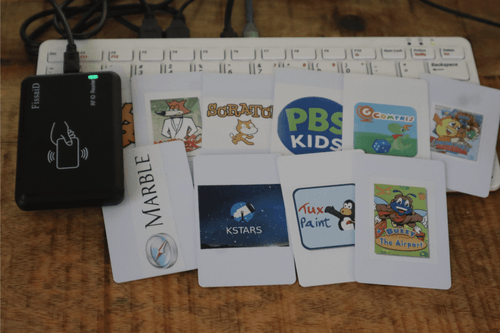
A child taps an RFID card against a reader, and a game or educational application launches on the screen. Tapping another card opens a different application, without requiring the child to navigate menus, search for software or use a conventional desktop. This is the idea behind ChipBit, an open-source project that turns a Raspberry Pi into a computer designed for young children.
Each RFID card is associated with a particular application, while a separate administrator card provides access to the parent interface for managing the available software.
The project draws inspiration from cartridge-based gaming consoles, replacing physical game cartridges with RFID cards. Children can select an application by tapping its assigned card, while parents control which applications are available.
The recommended hardware includes a Raspberry Pi 400 or Raspberry Pi 500, although a Raspberry Pi 4 or 5 with a separate keyboard can also be used. The system requires a microSD card, monitor, HDMI cable, USB mouse and a USB human interface device (HID) RFID reader operating at 13.56MHz and compatible with MIFARE cards. The reader must output each card’s unique identifier (UID) as hexadecimal characters followed by the Enter key. The developer used a Fissaid reader configured to provide this behaviour.
ChipBit does not need to write information to the RFID cards. Instead, it reads their factory-programmed UIDs and matches them to applications stored in a catalogue. This means compatible cards and NFC tags can be assigned to different applications without additional programming hardware.
When a card is presented, the reader sends its UID to the Raspberry Pi as keyboard input. A Python program listens for the input, checks the UID against catalog.yaml and launches the associated application. The graphical interface runs through Cage, a kiosk compositor that displays applications in full-screen mode rather than exposing a conventional desktop. The operating system is built using CustomPiOS and Raspberry Pi’s pi-gen image-building system.
Installation begins by downloading the available ChipBit system image from the project’s GitHub Releases page and writing it to a microSD card using Raspberry Pi Imager or dd. The developer advises against using Raspberry Pi Imager’s operating-system customisation options because ChipBit handles initial configuration during its first boot.
After connecting the reader, mouse and monitor, users boot the Raspberry Pi and follow the setup process to configure the language and Wi-Fi. The documented language options are English, German, French and Spanish. Wi-Fi is optional for basic operation but is required when applications need to download additional components or content.
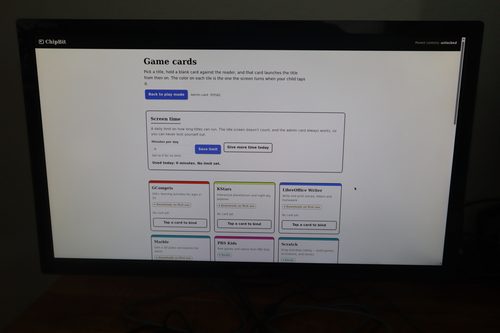
The first RFID card presented during setup can be assigned as the administrator card. Keeping it secure prevents children from accessing the parent interface. Presenting this card allows parents to open the management console through a browser using the Raspberry Pi’s IP address and port 8080. To assign an application, they select it in the console and choose the option to bind a new card. Presenting that card within the specified time links its UID to the selected application. A dedicated Home card returns the system to its idle screen.
The system comes with GCompris, a collection of educational activities for children, and Tux Paint, a drawing application. Other supported applications include Marble, a virtual globe; KStars, a planetarium; SuperTux; SuperTuxKart; and LibreOffice Writer. Scratch and PBS Kids can be accessed through a browser restricted to an allowlist of websites.
ChipBit also includes ScummVM for running supported classic point-and-click adventure games and Ruffle for compatible Flash content. These are software engines rather than game collections, so users must supply their own legally obtained game files. The project does not bundle commercial games with the system.
The GitHub repository contains the source code, card-reading software and image-building scripts. However, the developer has not published measured boot times, application-launch latency or other performance benchmarks.
The system has some limitations. Its kiosk interface does not provide a conventional desktop or an on-screen route to exit into one. Administration outside the kiosk environment requires remote access, such as SSH. The RFID reader must also be configured to output UIDs in the expected format; readers that output decimal values may require reconfiguration. Flash applications that depend on additional files being loaded dynamically may not work with the project’s current implementation.
For Indian families, makers and schools, ChipBit offers a way to build a controlled computing environment using a Raspberry Pi and readily available RFID hardware. Its educational applications provide drawing, science and learning activities without requiring separate software purchases for the included programmes. The current interface supports four languages but not Hindi or other Indian languages, creating an opportunity for contributors to expand its accessibility. Its card-based interface could also inspire educational computing systems in which children can independently select approved applications without navigating the open internet.
For more information, click here.