





A low-cost microcontroller board becomes a configurable audio processor for speaker correction, multi-way crossovers and subwoofer integration.
A Raspberry Pi Pico can become a configurable digital audio processor with the DSPi firmware, an open-source project that adds USB audio, equalisation, speaker crossovers and time alignment to the inexpensive microcontroller board. The firmware supports the original Pico, based on the RP2040, and the newer Pico 2, based on the RP2350, allowing users to build audio processing systems around external digital-to-analogue converters (DACs) and amplifiers.

Developed by WeebLabs, DSPi is released under the GNU General Public License version 3.0. It is intended for audio enthusiasts who want to experiment with digital signal processing (DSP) without buying a dedicated commercial processor. However, the firmware is only one part of the system: users still need suitable audio hardware, wiring and an amplifier or powered speakers to produce sound.
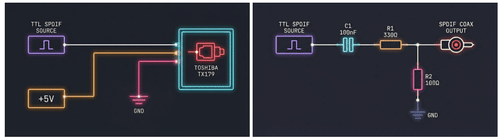
The firmware presents the Pico as a USB audio device to a connected computer or compatible host. It supports 16-bit and 24-bit PCM audio at sampling rates of 44.1kHz, 48kHz and 96kHz. It can also accept stereo digital audio through an S/PDIF input when the appropriate receiver circuit is added. The processed signal can then be routed to digital S/PDIF or I²S outputs, depending on the selected configuration and connected hardware.
The principal difference between the two supported microcontrollers is their processing capacity. Both platforms run at a configured system clock of 307.2MHz, but the RP2040 uses fixed-point arithmetic while the RP2350 uses single-precision floating-point calculations through its hardware floating-point unit. DSPi’s documentation lists up to seven processing channels for the RP2040 platform and 11 for the RP2350 platform. The latter supports four independent stereo output slots, compared with two on the original Pico. A dedicated pulse-density modulation (PDM) output is also available for a subwoofer signal, subject to the firmware’s resource constraints.
These outputs can be used to build a multi-way speaker system, in which separate signals feed different drivers, such as woofers, midrange drivers and tweeters. DSPi supports up to 10 parametric equalisation bands per channel, allowing users to adjust frequency response, while its crossover filters divide audio into frequency ranges for different drivers. Available crossover types include Linkwitz–Riley, Butterworth and Bessel filters, with orders up to eighth order. Each output can also have its own gain, mute setting and delay of up to 85 milliseconds. These controls help users adjust relative levels and timing when integrating multiple speakers or a subwoofer.
Other processing functions include a volume leveller that raises quieter passages towards a target level, loudness compensation based on the ISO 226:2003 equal-loudness contours, and headphone crossfeed. The latter mixes a filtered portion of each stereo channel into the other to reduce the exaggerated left-right separation sometimes perceived when listening through headphones. Users can save up to 10 DSP configurations as presets, making it easier to switch between listening setups.
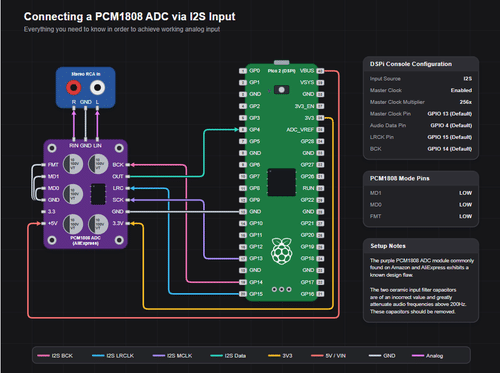
Building the hardware requires more than connecting a Pico to a speaker. For analogue output, users can connect an I²S-compatible DAC module, such as one based on the PCM5102, to the appropriate data and clock signals. The DAC’s analogue output must then feed an amplifier or powered speaker. S/PDIF output requires an optical transmitter or a suitable electrical output circuit. The dedicated PDM subwoofer signal also needs an appropriate low-pass conversion circuit before it can be used as an analogue signal. DSPi documents a PCM1808-based I2S input configuration for the Pico 2, enabling analogue audio input when the required converter and connections are provided.
To install the firmware, users download the appropriate UF2 file for their board, hold the BOOTSEL button while connecting the Pico to a computer, and copy the file to the removable drive that appears. Once the board restarts, it should enumerate as a DSPi USB audio device. A companion application, DSPi Console, provides controls for configuring equalisation, crossovers, routing, output levels and other processing parameters without reflashing the firmware for each adjustment. Users should match the Console version to the firmware version, as the two share a control protocol that changes between releases.
For room correction, users can measure their speaker system and listening space with suitable measurement equipment and software such as Room EQ Wizard, then apply appropriate filters in DSPi. This process requires measurement and adjustment; the firmware does not automatically measure a room or guarantee a particular frequency response.
DSPi’s documentation provides the wiring assignments, build instructions and configuration details needed to adapt the project to different audio setups. The RP2350-based Pico 2 is the more capable option for multi-output systems, although the original Pico remains useful for simpler configurations. Actual sound quality depends on the converter, analogue circuitry, amplifier, speakers and implementation. The project documentation does not establish a universal measured distortion or noise performance for every possible build.
For more information, click here.