




Flux EDA puts PCB design, AI, collaboration, and manufacturing tools in one place. But can it really simplify the entire hardware design process?
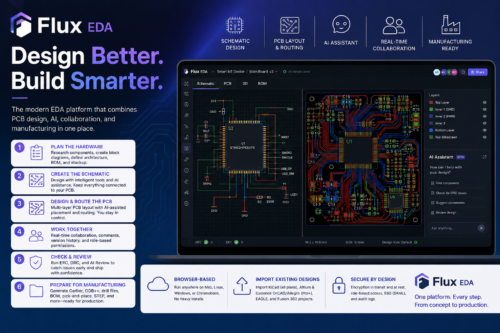
Electronic design automation (EDA) software helps engineers design, test, and prepare electronic hardware for manufacturing. Flux brings these tasks into a browser-based design environment, covering schematic design, component research, printed circuit board (PCB) layout, simulation, design-rule checking, collaboration, and manufacturing preparation. “Designed and manufactured the entire product in Flux, taking it from concept to production without external electrical engineering help,” said one user.
The platform keeps the schematic, multi-layer PCB layout, constraints, bill of materials (BOM), reviews, and manufacturing outputs connected within the same project. This reduces the need to move files and design information between separate tools. Flux also includes an artificial intelligence (AI) hardware assistant that can support the design process while keeping design decisions editable and reviewable. For PCB-focused workflows, Flux provides dedicated tools for PCB design and schematic capture.
What Can You Do With Flux EDA?
Flux brings hardware planning, schematic design, PCB layout, validation, and manufacturing preparation into one EDA environment. AI can help with tasks such as component research and design work, while engineers remain in control of requirements, architecture, component selection, design constraints, critical routing, and final manufacturing release.
1. Plan the Hardware
Hardware development can start with product requirements, an existing reference design, or a plain-language description of the project. Flux can help research components, organise functional blocks, outline an initial architecture, create a preliminary BOM, and suggest a PCB stackup for review.
This helps engineers move from early requirements to schematic design without switching between separate tools.
2. Create the Schematic
Flux lets engineers create and edit circuit schematics using components, symbols, footprints, and reusable design blocks. AI can assist with component research, supporting circuits, missing library assets, and electrical-rule checks.
Engineers can review and edit these suggestions before using them. The schematic also stays connected to the PCB layout within the same project.
3. Design and Route the PCB
Once the schematic is ready, engineers can move it into a multi-layer PCB layout without recreating the design in another tool. They can define the board shape, place components, set net classes and clearances, and route critical connections.
AI can assist with component placement and routing tasks, while engineers can review differential pairs, spacing, ground connections, component placement, and other design constraints before release.
4. Work on the Same Design Together
Flux allows multiple engineers to work on the same schematic and PCB layout at the same time. Changes are synchronised within the shared project, while version history tracks edits.
Comments can be linked to specific parts of the design, and role-based permissions can control access. This allows engineering, sourcing, and manufacturing teams to review the same design information instead of exchanging separate project files.
5. Check and Review the Design
Flux includes automated electrical rule checking (ERC) and design rule checking (DRC). These checks can identify issues such as overlapping copper, floating traces, clearance problems, and ground-fill issues.
Engineers can select a violation and move directly to the affected part of the design. AI Review can provide another layer of design checking before the project is released for manufacturing.
6. Prepare for Manufacturing
Before manufacturing, engineers can review the schematic and PCB layout, resolve design-rule issues, and check component and footprint information.
Flux can generate files needed for PCB fabrication, assembly, and mechanical handoff. These include Gerber X2, ODB++, IPC-2581, Excellon drill files, IPC-356A netlists, BOM comma-separated value (CSV) files, pick-and-place files, STEP files, DXF, and schematic and assembly portable document format files (PDFs).
The BOM, PCB layout, manufacturing files, and approved design revision remain part of the same project, keeping the hardware design and manufacturing data connected.
Other Features of Flux EDA
Flux also includes features that support existing designs, browser-based collaboration, and project security.
- Import Existing EDA Designs
Flux can be used with existing PCB designs. KiCad projects can be imported across plans, while Altium and Cadence OrCAD/Allegro imports are available with Pro and higher plans. EAGLE and Fusion 360 projects can also be imported. Schematic data, parts, and footprints can be imported, although layout imports have some limitations. - Use EDA in a Browser
Flux runs in a web browser and works on Mac, Linux, Chromebook, and Windows systems with modern browsers. Teams do not need to maintain a specific desktop operating system. Since projects are accessed online, contributors can work on the same design instead of maintaining separate local copies. - Security and Access Control
Flux keeps projects private by default and encrypts data both in transit and at rest. The platform is Service Organisation Control (SOC) 2 Type II compliant. Enterprise features include hidden workspaces, single sign-on, audit logs, and annual third-party security reviews. Private projects are not used to train the AI.
Together, these features allow teams to bring existing designs into Flux, work on them through a browser, and manage project access and security from the same platform. A user review of Flux notes: “I actually think it’s pretty good. It has most of what I need for projects ranging from simple to medium degree of complexity. There’s some rough edges here and there but for the most part I think it’s great.”
What’s New?
Flux has added several capabilities in its recent updates that extend what its AI can do across the PCB design workflow. The May 2026 update introduced a more steerable AI hardware agent, while the April 2026 update added Flux Files for managing project assets. Together, these updates move Flux beyond AI-assisted schematic work toward a more complete AI-driven PCB design workflow.
One of the key changes is automated PCB component placement. Earlier versions of Flux could help create schematics, research components, and suggest circuit connections, but placing components on the physical PCB remained a manual task. The newer workflow allows the AI to place components on the board after completing the schematic, reducing one of the more time-consuming parts of PCB layout.
The AI workflow is also more interactive. Earlier Flux Copilot interactions were largely based on individual prompts and responses. The updated hardware agent allows users to steer the AI while it is working, make corrections and change the direction of a task without starting over. This supports a more continuous workflow from an initial idea and schematic through to component placement and board layout. “It evaluates progress after each step and course-corrects along the way,” added another user.
Another change is Flux Files, which brings project documentation and other assets into the browser-based workspace. Earlier, users could need separate methods to manage generated content, documentation, and design assets. Flux Files provides a central place for these resources, keeping them connected to the project.
These changes mark a shift in Flux from an AI assistant that helps with individual EDA tasks to a system that can handle more of the PCB design process, including schematic creation, component selection, placement and layout.
How to Start and Use the Flux EDA Free Trial
To start the 14-day free trial of Flux EDA, visit the official Flux website, click Start Free Trial or Sign Up, and create an account using an email address, Google, or GitHub. After selecting a paid tier, such as Explore or Build, the trial provides access to features that are otherwise available through paid plans. Since Flux is browser-based, no software installation is required.
During the trial, users can test the AI-assisted hardware design workflow and use features such as Flux Copilot for creating block diagrams and schematics, finding alternative components, and assisting with PCB layout. The trial can also include up to 500 AI credits for testing AI features. Users can create private workspaces for proprietary designs and export manufacturing files such as Gerber files, drill files, BOMs, and pick-and-place data.
The trial also allows users to work on multi-layer PCB designs of up to eight layers, with features such as design-rule checking and routing. Existing designs can be imported from supported EDA tools. This gives users 14 days to test Flux’s design, AI, collaboration, and manufacturing features before deciding whether to continue with a paid plan.
Flux EDA brings schematic design, PCB layout, AI assistance, collaboration, design checks, and manufacturing preparation into one browser-based platform. Its recent updates also expand the role of AI from assisting with individual tasks to supporting more of the PCB design workflow, including component placement and layout. While the platform may have some limitations for complex designs, its connected workflow and collaborative features can make it useful for engineers and teams working on simple to medium-complexity hardware projects. The 14-day free trial provides a way to test these features and decide whether Flux fits a particular design workflow.
| Software | Free access | Platform | What you get for free |
| Flux | Free account after a 14-day trial | Browser-based | Access to public projects and the Flux community. Editing private projects, exporting designs and AI features require a paid plan. |
| Altium Designer | Free trial; no permanent free version | Windows | Full Altium Designer access during the trial. A paid subscription is required after the trial. |
| KiCad 10 | Free and open source | Windows, macOS, Linux | Schematic capture, PCB layout, simulation, 3D viewing and manufacturing outputs without a paid license. |
| Fusion for personal use | Free for qualifying non-commercial users | Desktop + cloud | Limited electronics and PCB design, including schematics and PCB layout. The free version is limited to two schematic sheets, two signal layers and an 80 cm² board area. |
| How Flux Fits Into the EDA Workflow EDA is a broad category that includes software for schematic capture, component management, circuit simulation, PCB design, design verification, and manufacturing preparation. PCB design software is one part of this larger category. Flux focuses on the PCB-level workflow, connecting schematic capture, component research, PCB layout, routing, simulation, design checks, collaboration, BOM management, and manufacturing preparation in one project. It does not handle integrated circuit (IC) or semiconductor design, which remains the focus of tools such as Cadence Virtuoso, Synopsys, and Siemens EDA. Flux instead focuses on connecting the different stages of PCB development while adding AI assistance to the workflow. |