





This Wi-Fi-enabled smart dictionary uses an ESP8266 NodeMCU to retrieve word meanings, synonyms, and antonyms from online APIs in real time. The project uses the Arduino IDE, Wi-Fi, HTTP requests, and ArduinoJson to turn a low-cost ESP8266 into an internet-connected vocabulary tool.
Imagine a pocket-sized dictionary that never runs out of words. Instead of storing thousands of definitions in memory, this ESP8266-based smart dictionary connects to the internet and retrieves meanings, synonyms, and antonyms in real time. Besides helping users improve their vocabulary, it demonstrates how embedded systems can communicate with cloud services, making it an ideal project for learning IoT, web APIs, and JSON data processing.
The Wi-Fi Enabled Smart Dictionary System is an IoT-based educational project developed using an ESP8266 NodeMCU module. provides an intelligent and efficient method for retrieving meanings, synonyms, and antonyms using internet connectivity. The project successfully combines IOT technology, cloud-based APIs, and embedded programming to create a useful educational tool. Its simple interface, low hardware requirements, and real-time functionality make it an excellent learning and demonstration project for students and electronics enthusiasts.

The system enables a user to obtain the meaning, synonyms, and antonyms of any English word through an internet connection. Unlike conventional electronic dictionaries that require large memory storage, this project uses online APIs to retrieve real-time data from the internet. The user simply enters a word in the Arduino Serial Monitor, and the ESP8266 fetches the requested information from online dictionary servers. The project demonstrates how IoT devices can interact with web-based APIs and process JSON data for educational applications.
With minimal hardware requirements and real-time operation, it serves as an excellent hands-on project for students, makers, and electronics enthusiasts who want to explore IoT applications beyond conventional sensor-based projects.

Principle of operation
The working principle of the project is based on:
- User input acquisition
- Wi-Fi communication
- HTTP/HTTPS request generation
- API response handling
- JSON data parsing
- Output display on Serial Monitor
The system continuously waits for user input through the Serial Monitor. Depending on the symbol entered with the word, the ESP8266 determines whether the user wants:
- Meaning
- Synonym
- Antonym
The corresponding API request is then generated and sent through the internet.
The user can control the type of output using simple keyboard symbols:
- No symbol → Meaning
- ‘#’ symbol → Synonyms
- ‘*’ symbol → Antonyms
The system connects to a Wi-Fi network and fetches real-time linguistic data from online dictionary APIs and the Datamuse API. This eliminates the need for offline dictionary memory storage and enables dynamic language learning support. The project is cost-effective, portable, and suitable for educational and learning environments.
The project uses a simple symbol-based command system:
| User Input | Function |
|---|---|
| Happy | Meaning |
| happy# | Synonym |
| Happy* | Antonym |
This eliminates the need for external push buttons and makes the system easier to use directly from a laptop or computer.
NOTE: The word happy is used here as an example.
System overview
The project mainly consists of:
- ESP8266 NodeMCU module
- Wi-Fi network connection
- Arduino IDE software
- Online dictionary APIs
- Serial Monitor interface
The ESP8266 acts as the central controller. It connects to a Wi-Fi network and communicates with online servers using HTTP and HTTPS protocols. When the system starts, the ESP8266 connects to the specified Wi-Fi network using the SSID and password provided in the program.
The following libraries are used for connectivity:
- ESP8266WiFi.h
- WiFiClientSecure.h
- ESP8266HTTPClient.h
During connection, dots appear on the Serial Monitor until Wi-Fi is successfully connected.
Example: Connecting WiFi……
After successful connection: WiFi Connected
The IP address assigned by the router can also be displayed if required.
Meaning retrieval process
If the user enters a word without any special symbol, the system interprets the request as a meaning search.
Example: computer
The ESP8266 generates an HTTPS request using the Dictionary API: https://api.dictionaryapi.dev/api/v2/entries/en/computer
The server returns data in JSON format containing:
- Word
- Meaning
- Pronunciation
- Grammar information
The ArduinoJson library parses the JSON response and extracts only the required definition. The extracted meaning is then displayed on the Serial Monitor. Example Output: Word: computer Meaning: An electronic device used for processing data.
Synonym retrieval process
If the user in the Serial Monitor types the ‘#’ symbol after the word: happy i.e. happy# and then Press Enter:-
The system identifies the request as a synonym search. The ESP8266 sends an HTTP request to the Datamuse API. The API returns a JSON array containing related synonym words. The ESP8266 parses the response and displays multiple synonyms.
Example Output: SYNONYMS: joyful cheerful glad pleased
Antonym retrieval process
If the user in the Serial Monitor types the ‘* ‘symbol after the word: happy, i.e. happy* and then press Enter:-
The ESP8266 recognises it as an antonym request. The following API request is generated: https://api.datamuse.com/words?rel_ant=happy. The Datamuse server returns opposite words in JSON format. After JSON parsing, the antonyms are displayed.
Example Output: ANTONYMS: sad unhappy depressed
JSON parsing
The APIs return data in JSON format. Since raw JSON is difficult to understand directly, the ArduinoJson library is used to decode and extract meaningful data.
The parsing process involves:
- Receiving JSON string
- Deserialising JSON document
- Accessing required fields
- Displaying clean output
This enables the ESP8266 to display only useful information instead of the raw JSON response.
Role of APIs in the project
Here, two APIs are used:
Dictionary API
Used for:
- Word meanings
- Definitions
- Vocabulary information
Datamuse API
Used for:
- Synonyms
- Antonyms
- Related words
Using APIs removes the need for storing large dictionaries inside the ESP8266 memory.
Code
//Rakesh Jain Program FOR Wi-Fi Enabled Smart Dictionary System
#include <ESP8266WiFi.h>
#include <WiFiClientSecure.h>
#include <ESP8266HTTPClient.h>
#include <ArduinoJson.h>
const char* ssid = "AndroidShare_H8";
const char* password = "95428748";
String input;
void setup()
{
  Serial.begin(115200);
  WiFi.begin(ssid, password);
  Serial.print("Connecting WiFi");
  while (WiFi.status() != WL_CONNECTED)
  {
    delay(500);
    Serial.print(".");
  }
  Serial.println("\nWiFi Connected");
  Serial.println("Format:");
  Serial.println("word   → Meaning");
  Serial.println("word#  → Synonym");
  Serial.println("word*  → Antonym");
  Serial.println("----------------------");
}
void loop()
{
  if (Serial.available())
  {
    input = Serial.readStringUntil('\n');
    input.trim();
    char mode = input.charAt(input.length() - 1);
    String word = input;
    if (mode == '#' || mode == '*')
    {
      word = input.substring(0, input.length() - 1);
    }
    if (mode == '#')
    {
      getSynonym(word);
    }
    else if (mode == '*')
    {
      getAntonym(word);
    }
    else
    {
      getMeaning(word);
    }
    Serial.println("\nEnter next word:");
  }
}
// ---------------- MEANING ----------------
void getMeaning(String w)
{
  WiFiClientSecure client;
  client.setInsecure();
  HTTPClient http;
  String url = "https://api.dictionaryapi.dev/api/v2/entries/en/" + w;
  http.begin(client, url);
  int code = http.GET();
  if (code > 0)
  {
    String payload = http.getString();
    DynamicJsonDocument doc(8192);
    deserializeJson(doc, payload);
    const char* meaning =
      doc[0]["meanings"][0]["definitions"][0]["definition"];
    Serial.println("\n--- MEANING ---");
    Serial.println(meaning);
  }
  http.end();
}
// ---------------- SYNONYM ----------------
void getSynonym(String w)
{
  WiFiClient client;
  HTTPClient http;
  String url = "http://api.datamuse.com/words?rel_syn=" + w;
  http.begin(client, url);
  int code = http.GET();
  if (code > 0)
  {
    String payload = http.getString();

    DynamicJsonDocument doc(4096);
    deserializeJson(doc, payload);
    Serial.println("\n--- SYNONYMS ---");
    for (int i = 0; i < 5 && i < doc.size(); i++)
    {
      Serial.println((const char*)doc[i]["word"]);
    }
  }
  http.end();
}
// ---------------- ANTONYM ----------------
void getAntonym(String w)
{
  WiFiClient client;
  HTTPClient http;
  String url = "http://api.datamuse.com/words?rel_ant=" + w;
  http.begin(client, url);
  int code = http.GET();
  if (code > 0)
  {
    String payload = http.getString();
    DynamicJsonDocument doc(4096);
    deserializeJson(doc, payload);
    Serial.println("\n--- ANTONYMS ---");
    for (int i = 0; i < 5 && i < doc.size(); i++)
    {
      Serial.println((const char*)doc[i]["word"]);
    }
  }
  http.end();
}
Example Output:
1.Type the word clean in the  serial monitor and press enter key. This will give you the meaning of the word ‘clean’ as the result:-

--- MEANING ---

Removal of dirt.

Enter next word:

2.Type the word clean# in serial monitor and press enter key will give you synonyms result:-

--- SYNONYMS ---

light

adroit

clear

just

complete

Enter next word:

3.Type the word clean* in serial monitor and press enter key will give you antonyms result:-

--- ANTONYMS ---

dirty

soil

soiled

colly

bemire

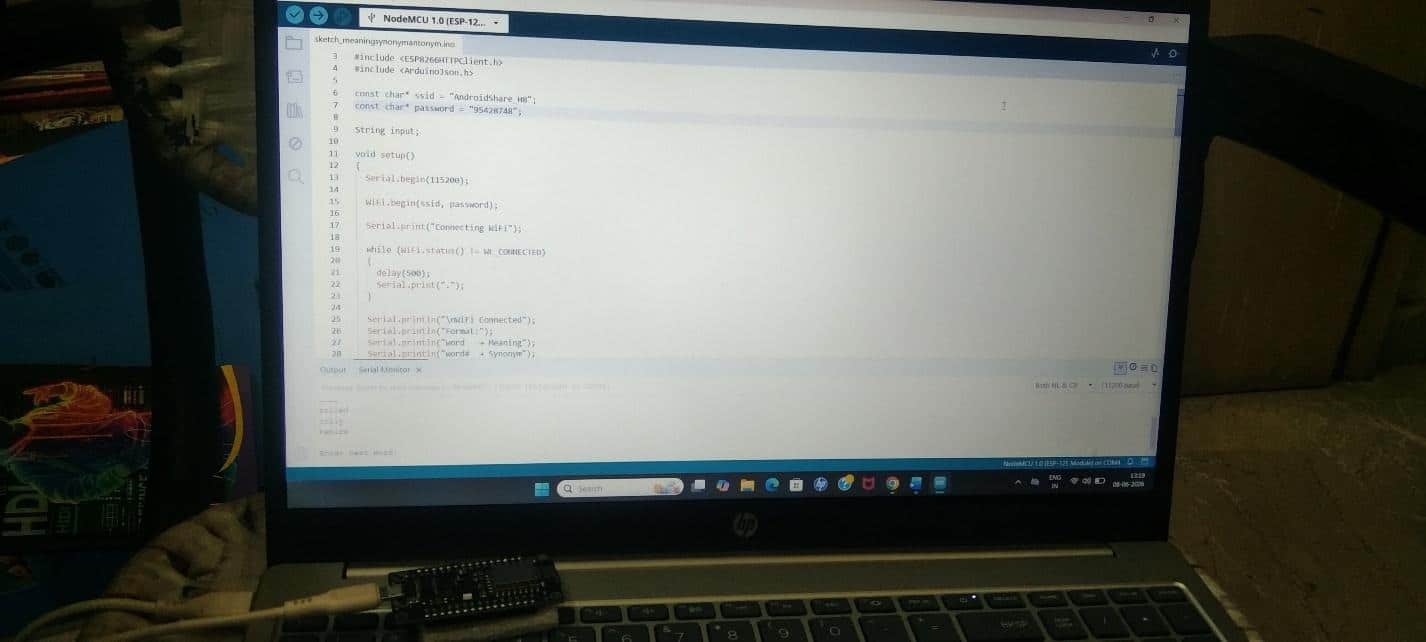
Enter next word:
Prototype
Advantages of the Wi-Fi Enabled Smart Dictionary project
- Simple and low-cost design
- Real-time internet-based dictionary
- No external memory requirement
- Supports multiple vocabulary functions
- Easy serial-based operation
- Demonstrates practical IoT concepts
- Useful for students and language learners
Limitations
- Requires internet connection
- Depends on online API availability
- Serial Monitor interface is basic
- Limited by ESP8266 module’s memory capacity
Educational importance
This project can help students understand:
- IoT communication
- ESP8266 programming
- API handling
- JSON parsing
- Wi-Fi networking
- Real-time cloud communication