





We previously developed a time-lapse photography system based on the MaixCam platform, which performed remarkably well in terms of functionality and features. However, one significant limitation remained—its inability to sustain prolonged operation on battery power.
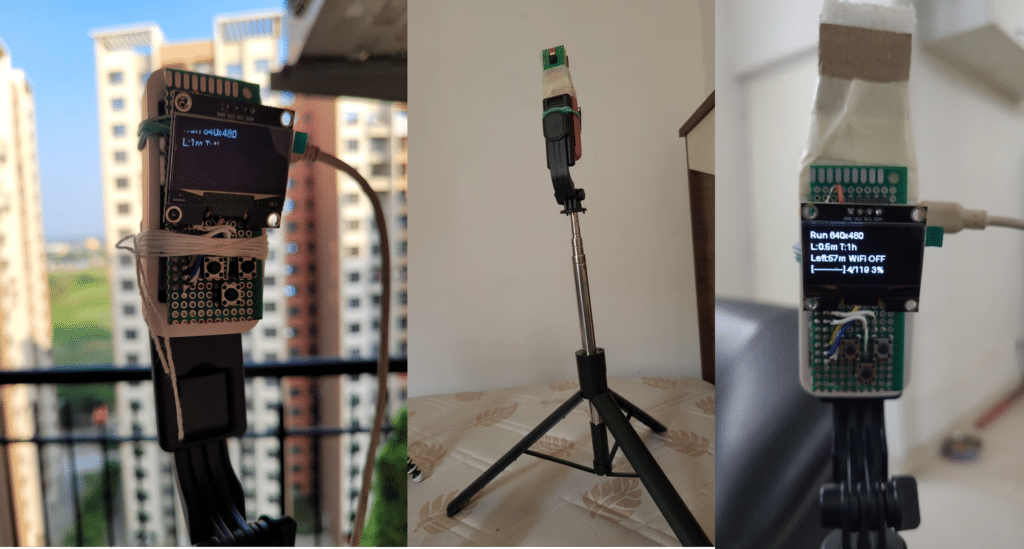
To address this drawback, we present a modified version of the time-lapse camera built on the Raspberry Pi Zero 2 W platform. This version offers extended battery operation of up to 10–12 hours on a single 18650 Li-ion cell, making it highly suitable for real-world time-lapse applications. Mounted on an inexpensive yet sturdy selfie tripod, the setup is both practical and aesthetically pleasing. The total cost of the project is ₹ 2500.
For reference, the earlier MaixCam-based project can be accessed here:
Advantage of Pi_Zero Timelapse over MaixCam Timelapse
The Sipeed MaixCam is undoubtedly a powerful platform. It features a 1 GHz RISC-V/ARM A53 processor, a secondary 700 MHz core, a 1 TOPS NPU for AI acceleration, 256 MB DDR3 RAM, a built-in TFT touchscreen, microphone input, SD card support, a 5 MP camera, and Wi-Fi connectivity. Priced at approximately INR 7314 [robu.in], it is well-suited for AI and vision-based applications.
In comparison, the Raspberry Pi Zero 2 W offers a 1 GHz quad-core processor, 512 MB RAM, built-in Wi-Fi, and the flexibility of a full Linux operating system—all at a significantly lower cost of around INR 1730. Adding a Raspberry Pi 5M Camera Module (approximately INR 340) completes the setup.
Both platforms are capable of performing the intended time-lapse photography task effectively using Python-based implementations. However, the Raspberry Pi Zero stands out in two key areas:
- Cost Efficiency: Substantially lower overall system cost [INR:7314 Vs INR:2500 ]
- Power Consumption: More suitable for extended battery-powered operation
The primary limitation of the Pi Zero setup is the absence of an integrated display, such as a TFT screen. This makes it slightly less convenient to verify camera alignment and framing during setup. Nevertheless, this drawback can be managed with careful positioning or temporary external display support during initialisation. In summary, while the MaixCam excels in performance and integrated features, the Raspberry Pi Zero offers a more economical and power-efficient alternative for long-duration time-lapse photography. This makes it particularly attractive for portable and battery-operated deployments.
Bill of Materials:
- Raspberry Pi_Zero 2W [01]
- 5M camera [01]
- Push-to-on push buttons [03], wires, jumper wires etc.
- I2C OLED [1.3” ~ 1.54”]
- Power supply [5V] – Any standard mini-USB phone power supply will be able to power the device.
Working principle & data input:
Leveraging the capabilities of the Raspberry Pi Zero 2 W, a compact and efficient time-lapse photography system has been developed. In this setup, the user can configure three key parameters using external push buttons:
- Max Time (T): Total duration for which the time-lapse session will run
- Lapse Time (L): Interval between consecutive image captures
- Start Button : Start / Pause / Shut down the device.
These parameters can be adjusted prior to starting the session through dedicated buttons. If no changes are made, the system operates using predefined default values. Once configured, pressing the START button initiates the capture process. During operation, real-time status information is displayed on the connected OLED screen, including:
- Selected lapse time and total duration [the values rotate for selection]
- Remaining time [the values rotate for selection]
- Number of images captured
- A visual progress indicator for intuitive monitoring
Unlike the earlier touchscreen-based interface, this design uses a minimal and power-efficient display, and therefore all controls are hardware-based. The displayed information is only for user reference and does not appear in the captured images. The program automatically terminates upon completion of the set duration (Max Time), after which the system re-enables Wi-Fi connectivity and displays the device IP address for user access using ssh.
Caution note



Sample video https://youtu.be/-QeasrFw5zo