

From circuit simulation to embedded firmware testing and PCB design, Proteus lets you see how hardware and code work together before building a single board.
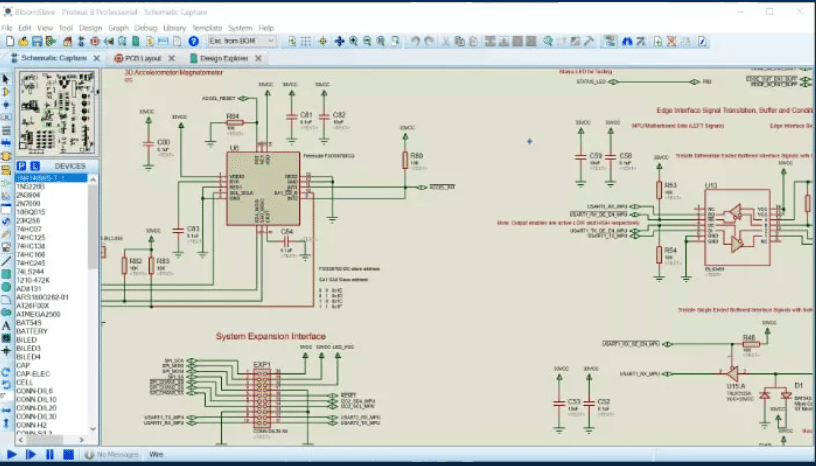
When you begin learning electronics or embedded systems, one challenge shows up early: how do you know a circuit and its firmware will actually work together before you build hardware? This is where Proteus Design Suite quietly becomes one of the most practical tools in an engineer’s toolkit.

Developed by Labcenter Electronics, Proteus is a professional Electronic Design Automation (EDA) software that allows users to design circuits, simulate behaviour, test embedded firmware, and generate manufacturable PCBs all within a single environment. Unlike tools that stop at schematic capture or PCB layout, Proteus focuses on system-level understanding.
As one engineering student noted, “Proteus helped me understand what my code was actually doing to the hardware. It felt less abstract compared to just writing firmware blindly.”
Seeing Circuits Behave Like Real Hardware
At its core, Proteus enables designers to simulate real-world circuit behaviour without building physical prototypes. Its Virtual System Modelling (VSM) engine supports analog, digital, and mixed-signal SPICE-based simulation, allowing engineers to test designs under varying conditions early in the development cycle.

This capability often translates directly into saved time and cost. A PCB designer shared, “Catching a timing issue during simulation saved me at least one board re-spin. That alone justified using Proteus.”
What truly differentiates Proteus from many other EDA tools is its microcontroller co-simulation. Engineers can write firmware for PIC, AVR, ARM, Arduino, and MicroPython platforms and run that code directly within the circuit simulation.LEDs blink, displays update, motors respond all driven by real embedded code. An embedded developer summed it up well: “Being able to run firmware and hardware together in one tool speeds up debugging massively. You see instantly whether the issue is in code or circuitry.”
For students, this integration removes the gap between theory and practice. For professionals, it provides early confidence before hardware fabrication.
Key Capabilities at a Glance
Proteus combines multiple stages of the electronics design workflow into one cohesive platform:
- Schematic Capture with hierarchical design support
- Mixed-Mode Simulation for analog, digital, and hybrid circuits
- Microcontroller Co-Simulation (VSM) with live firmware execution
- PCB Layout and Routing using modern, constraint-driven tools
- 3D PCB Visualisation for enclosure and mechanical checks
- Extensive Component Libraries with online database support
A faculty member using Proteus in labs commented, “Students learn faster because they can immediately see how small design changes affect system behaviour.”
What’s New in Proteus 9.1?
The latest Proteus Design Suite 9.1 builds on the modern 64-bit architecture introduced in version 9.0 and adds AI-assisted design tools, collectively called EDAi.The most notable additions include:
- ProPilot, an AI design assistant that analyses circuits and firmware in real time, highlights potential errors, suggests improvements, and helps generate peripheral configuration code for interfaces such as I²C, SPI, ADCs, and timers.
One user remarked, “It feels like having a senior engineer review your design while you’re still working on it.” - ProTutor, a guided learning mode designed for students and self-learners. Instead of trial-and-error debugging, users receive contextual hints and step-by-step guidance during simulation and coding exercises.
Version 9.1 also improves library management with Git and Subversion integration, enhanced PCB silkscreen design rule checks, faster layout operations, and better live probing tools for simulation analysis. A long-time user observed, “Large boards that used to feel sluggish are noticeably smoother in the newer versions.”
Strengths and a Few Caveats
Across user communities, Proteus is widely praised for its tight hardware–software integration and strong educational value. Many users point out that it shortens development cycles and improves design confidence.
That said, some advanced users have noted occasional inconsistencies when simulating highly complex firmware or niche microcontrollers. As one engineer cautioned, “Proteus is excellent for validation and learning, but final hardware testing is still essential.”This balanced view reflects reality: Proteus is a powerful simulation and learning platform, not a replacement for real-world verification.
Licensing and Accessibility
Proteus is not fully free software. Labcenter provides demo and evaluation versions that allow schematic creation and limited PCB work, making it accessible for exploration and education.Full features including advanced simulation, embedded co-simulation, AI tools, and manufacturing outputs require a paid licence. While this may deter casual hobbyists, many users feel the productivity gains justify the cost.One reviewer put it simply: “You pay for Proteus, but you save weeks of development time.”
If you are a student, educator, hobbyist, or embedded engineer, Proteus offers a rare combination of visual learning, professional design tools, and system-level simulation.Much like Icarus Verilog introduces beginners to digital logic through simulation, Proteus Design Suite introduces you to how real embedded systems behave before you ever power up a board. And for many users, that first virtual blink of an LED is where real understanding begins.
For more information, click here.