Explore how this all-in-one PCB design and EDA tool helps engineers go from concept to production with a single project file, integrated simulation and real-world routing without artificial limits on board size or layers.
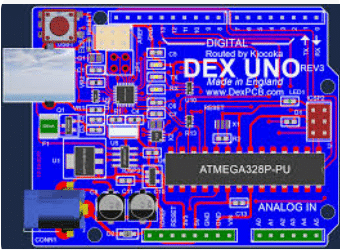
AutoTRAX DEX-PCB Designer is a full-stack Electronic Design Automation (EDA) platform built around a deceptively simple principle: remove the friction that traditionally exists between schematic capture, PCB layout, simulation, and manufacturing preparation. Instead of treating these as loosely connected stages spread across different tools, DEX brings them together inside a single, unified design environment where all data lives in one project space.
This unified architecture is not just a convenience feature; it defines how engineers interact with the tool from the earliest concept stage through to fabrication-ready outputs. In conventional EDA workflows, schematic and PCB layout are often separate files that must be synchronized through forward and back annotation, a process that can introduce errors, inconsistencies, and lost design intent. This tool eliminates this problem entirely. Any change made in the schematic instantly appears in the PCB layout, and changes on the board reflect immediately back into the schematic. There is no manual syncing, no version confusion, and no need to track what changed where.
For many design engineers, especially those working independently or in small teams, this “one file for everything” approach feels refreshingly straightforward. As one experienced user put it in an online discussion, “The idea of one file for everything is actually refreshing; you don’t lose track of what changed where.” That simplicity can translate directly into faster iterations and fewer late-stage surprises.
From Concept to Copper Without Tool Hopping
Beyond workflow mechanics, it positions itself as a tool for real-world product creation. Its stated mission is to empower engineers to design electronics-based products for a smarter, safer, and more connected world. This framing matters because it reflects how the platform is intended to be used not just for learning or experimentation, but for building functional, manufacturable hardware. The focus is clearly on taking ideas all the way to a physical board without breaking the design flow.
Despite its integrated philosophy, it is not a lightweight or stripped-down tool. It offers a comprehensive feature set that covers most mainstream PCB design requirements. Engineers can create unified schematic and PCB designs with real-time synchronization, use hierarchical schematic capture to manage complex systems, and rely on both manual and auto-routing supported by continuous design rule checking. Active3D visualization allows real-time inspection of the assembled board, helping designers catch mechanical or spatial issues early in the process.
Inside the Design Flow
Simulation is also tightly integrated. It includes built-in XSpice-based simulation for analog and digital circuits, eliminating the need to export designs to external simulators for early validation. Virtual instruments such as oscilloscopes, signal generators, and probes can be embedded directly into schematics. For early-stage verification and sanity checks, this capability can save significant time. As one engineer noted, “Dropping a virtual oscilloscope right into the schematic is handy when you’re sanity-checking a design quickly.”
Manufacturing preparation is treated as a natural continuation of the design process rather than a separate phase. Once routing is complete, it supports generation of Gerber files, CNC data, bills of materials, and pick-and-place outputs. These Computer Aided Manufacturing (CAM) files can be generated within the same environment and forwarded directly to manufacturers via email, without relying on third-party tools. This end-to-end continuity reinforces the platform’s core promise: a single environment that supports the entire journey from concept to fabrication-ready design.
One of the most distinctive aspects of this tool is its licensing philosophy. Unlike many EDA tools that impose artificial limits such as caps on board size, layer count, or component numbersDEX allows engineers to work without structural restrictions. Board size, number of layers, nets, pads, and components are all unlimited. There are no time limits imposed on designs, and users are not forced into reduced-capability modes simply because they are using a free version.
The Fine Print Engineers Should Know
This unrestricted approach stands out immediately to engineers evaluating the tool for the first time. As one reviewer observed, “For a free tool, it’s surprising that there are no limits on layers or board size that alone makes it worth testing.” For learning, experimentation, and serious prototyping, this freedom is a significant advantage, allowing engineers to design real, production-scale boards rather than simplified examples.
That said, there are practical boundaries that engineers should understand upfront. The free version of this tool is intended for non-commercial use. Certain manufacturing outputs, such as Gerber generation, may require a paid license key depending on usage. Official support is also more limited compared to mainstream EDA platforms, and the user community is smaller. Engineers accustomed to large open-source ecosystems or extensive online tutorials may find fewer ready-made answers when issues arise. As one design engineer cautioned, “It’s capable, but if you get stuck, there aren’t many tutorials or community answers compared to KiCad.”
These limitations do not necessarily make the tool unsuitable, but they do shape the type of user who benefits most from it. It tends to work best for engineers who are comfortable exploring features independently, value integration over modular toolchains, and prefer a single environment for schematic and layout work. It may feel less suitable for teams that rely heavily on plugins, third-party integrations, or guaranteed enterprise-level support. The tool is also Windows-centric, which may be a consideration for mixed operating system environments.
From a maturity standpoint, it has evolved steadily in recent years. Frequent incremental updates throughout 2025 and into early 2026 have focused less on headline-grabbing features and more on refinement. Engineers who used earlier builds often comment that newer versions feel smoother and more predictable, particularly during routing and 3D visualization. Improvements cited by users include faster graphics rendering in complex layouts, more responsive Active3D views for mechanical checks, and incremental polishing of routing behavior and part handling.
“It used to feel rough around the edges, but the newer builds are noticeably more stable than what I tried a couple of years ago,” one user reflected.
AutoTRAX DEX-PCB Designer also differentiates itself philosophically from legacy EDA systems. Traditional toolchains often consist of multiple separate applications, each with its own user interface and data files that are stitched together through imports and exports. DEX explicitly challenges this model by offering one cohesive environment with a single UI and unified data structure. Rather than optimizing individual stages of the workflow, it prioritizes continuity across the entire design lifecycle.
Ultimately, it is not a mainstream EDA platform, nor does it try to compete directly with industry-dominant tools on ecosystem size alone. Instead, it offers a conceptually strong alternative that rewards engineers willing to embrace its unified design philosophy. Its strengths lie in integration, flexibility, and accessibility, particularly through its unrestricted design model and all-in-one workflow. For design engineers looking for a single-environment solution that removes artificial limits and minimizes tool switching, AutoTRAX DEX-PCB Designer tool is worth serious evaluation. Approached with clear expectations, powerful features, evolving polish, and a smaller support ecosystem, it is capable of taking a design from initial idea to a manufactured board without breaking the flow.