

Experience real-time co-simulation of circuits and PIC firmware in a single unified workspace—KTechLab’s capability that lets engineers validate hardware–software interaction long before building a physical prototype.
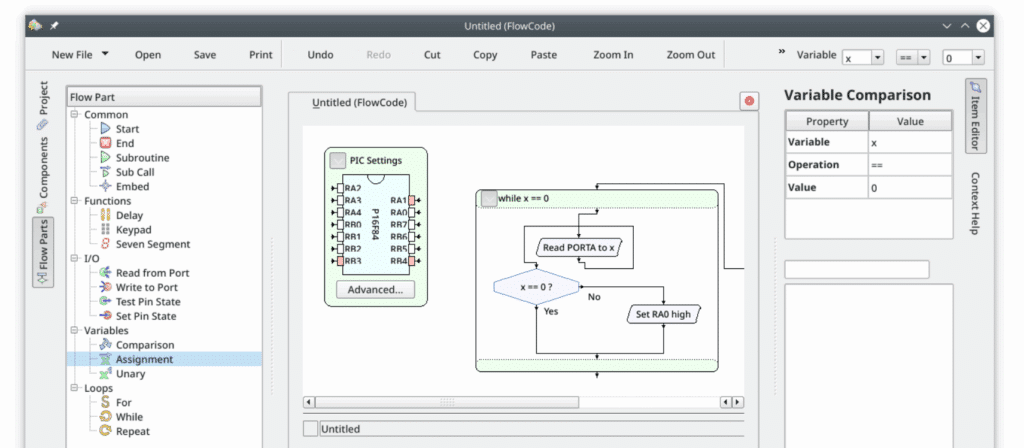
KTechLab is a free, open-source integrated development environment tailored for electronics engineers, students, and hobbyists who want to design and simulate circuits, especially those involving Peripheral Interface Controller (PIC) microcontrollers.
Unlike just a schematic editor or pure simulator, KTechLab provides a unified space to draw circuits, write PIC firmware, run simulations, and debug both hardware and software interactively.
Why It Matters in the Pre-Hardware Phase
- Real-time co-simulation of firmware and electronics: Due to its ability to simulate PIC microcontrollers (via integration with GPSim) inside the circuit. This means you can verify how your firmware affects real circuit behavior without building a physical board.
- Low barrier for embedded learners: With its FlowCode visual programming, MicroBASIC support, and ability to write C or Assembly, it’s particularly suited to beginners or educational environments.
- Cost-efficient prototyping: Being GPL-licensed and open-source, it’s accessible to students, academic labs, and startups with limited budgets.
- Lightweight and focused: Unlike heavyweight EDA suites, KTechLab is simple enough to run on modest hardware, but powerful enough to simulate mixed-signal designs.
KTechLab’s Core Features and Capabilities
Its schematic editor supports drag-and-drop placement of components (resistors, ICs, logic, power sources), with both auto-routing and manual routing for precise net wiring. During design, the simulator runs in the background, giving you immediate feedback on node voltages, branch currents, logic state changes, and more.
“As I was putting together the circuit it was simulating it in real time!” a tech engineer mentioned.
“It’s pretty cool how they integrated it with gpsim so you can simulate pic16f84 chips”, another design engineer quoted.
The integrated oscilloscope and probes allow you to measure and visualize voltage and current waveforms, giving behavior insight without hardware. It supports several ways to define PIC behavior:
- FlowCode: A flow-chart based visual programming method, intuitive for logic and control flows.
- MicroBASIC (Microbe): A BASIC-like high-level language tailored for PIC development.
- C/Assembly: For more traditional, low-level or performance-critical firmware.
- Language interconversion: You can switch between FlowCode, MicroBASIC, and Assembly/Hex, which is very handy for educational or prototyping use cases.
- Debugger/Simulator: Using gpsim, you can simulate the PIC’s instruction execution, put breakpoints, step through code, and simultaneously observe how I/O pins or peripheral circuits behave.
- Assembler & Disassembler: Integration with gpasm and gpdasm makes building and inspecting PIC code straightforward.
These features allow designers to build a full “firmware + circuit” simulation loop before committing to physical hardware. It supports a project-based workflow. Within a project, you can maintain multiple documents: circuit schematics, FlowCode diagrams, MicroBASIC code, C/ASM code, and plain text. Sub-projects help modularize designs (for example: power section, MCU logic, sensor front-end). You can also export flowcharts or circuit diagrams into images, making documentation and reports easy.
This keeps your schematic, code, and documentation in sync invaluable for teaching setups, labs, or engineering handoffs between design and PCB teams. Every component and flow-part in it has context-sensitive help. Hovering or clicking gives detailed information about pins, parameter meanings, and typical use cases. This is especially useful for beginners or people exploring new PIC peripherals.
Internally, it includes an embedded text editor for writing and editing code. You can set breakpoints, step through firmware, and watch how signals in the circuit evolve blending software debugging with hardware observation.
Port to Qt5 / KDE Frameworks 5: Earlier versions depended on older KDE libraries.
Recent releases (like 0.50 and beyond) have modernized the codebase, making it more stable on modern Linux desktops and improving GUI responsiveness.
- Better packaging & distribution: For example, ALT Linux packages KTechLab version 0.51.0 now come with correct dependency linking and are built without legacy KDE4 libraries.
- Improved usability: Updates in recent versions have refined context help, fixed minor bugs, and improved internationalization/documentation coverage.
“I was floored by how easily and quickly I could make schematics. Then I noticed that it was simulating it in real time! It integrates with gpsim, so you can emulate a PIC microcontroller in your schematic. This program is (almost) a breadboard replacement for little things.” mentioned a user.
The latest official release version 0.51.0, March 2023, delivers a range of important enhancements aimed at improving compatibility, stability, and long-term maintainability.
This update is largely a maintenance and modernization release, with the most notable improvement being an upgraded serial port component that now uses Qt’s QSerialPort library instead of older OS-specific calls, resulting in more reliable cross-platform communication.
A significant step forward in this version is the introduction of experimental Windows support, which enables the tool to be built using the MSVC 2019 compiler—an advancement that opens KTechLab to a wider engineering community beyond Linux users.
The developers have also completed extensive codebase modernization, moving away from deprecated APIs and aligning the tool with current KDE Frameworks and Qt standards to ensure better performance and easier future development.
Alongside these technical upgrades, the release includes numerous stability fixes and refreshed translations, enhancing usability and overall user experience across different languages. The project continues to evolve actively, reflecting ongoing community-driven development and long-term support.
Strengths & Key Use Cases
- Teaching & Learning: Because of its FlowCode and MicroBASIC support, KTechLab is ideal for students and labs.
- Early Prototyping: Engineers working on embedded systems can simulate entire firmware + circuit behavior, reducing risk before hardware build.
- Hobbyist Projects: Perfect for makers working with PIC microcontrollers who want to validate logic and circuits before soldering.
- Linux/Open-Source Environments: For developers who prefer GPL tools and don’t want to depend on commercial, proprietary EDA suites.
Limitations and Considerations
- MCU Support Is Narrow: Focuses on PIC microcontrollers only; doesn’t support ARM, AVR or other popular modern MCUs.
- Not a Full Analog SPICE Tool: While good for logic and simple analog, it’s not designed for deeply detailed analog/RF simulations like a dedicated SPICE tool.
- Platform Constraints: Best suited for Linux (especially KDE or Qt environments). Porting or stable usage on non-Linux platforms may be difficult.
- UI & Performance: Some users have reported crashes or instability in older versions; though modern releases have improved, you should validate behavior in your distribution.
- No PCB Layout: KTechLab does not include a PCB layout or routing engine; it’s for design + simulation, not full board-design.
It remains a remarkably useful EDA environment for embedded engineers, educators, and makers, especially those working with PIC microcontrollers. Its ability to combine schematic capture, firmware design (FlowCode/BASIC/C/ASM), and in-circuit simulation makes it a powerful “first stop” before committing to hardware.
If your workflow involves early firmware-hardware validation or if you teach embedded systems/electronics, KTechLab is a strong, open-source contender. It’s not meant to replace advanced SPICE tools or full PCB EDA suites, but for its niche, it’s very effective.
For more information, click here.