Want a PCB design tool from designing to manufacturing? ExpressPCB is a free solution, perfect for hobbyists, students, and small time prototyping.
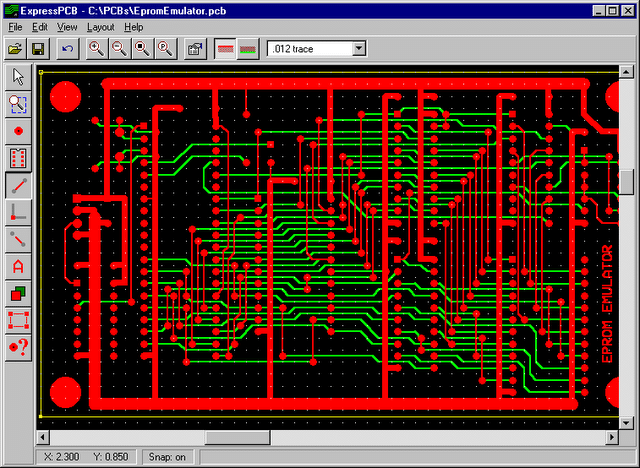
ExpressPCB is a free CAD software designed for creating printed circuit boards. When I install it, I get two tools: ExpressSCH for drawing circuit diagrams and ExpressPCB for laying out boards, placing components, and routing connections. These tools only work on Windows.
It’s great for quick projects, education, prototyping small to medium boards, supporting designs with up to six layers. The two programs ExpressSCH and ExpressPCB talk to each other, so changes in my schematic automatically update the PCB layout, keeping everything aligned.
I can design from anywhere, but the manufacturing services run only in the US. These services also offer advanced features like high-speed signal analysis.
An experienced designer with 14 years experience used ExpressPCB and said “Internally there is a rich selection of surface mount components. This allows me to create designs with Postscript and other tools such as KiCad that support DRC. Even BGA grids have limited support. Component creation is easy. Draw the part in the layout tool, then group it and save it.”
The latest version I use is ExpressPCB Plus 3.2, released in June 2023. It has smoother font rendering, better parts preview through SnapEDA, UL safety certifications, IoT and date code markings, and stability improvements. I keep the Classic 7.9.0 version from August 2020 for older projects. Although no major updates have come in 2025.
ExpressPCB packs essential features that balance ease for beginners with functionality for pros:
- Access to over 10,000 components in the software library.
- Create multi-page diagrams of up to 100 sheets.
- Designing boards up to 31×31 inches with up to 6 copper layer PCB.
- Drag-and-drop the tools for easy usability.
- Real-time Design Rule Checking
- Ensures schematic-layout alignment.
- Access to component library plus SnapEDA
- Generate Gerber files, Excellon drill files, BOMs, and PDFs/PNGs.
- Integrated quoting lets you order prototypes directly
These features make it easy for quick prototypes, though it lacks advanced simulation or unlimited layers.
PCB designer who used expressPCB for years said “Software is relatively easy to use and with a modicum of effort, good designs may be made. However, mechanical features are limited, such as maximum hole size and no support for non-plated holes or slots in the board’s interior.”
One user using expressPCB for years said “Their product is as advertised, they ship when they say they will, the prices are quite reasonable for small quantities and disclosed up front with no hidden fees, the layout software is dirt simple to use and there is no worrying about whether you have the right file format — just click a few buttons in the program and enter your credit card number, and the boards are on their way.”
Both Classic and Plus versions are free to download and to use with no subscriptions or hidden fees for design features. Only manufacturing orders cost money. It’s proprietary, so no source code, but fully functional for unlimited projects.
Also, check the 9 most popular PCB design tools.