
The article explains a laptop-based human-machine interface (HMI) system that allows users to control the speed and direction of a DC motor using software instead of physical switches or potentiometers.
DC motors are usually controlled with switches or buttons for direction and a potentiometer for speed. While the potentiometer remains effective for speed regulation, this system offers an alternative, enabling both speed and direction control of a DC motor (up to 36V) directly through a laptop. It integrates an Arduino Uno board for serial communication with a graphical user interface (GUI) developed using Processing. (Processing is a free, open source programming language and environment for creating interactive graphics, animations, and applications.) The GUI functions as a laptop-based human-machine interface (HMI), providing smooth, screen-based motor control.
POC Video Tutorial:
| Table 1: Bill of Materials | |
| Components | Quantity |
| Arduino Uno board (MOD1) | 1 |
| L293D motor driver IC (IC1) | 1 |
| 2-pin, 5.08mm pitch plug-in screw terminal block connector | 1 |
| DC motor (M) may use 5 to 36V DC | 1 |
| 9V external power supply for motor | 1 |
| Laptop with USB interface | 1 |
| Connecting wires and a breadboard | Need based |
The components required to assemble the hardware are listed in the Bill of Materials Table 1. A breadboard-based author’s prototype of the system is shown in Fig. 1.
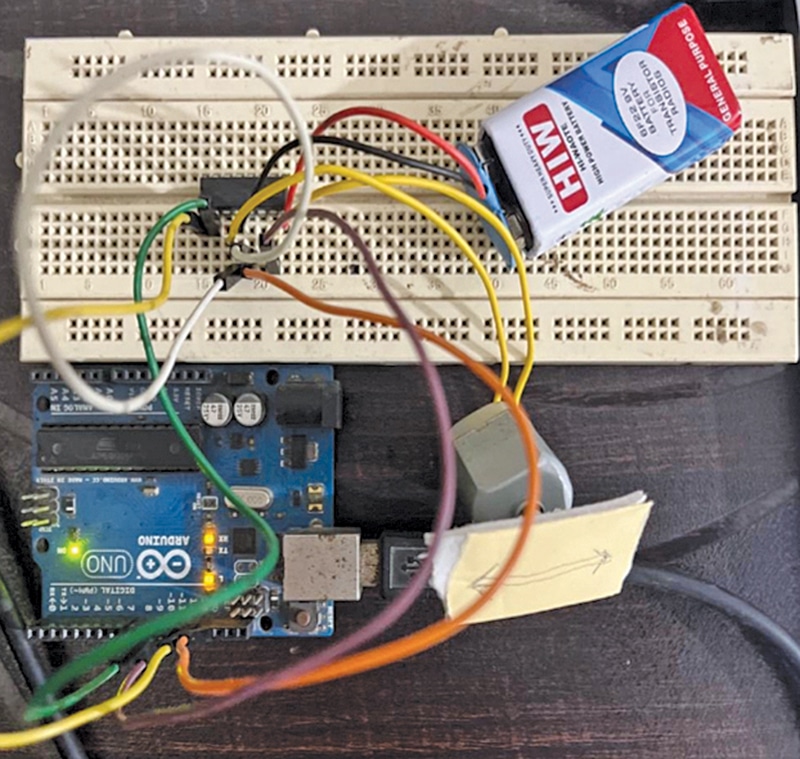
Circuit and Working
Fig. 2 shows the circuit diagram of the laptop-based HMI for DC motor speed and direction control. The system is built using an Arduino Uno board (MOD1), the L293D motor driver IC (IC1), a DC motor (M), and a few supporting components. A separate 9V power supply should be used for the motor instead of combining it with the Arduino’s power source. The Arduino board requires a dedicated 9V supply. A USB cable is used for programming.
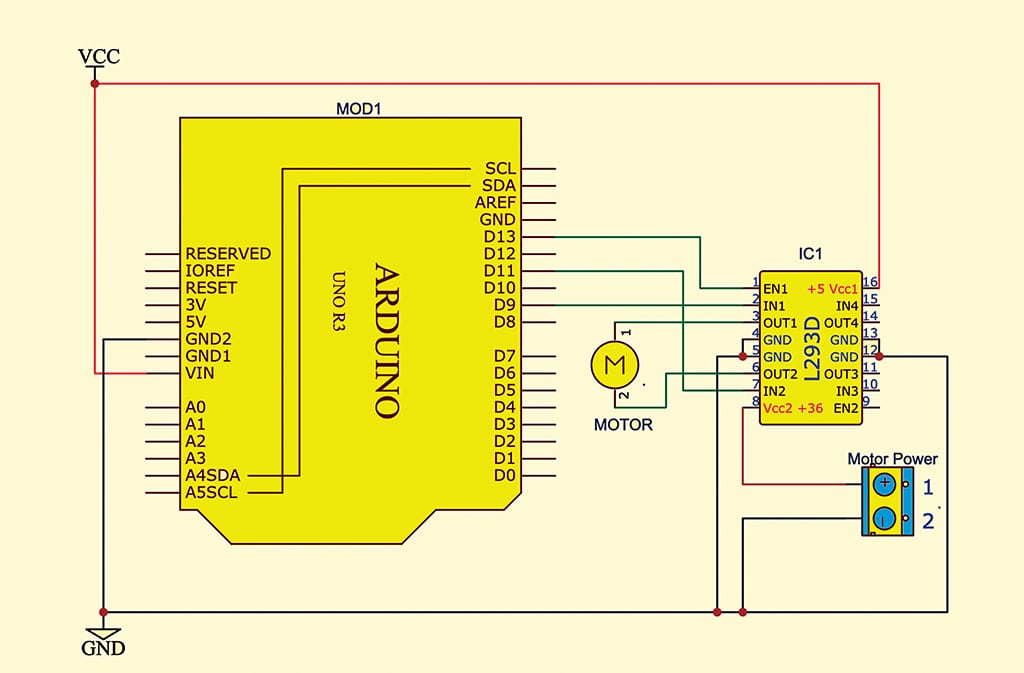
The system functions through serial communication between the laptop GUI and the Arduino board. The GUI sends control commands to the Arduino via the USB serial port. Upon receiving these commands, the Arduino interprets them and activates the motor using the L293D driver. Specifically:
- Command 0: Moves the motor forward
- Command 1: Stops the motor
- Command 2: Reverses the motor direction
- Commands 3 through 255: Represent PWM values for speed control
Arduino Code to Control DC Motor Speed and Direction
Two code sets are used in this system: