
Want to turn your circuit ideas into real designs? Check out a free tool that makes drawing schematics, adding symbols, and preparing PCBs fast and easy.
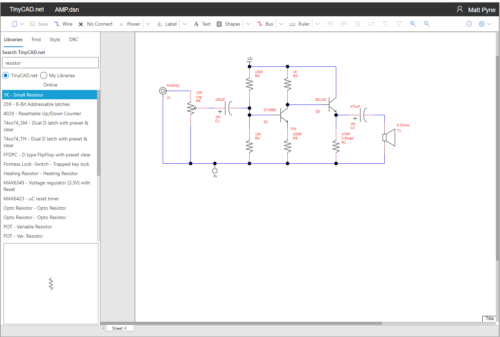
In electronic design, turning ideas into reality starts with a clear circuit plan. PCB design is the bridge between creativity and a working device, and for many hobbyists and professionals, TinyCAD has become a go-to tool for making that transition easier. Its combination of simplicity, flexibility, and no-cost access makes it ideal for both learning and professional use.
TinyCAD is an open-source schematic capture program for all versions of Microsoft Windows. It allows users to draw electrical circuit diagrams quickly and efficiently. One of its biggest strengths is ease of use: beginners can start designing right away, while experienced users can take advantage of advanced features like custom symbol libraries, netlist exports for PCB layout programs such as FreePCB, and SPICE simulation support.
The tool is suitable for a wide range of user groups, including electronics design beginners, hobbyists, educators, and professionals who need to perform simple circuit designs. Its free and open-source nature makes it possible for anyone to try PCB design without worrying about the cost. “Recommended for anyone that’s looking for a simple program to draw schematics,” added one user.
Another key feature is the ability to create and share your own symbols. TinyCAD drawings are self-contained, meaning a unique symbol doesn’t require the original library to display correctly. You can also copy symbols from existing drawings into your library, making it simple to reuse and customize designs. Beyond traditional schematics, TinyCAD is also useful for block diagrams, one-line diagrams, and presentation drawings.
With its intuitive interface, powerful symbol management, and multi-platform flexibility, with a browser-based version that requires no installation, TinyCAD makes schematic design accessible to everyone. Its advanced printing features and support for multiple netlist formats further strengthen its role as a versatile tool for both learning and professional PCB design. “”Just what I needed for simple circuit design. As someone new to electrical engineering, it was easy to start and place components right away,” added another user.
What Users Can Do?
We have learned till now that TinyCAD is a free, open-source schematic editor for Windows that helps users create and manage circuit diagrams. But what actually the users can do using this tool? Lets find out:
- Create Circuit Diagrams: Draw electrical schematics by dragging components from built-in libraries onto a canvas and connecting them with wires. Both flat and hierarchical designs are supported. Users can also create custom symbols and libraries for components not included in TinyCAD.
- Prepare Designs for PCB Layout: Export netlists from schematics, listing all components and connections. These netlists can be imported into PCB layout programs like FreePCB, Protel, PADS, or Eagle to build actual circuits. TinyCAD includes a design rules checker to catch issues before PCB design.
- Simulate Circuits with SPICE: Add SPICE attributes to components and generate simulation files. TinyCAD’s SPICE template engine works with many SPICE engines and supports advanced features like conditional statements for complex simulations.
- Export and Share Designs:
- Convert schematics to PNG images for web or digital use.
- Copy and paste diagrams directly into Word, PowerPoint, or other Office applications as high-quality vector graphics.
- Print designs or convert them to PDF files using open-source PDF creators.
- Documentation: Generate Bills of Materials (BOMs) or parts lists for your projects.
- Open-Source and Free: TinyCAD is fully open-source. Users can download the program and the source code for free, making it easy to customize or integrate into their own projects.
- Web and Presentation Ready: TinyCAD makes it simple to include schematics in documents, presentations, or websites. Users can create diagrams in color or black-and-white, ready for reports, teaching materials, or online tutorials.
TinyCAD helps you turn circuit ideas into working designs that can be used in projects or shared with others. “TinyCAD was useful for my circuit diagramming and design projects. I used it to design a six-IC pressure alert module, and the output made my project documentation clear.”
Latest Update
The current stable version of TinyCAD for Windows is 3.00.04, released in late 2021/2022. The 3.x series added several updates over the 2.x versions to improve usability and stability for creating electrical schematics. Now we will find out what the new version holds for us as a users of TinyCAD:
- Symbol Libraries: Every part in a schematic (like a resistor, capacitor, or IC) is represented by a symbol. TinyCAD 3.x has updated these symbols and added new ones. But If you already drew a schematic, changing the library won’t automatically change the symbols in your old design. You have to update them manually.
- Stability: Older versions sometimes crashed or slowed down, especially with big circuit designs. The 3.x series fixed many of these problems, making the software more reliable when working on large schematics.
- Export Options: TinyCAD can create “netlists,” which are lists of connections between components in your circuit. The 3.x versions improved how these netlists work with popular PCB software like FreePCB, Protel, PADS, and Eagle. This makes it easier to move your design from TinyCAD to a PCB program for manufacturing.
- Modernization: The software’s code was updated to work better on newer versions of Windows. This means fewer crashes or compatibility issues with modern computers.
- Embedded Images: You can now include pictures or graphics in your schematic more easily. For example, you could add a logo, a diagram, or a photo of a component.
But not everything in the new version is positive. Every tool has two sides. Users have also pointed out some limitations and issues in the current versions. These are explained below:
- User Interface (UI): The program still looks a bit old-fashioned compared to modern software. Buttons and menus may not be as smooth or fancy as newer tools.
- No Dynamic Library Updating: If you change a symbol in the library after you’ve drawn your schematic, the change won’t appear automatically. You need to manually update any old schematics if you want them to use the new symbols as I told earlier.
- Limited Features: It focuses on drawing schematics. It doesn’t have 3D views of circuits or built-in simulation to test circuits. You would need other software for those advanced features.
Despite some limitations, TinyCAD remains a practical and accessible tool for creating and managing schematics. “I have been using this software for over two years. For any quick project, this is the only tool I use. It makes documenting circuits simple and does more than just schematics—you can even insert pictures as references,” said another user.
How TinyCAD Compares to Other Tools
Is TinyCAD the best schematic-only tool? A comparison chart below helps answer this question.
| Tool Compared | TinyCAD | Other Tool |
| TinyCAD vs. KiCad | Schematic-only tool. Works only on Windows. Does not include advanced PCB routing or tight PCB integration. | More powerful, open-source, cross-platform tool. Supports both schematic capture and PCB layout. Better for complex and professional designs. |
| TinyCAD vs. EasyEDA | Fully offline. Best for quick, simple schematics without relying on cloud services. | Cloud-based platform with a large, continuously updated component library and built-in simulation. Better for fast design-to-PCB fabrication workflows. |
| TinyCAD vs. Fritzing | Better for traditional, schematic-based documentation. Interfaces may feel less modern. | Designed for beginners. Focuses on visual workflows, especially breadboard-to-PCB design. |
| TinyCAD vs. ExpressPCB | Open source. Supports export formats compatible with many PCB tools, offering flexibility in manufacturing choices. | Simplifies schematic and PCB design but is closely tied to its own manufacturing service. |
Getting Started
TinyCAD is completely free and open‑source software that you can download and use without paying any fees. There is no “pro” version, no paid upgrades, and no licensed seller selling TinyCAD licenses. It is free for personal and commercial use, and it will remain free under its open-source license. Some third-party sellers online might list a “TinyCAD” product for sale, but the official TinyCAD software itself is distributed free and does not require any payment. Find out the getting started steps below:
- Installation: Download the latest version from SourceForge. The installation is straightforward and includes necessary Microsoft Visual C++ files.
- Interface Basics: Upon opening, you will see a blank canvas. Use the toolbar to add components, draw wires, and manage your project. The mouse wheel zooms in and out.
- Adding Components: Click the component icon to open the library, or use the search feature to find parts like resistors, batteries, and LEDs. Components can be rotated or flipped.
- Wiring: Click the wire icon, then click on component terminals to connect them. The software automatically snaps wires to correct connection points.
- Customization: Access settings to adjust grid spacing, change colors, and configure auto-backup intervals.
- Libraries: For specialized components, you can create or edit your own libraries.
A web-based version is available that works with Google Drive. It requires Chrome or Edge, and ad-blockers should be disabled for full functionality.
There are many places to get help and talk about TinyCAD. The TinyCAD Discord is the most active place for questions and community discussion. You can report bugs or technical problems on the GitHub issues page. The SourceForge TinyCAD page also has discussions about features and problems. Electronics forums like All About Circuits, the Arduino Forum, and Electronics Stack Exchange are good for asking questions, sharing tips, and learning about libraries and schematics.