Planning to use Ansys HFSS? Explore its features, uses, free student version, and the computer requirements needed to run the software.
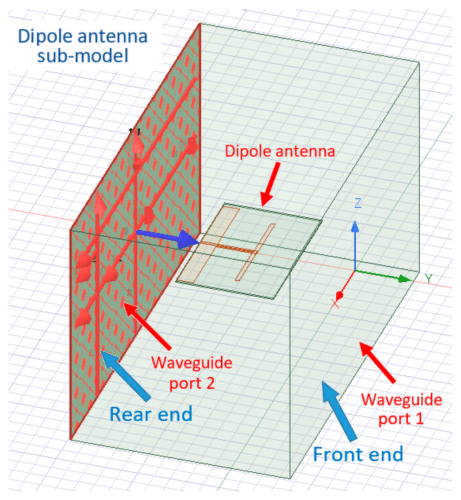
High-frequency electronic products such as antennas, RF and microwave components, printed circuit boards (PCBs), integrated circuits (ICs), and chip packages must perform reliably before they are manufactured. Even small electromagnetic issues can lead to signal loss, interference, or poor system performance, making simulation an important part of the design process. Engineers therefore rely on electromagnetic simulation software to predict how these products will behave, reduce design iterations, and improve performance before moving to production.
One of the most widely used tools for this purpose is Ansys High-Frequency Structure Simulator (HFSS). HFSS is a 3D electromagnetic (EM) simulation software that helps engineers design, simulate, and optimize high-frequency and high-speed electronic products. Using the finite element method to solve Maxwell’s equations, it accurately models how electromagnetic waves propagate and interact with complex structures. Engineers can analyze antennas, ICs, chip packages, PCBs, connectors, and RF and microwave circuits, while evaluating parameters such as S-parameters, radiation patterns, field distribution, bandwidth, and efficiency. By helping identify potential issues early in the design process and integrating with other design tools, HFSS enables faster development and reduces the need for costly physical prototypes.
What can engineers do with HFSS?
Using Ansys HFSS, you can easily:
- Design, simulate, and optimize antennas, including 5G, automotive, satellite, and IoT antennas, and evaluate their performance inside products such as smartphones and vehicles.
- Develop and analyze RF and microwave components such as filters, waveguides, couplers, connectors, and transmission lines before manufacturing.
- Design and validate integrated circuits (ICs), chip packages, interconnects, high-speed printed circuit boards (PCBs), and complete electronic systems.
- Analyze S-parameters, radiation patterns, electromagnetic field distribution, gain, bandwidth, and efficiency to evaluate product performance.
- Detect and reduce electromagnetic interference (EMI) and ensure electromagnetic compatibility (EMC) compliance.
- Evaluate signal integrity (SI) and power integrity (PI) in high-speed PCBs, packages, and chip-to-board connections.
- Optimize designs by modifying dimensions, materials, and layouts before fabrication.
- Perform both frequency-domain and time-domain electromagnetic simulations.
- Integrate electromagnetic analysis with thermal, mechanical, and fluid simulations to study the impact of heat and mechanical stress on electrical performance.
- Virtually validate designs before manufacturing, reducing development time, cost, and the need for physical prototypes.
“HFSS delivers electromagnetic simulations that closely match real-world performance. Its documentation is easy to follow, making it simple for beginners to get started. The software also makes report generation straightforward, offers a high level of flexibility, and provides a wide range of features compared with many competing tools,” added one user.
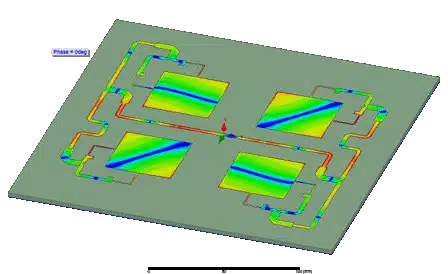
Where is HFSS used?
HFSS is used across industries where high-frequency electromagnetic performance is critical. Engineers use it to design, simulate, and validate products in applications such as:
- Antenna design and placement – Design antennas and evaluate their performance inside smartphones, vehicles, aircraft, satellites, and IoT devices. The software also helps optimize antenna placement and reduce co-site interference.
- PCBs, ICs, and IC packages – Analyze electromagnetic behavior, signal integrity, and power integrity across complete chip-package-board systems before fabrication.
- EMI/EMC analysis – Detects and reduces electromagnetic interference while ensuring products meet electromagnetic compatibility requirements.
- Power electronics – Simulate inverters, converters, transformers, motors, and other power electronic systems while studying electrical, thermal, and electromagnetic performance together.
- Electronics reliability – Evaluate how thermal, electrical, and mechanical effects influence the long-term reliability of electronic products.
- Autonomous systems – Support the development of radar, lidar, and communication systems used in autonomous vehicles and advanced driver-assistance systems (ADAS).
- Electric vehicles (EVs) – Analyze antennas, power electronics, electric motors, battery systems, and vehicle communication networks.
- Aerospace and defense – Design radar systems, satellite communication equipment, aircraft antennas, and other RF systems.
“After a two-year extensive evaluation and measurement correlation of the ANSYS tools against multiple industry products, the measurement comparisons have shown that the ANSYS solutions are robust and accurate across the widest range of applications and structures. We found through detailed measurement testing that HFSS is truly the ‘golden standard’ in electromagnetic modeling. When the structures we measured were modeled faithfully and the material properties were characterized and entered accurately, ANSYS HFSS produced extremely accurate results with no discernible difference between measured and modeled results,” said Scott McMorrow, Strategic Technologist at Samtec Inc.
“Engineering teams developing high-frequency electronic products often use Ansys HFSS to simulate, test, and validate antennas, PCBs, and RF components before building physical prototypes. This helps reduce development time, lower prototyping costs, and identify design issues early in the process. HFSS is widely adopted across industries such as semiconductor design, telecommunications, aerospace, automotive, and consumer electronics. However, for smaller teams or startups working on less complex projects, the software’s learning curve and licensing cost can be a consideration,” added one more user.
What’s new in Ansys HFSS 2026 R1?
The latest major release, Ansys HFSS 2026 R1, launched on March 11, 2026, with updates focused on improving simulation speed, scalability, and design workflows. The release also strengthens integration across the Ansys Electronics portfolio, helping engineers move more efficiently from chip-level design to complete electronic systems.
Some of the key enhancements include:
- GPU-accelerated frequency-sweep solving using cuDSS-based GPU support to reduce simulation time.
- Omega Mesher, which delivers faster mesh generation, better reliability, and lower memory usage, particularly for complex rigid-flex PCB designs.
- Broadband 3D Power Integrity (PI) analysis for complete chip-package-board systems in HFSS and HFSS-IC.
- A parallelized post-processing engine for faster visualization and analysis of simulation results.
- A native Joule Heating Solver for electrothermal analysis within the HFSS environment.
Beyond these feature additions, HFSS 2026 R1 expands support for advanced semiconductor packaging, high-speed PCB design, RF and microwave components, and antenna development. Engineers can analyze larger and more complex models, improve power delivery analysis across complete electronic systems, and study both electromagnetic and thermal effects within a unified workflow.
The release also improves integration with other Ansys Electronics tools, enabling smoother multiphysics simulations that combine electromagnetic, thermal, mechanical, and circuit analyses. These enhancements help engineers validate complete designs earlier, reduce the need for physical prototypes, and shorten product development cycles.
What can you do with the free version?
The Ansys Electronics Desktop Student edition includes HFSS and allows students and self-learners to gain hands-on experience with electromagnetic simulation. It is suitable for learning antenna, RF, and PCB design concepts without purchasing a commercial license.
With the free version, you can:
- Design and simulate 3D electromagnetic components such as antennas, PCBs, RF and microwave circuits, and waveguides
- Build and test antennas such as dipole, patch, and PIFA antennas using the HFSS Antenna Toolkit
- Evaluate antenna radiation patterns and return loss
- Simulate passive RF components including filters, couplers, and waveguides
- Analyze electromagnetic fields, signal integrity, and power integrity in PCBs and IC packages
- Explore basic multiphysics simulations by combining HFSS with Ansys Icepak for thermal analysis and Ansys Circuit for circuit design.
“The Ansys Student version is free. Although it has limitations on model size and computation, it is a good tool for engineering students to learn, gain hands-on experience, and build both practical and theoretical knowledge,” said one user. The free student edition is intended for learning and academic use, so it has a few restrictions:
- It can only be used for personal learning, classroom instruction, and academic projects
- It cannot be used for commercial product development
- It has limits on mesh size and geometry complexity, making it unsuitable for very large or highly complex commercial designs
System requirements and supported platforms
Before installing Ansys HFSS, it is important to ensure that your computer meets the software requirements. The commercial and student editions use the same interface and core workflow, but the commercial version is designed to handle much larger and more complex simulations, requiring more powerful hardware.
| Requirement | Ansys HFSS Student | Commercial Ansys HFSS |
| Operating system | Windows 10 or Windows 11 (64-bit) | Windows 10/11 (64-bit) and supported Linux distributions (64-bit) |
| Processor (CPU) | Multi-core Intel or AMD processor | Multi-core Intel Xeon, AMD Ryzen, AMD EPYC, or Intel Core processors with higher core counts recommended |
| Memory (RAM) | Minimum 8 GB; 16 GB or more recommended | Minimum 16 GB; 32–64 GB or more recommended for large simulations |
| Graphics (GPU) | Dedicated GPU recommended for better graphics performance | NVIDIA GPU recommended for GPU-accelerated solvers available in HFSS 2026 R1 |
| Storage | SSD recommended with at least 20–30 GB of free space | High-speed SSD with 100 GB or more free space for large projects and simulation data |
| Internet connection | Required for download, activation, updates, and online learning resources | Required for licensing, updates, cloud services, and technical support |
Besides the hardware, engineers should keep a few additional requirements in mind:
- A 64-bit operating system is required, as HFSS does not support 32-bit platforms.
- The student edition is licensed only for personal learning, classroom instruction, and academic projects, while the commercial version requires a paid license for professional product development.
- Large electromagnetic simulations benefit from multi-core processors, high memory capacity, and fast SSD storage to reduce solution time.
- To take advantage of GPU-accelerated frequency-sweep solving introduced in HFSS 2026 R1, a supported NVIDIA GPU is recommended.
- Engineers working on large chip-package-board designs or multiphysics simulations may also require additional Ansys products such as Ansys Icepak, Ansys Circuit, or HFSS-IC, depending on their workflow.
- HFSS integrates with common ECAD and MCAD design tools, making it easier to import PCB layouts, IC packages, and mechanical models into the simulation environment.
For students and beginners, a modern Windows laptop or desktop with a multi-core processor, 16 GB RAM, an SSD, and a dedicated graphics card is generally sufficient to learn the software and complete most educational projects. Commercial users working on large semiconductor, aerospace, or automotive designs typically require workstations with higher core counts, 32 GB or more RAM, dedicated NVIDIA GPUs, and larger storage capacity to handle complex electromagnetic simulations efficiently.
Getting started with the free version
- Download Ansys Electronics Desktop Student: Click here
- Install the software by following the on-screen instructions.
- Open Ansys Electronics Desktop and create a new HFSS Design.
- Build a simple model, such as a patch antenna, dipole antenna, or waveguide, or import an existing design.
- Set up the simulation by assigning materials, ports, boundaries, and the operating frequency.
- Run the simulation to analyze parameters such as S-parameters, return loss, radiation patterns, and electromagnetic fields.
- Modify and optimize the design based on the simulation results.