

Making PCBs can be hard. Learn about a free tool that helps hobbyists and beginners create real circuit boards without using complex software.
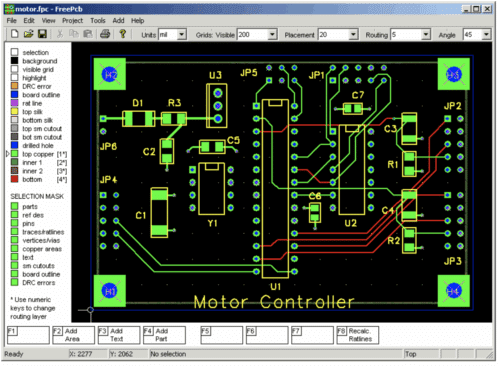
We all know that designing printed circuit boards (PCBs) for electronic circuits is a very challenging task. Especially for small designers and hobbyists. Many free or commercial EDA tools are available but they are either too complex or require steep learning curves. Some of them do not allow multi-layer designs or standard file exports for production. This makes it difficult for small teams or individuals to turn a circuit schematic into a real, manufacturable PCB quickly and accurately. Let us find a solution to this problem.
Today, I will tell you about an EDA tool that is very simple and free, so that you can design your PCBs very easily and free of cost. FreePCB is a free, open-source PCB design software for Microsoft Windows. It is accessible to a wide range of users. With its straightforward interface and professional-grade output, FreePCB became a popular choice for PCB layout.
“FreePCB is a simple and practical PCB design software for basic design and beginners”, said one user.
The creators of FreePCB have stopped releasing new updates or improvements for the software, and it hasn’t been actively developed for over ten years. The last release by the company was done on September 11, 2010 (FreePCB v1.359). This mainly fixes a few more bugs. While development has paused still it remains a reliable option, especially for hobbyists and small projects.
A user added, “I use FreePCB and find it easy and intuitive for creating circuit layouts quickly, thanks to its very short learning curve.”
Core Features
FreePCB offers a set of tools designed for both hobbyists and professional PCB designers.
Key features include:
- Multi-Layer Support: Handles up to 16 copper layers for complex designs.
- Large Board Sizes: Supports boards up to 60 × 60 inches for large projects.
- Imperial & Metric Units: Design in mils or millimeters for flexibility.
- Extensive Libraries: Includes component footprints from ready-made components library like Ivex Design International, PCB Matrix, and IPC.
- Copper Filled Areas: Easily create copper pours for routing and shielding.
- Footprint Wizard & Editor: Quickly create or modify component footprints.
- Import/Export: Works with PADS-PCB network tables and exports Gerber and Excellon drill files.
- Design Rule Checker: Ensures your design meets manufacturing standards.
- Autosave: Protects your work with automatic saving.
Pros and Cons
Apart from being a cost-effective choice for hobbyists, students, and early-stage startups with limited resources, it also gains value from an active online community that provides tutorials, discussions, and troubleshooting support. This gives you a steady place to learn and resolve issues. It is accessible to a wider range of users as it supports multiple operating systems.
A user commented, “I’ve been using FreePCB for four years, creating many custom footprints and getting boards manufactured by several houses.”
However, FreePCB also has some limitations when compared with paid, full-featured PCB design tools. It lacks certain advanced capabilities found in commercial software, especially in areas like large-scale library management and built-in simulation tools. And while the interface is generally simple, new users may still find that mastering all of its functions takes time, especially if they are new to PCB design.
One of the users added,“FreePCB is easy to use for hobbyists, but its features are too basic for advanced commercial work, leading many users to consider moving to a more powerful tool.”
FreePCB may be an old tool, but it still helps many people design PCBs without spending money or learning very complex software. It is simple, easy to start with, and supported by a helpful community. Even though it lacks advanced features, it works well for basic projects and hobby work. For anyone beginning PCB design, it remains a useful and reliable option.
Visit the official website to download the latest version of FreePCB.
Tips for Beginners1. Set Up Shortcut Keys: Learn and use common shortcuts to speed up placing components and wiring. 2. Use Grid Alignment: Keep components and wiring neat. Adjust grid density for more precise wiring. 3. Customize Component Library: Add missing components or import from other designs to meet your needs. 4. Layered Wiring & Vias: Use double-layer boards and vias carefully to avoid congestion and maintain signal integrity. Avoid too many vias on critical paths. 5. Run DRC Checks: Use the Design Rule Checker to find wiring errors before exporting files to prevent manufacturing issues. 6. Save & Backup Regularly: Save progress often to avoid losing work during complex operations. 7. Explore the Community: Learn tips, tricks, and shortcuts from other FreePCB users. 8. Use Online Resources: Watch tutorials and read guides to master advanced features. 9. Start Small: Practice on simple projects before moving to complex PCB designs. |