




In this project, we will create an IoT-based RFID attendance system using the IndusBoard Coin with the ESP32-S2 chip. The system will read RFID card Unique Identifiers (UIDs) using an MFRC522 module, record attendance with precise timestamps, and display it in real-time on a web page hosted by the ESP32-S2. Each RFID card will be associated with a specific user, and the web page will show the punch-in and punch-out times along with the current status (e.g., “In” or “Out”). The system leverages WiFi connectivity to sync time via the Network Time Protocol (NTP) for accurate date, time, and day, and uses dynamic arrays to manage user data. Unknown UIDs trigger a separate entry webpage for new user registration, appending details to the user database. The coding integrates libraries such as WiFi, NTPClient, SPI, MFRC522, and WebServer, with a structured workflow for initialization, RFID scanning, attendance logging, and web serving. Testing involves verifying hardware connections, WiFi and NTP synchronization, RFID functionality, and webpage responsiveness, ensuring a robust solution for educational or professional attendance tracking.
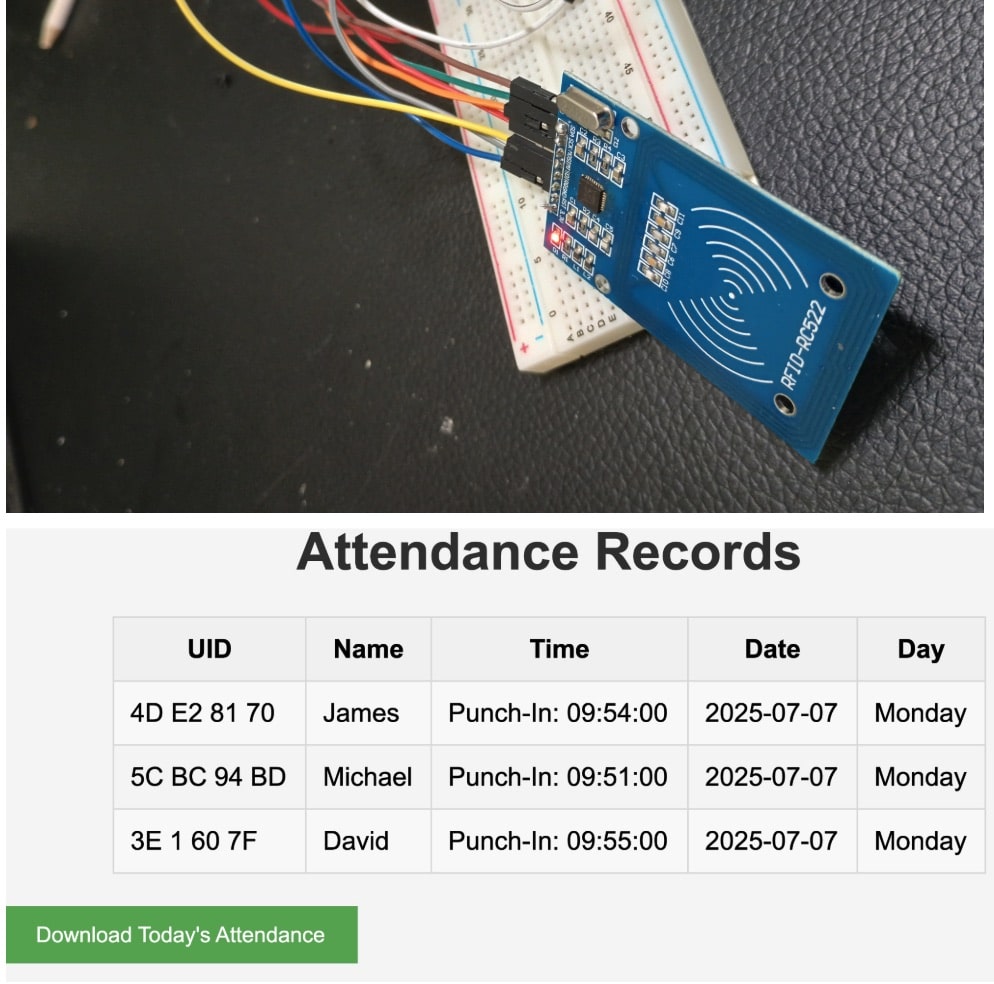
Bill Of Material
| Component | Part number | Quantity |
| IndusBoard Coin | Coin V2 | 1 |
| RFID Reader Writer Module | MFRC522 , 3.56MHz | 1 |
| NTAG RFID CARD | 3.56Mhz NTAG 215 | 1 |
| 5V DC USB C Adapter | 1A 5V DC | 1 |
Connection
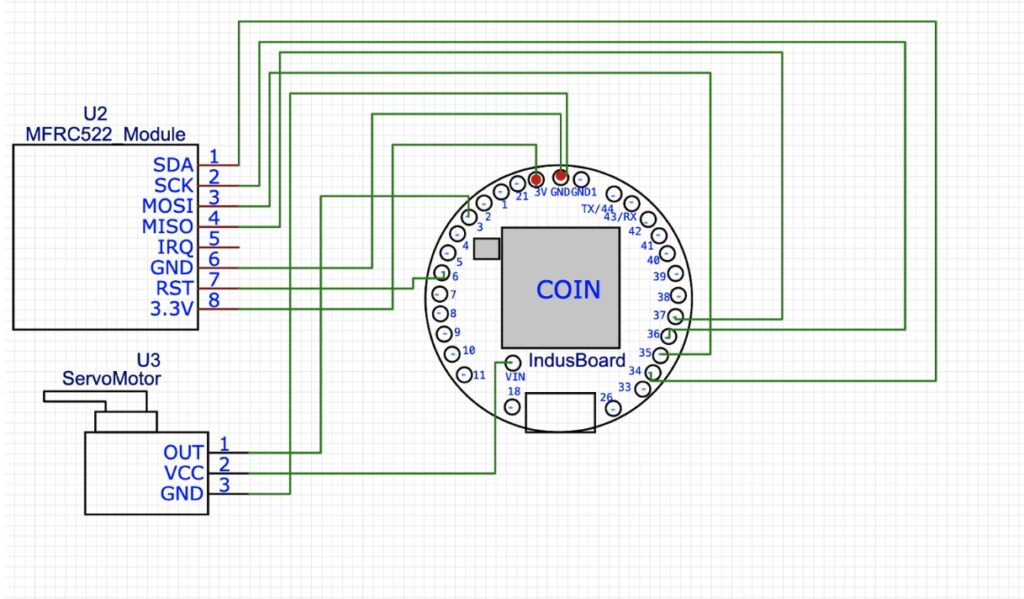
The IndusBoard COIN with the ESP32-S2 chip serves as the central microcontroller for this IoT-based RFID attendance system. The hardware connections involve interfacing the ESP32-S2 with an MFRC522 RFID module and ensuring proper power and communication lines. Here’s a step-by-step breakdown:
- Power Supply:
- The ESP32-S2 is powered via a micro-USB cable connected to the IndusBoard COIN’s USB port, providing 5V. The onboard voltage regulator steps this down to 3.3V, which is used to power the MFRC522 module.
- Connection: Connect the MFRC522’s VCC pin to the 3.3V pin on the ESP32-S2, and GND to the GND pin to complete the power circuit.
- SPI Communication:
- The MFRC522 module communicates with the ESP32-S2 via the Serial Peripheral Interface (SPI) protocol, which requires specific pins for data exchange. The IndusBAord has flexible SPI configued with any free I/O pins or can use default SPI pins refer to datasheet to IndusBoard coin :- https://indus.electronicsforu.com/wp-content/uploads/2025/05/CoinV2_DataSheet.pdf
Coding
For coding the MFRC522 library and NTP for network time library ae used can be installed using library manager . other tahn these libraries few more are used
- SPI.h: Manages SPI communication for the MFRC522 module.
- MFRC522.h: Provides functions to initialize and read data from the MFRC522 RFID reader.
- WiFi.h: Enables WiFi connectivity for the ESP32-S2.
- WebServer.h: Implements a synchronous web server to host the attendance webpage.
- NTPClient.h and WiFiUdp.h: Facilitate time synchronization with an NTP server (set to IST offset +5:30).
Then in code the WiFi needed to configured with wyour wifi SSID and password.
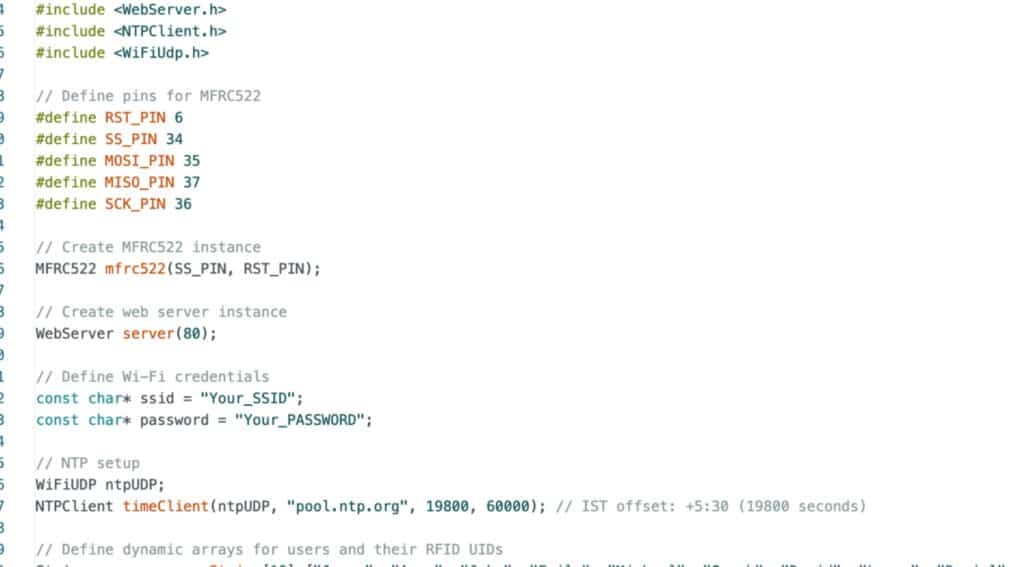
Then we have function for system as follows:-
Loop Function
- Client Handling: Continuously processes web server requests.
- RFID Scanning:
- Checks for a new card with PICC_IsNewCardPresent() and reads the UID with PICC_ReadCardSerial().
- Constructs a hexadecimal uid string from the raw UID bytes.
- Attendance Logic:
- Compares the scanned uid with stored uids.
- If matched, updates attendanceRecords with punch-in or punch-out times using NTP data (getFormattedTime(), getFormattedDate(), getDayOfWeek()).
- If unmatched, redirects to the /entry page.
- Response: Sends a success message or redirection header.
Handler Functions
- handleRoot(): Serves a simple homepage with a link to the attendance page.
- handleAttendance(): Generates an HTML table displaying UID, name, time, date, and day for each recorded attendance, with a download button triggering /download.
- handleEntry(): Displays a form for unknown UIDs, allowing name entry with a hidden uid field.
- handleSave(): Processes the form submission, adds the new user to arrays, copies data to attendanceRecords, and redirects to /attendance.
- handleDownload(): Creates a CSV string with attendance data and sends it as a file attachment.
Utility Functions
- getFormattedDate(unsigned long epoch): Converts an epoch timestamp to a “YYYY-MM-DD” string using strftime.
- getDayOfWeek(uint8_t day): Maps the NTP day index (0-6) to a day name.
Key Coding Features
- Dynamic Memory: Uses new to allocate arrays, with manual deletion to prevent leaks (though attendanceRecords remains fixed-size).
- NTP Synchronization: Ensures accurate timestamps, reflecting 02:12 PM IST, Monday, July 07, 2025.
- Web Interface: Employs CSS for styling and JavaScript for the download trigger.
- Error Handling: Includes basic checks for array bounds and WiFi connectivity.
Testing
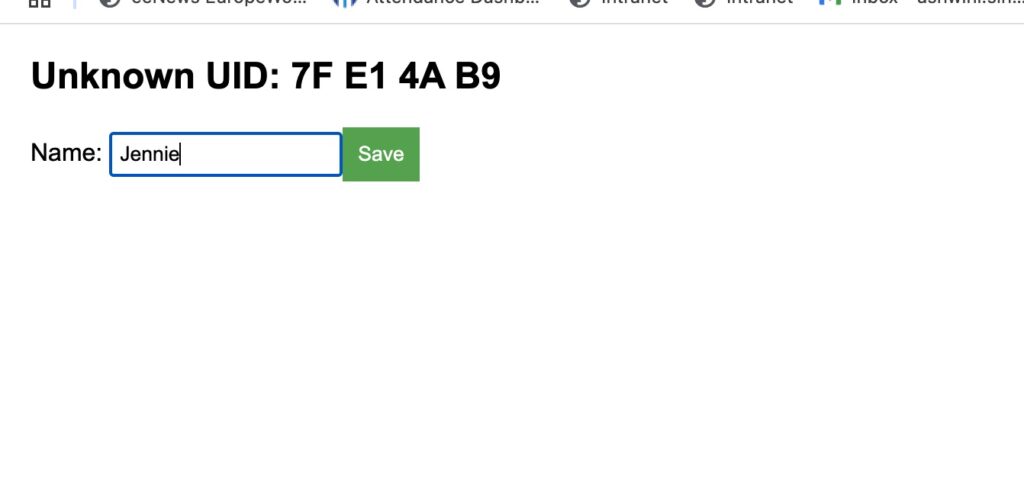
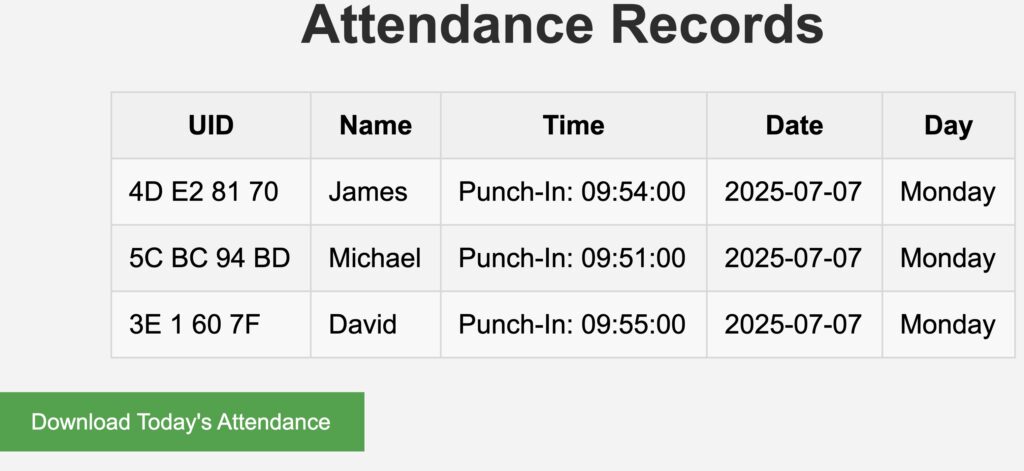
After powering on, wait until the device connects to the WiFi network, then connect to it using the IP address shown in the Serial Monitor, ensuring both the device and your laptop are on the same network. Open the IP address in a browser, scan an RFID card, and if the UID is known (e.g., “UID1” for “James”), attendance will be marked with the current time (around 02:21 PM IST), date (July 07, 2025), and day (Monday); if unknown, it will redirect to a new entry page where a name can be added. Verify the attendance table updates correctly, test the CSV download for today’s records.