





This system uses a colour-changing LED (RGB LED/tri-colour LED) that switches to a new colour every 5 seconds. Simultaneously, the colour name is displayed on an OLED mini screen (SSD1306). This pairing helps learners connect colour names with the actual shades, making the process engaging and enjoyable.
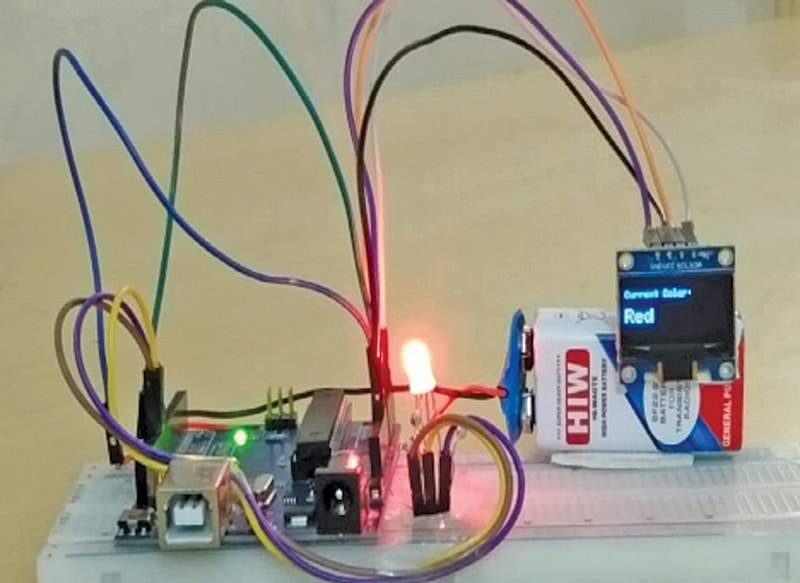
Colour Buddy is a playful yet educational system that merges technology with early childhood learning. It highlights how simple electronics can be turned into interactive learning aids for children. Fig. 1 shows the author’s prototype. The Bill of Materials required to build the system is listed in Table 1.
POC Video Tutorial:
| Table 1 Bill Of Materials | |
| Name | Quantity |
| Arduino Uno board | 1 |
| Common-cathode RGB LED | 1 |
| OLED display (SSD1306) | 1 |
| 220Ω resistor | 3 |
| 9V battery with connector | 1 |
| USB cable | For programming |
| Connecting wires | As required |
This circuit is designed for children. It makes learning colours enjoyable by combining visual display and text, while also introducing beginners to microcontrollers, LED colour mixing, and I²C display control.

The idea is based on the principle that two different colour combinations can generate a new colour. For example, by adding red and green, yellow is produced. In an RGB LED, various colour combinations generate multiple coloured lights, and through interfacing with the OLED, the name of the colour is displayed on the screen. Table 2 shows the colour combinations of an RGB LED.
| Table 2 Colour Combinations of RGB LED | |||
| Colour Name | Red | Green | Blue |
| Black | 0 | 0 | 0 |
| Red | 255 | 0 | 0 |
| Green | 0 | 255 | 0 |
| Blue | 0 | 0 | 255 |
| Yellow | 255 | 255 | 0 |
| Cyan | 0 | 255 | 255 |
| Magenta | 255 | 0 | 255 |
| White | 255 | 255 | 255 |
| Orange | 255 | 165 | 0 |
| Pink | 255 | 192 | 203 |
| Purple | 128 | 0 | 128 |
| Brown | 165 | 42 | 42 |
| Gray | 128 | 128 | 128 |
| Light Blue | 173 | 216 | 230 |
| Lime | 0 | 255 | 0 |
| Dark Green | 0 | 100 | 0 |
| Maroon | 128 | 0 | 0 |
| Navy | 0 | 0 | 128 |
| Olive | 128 | 128 | 0 |
| Teal | 0 | 128 | 128 |
Circuit and Working
Fig. 2 shows the circuit of Colour Buddy. It is built around an Arduino Uno and powered by a 9V battery. It controls a common-cathode RGB LED and an OLED display. The battery connects to the Arduino’s DC jack, which regulates the voltage to 5V.
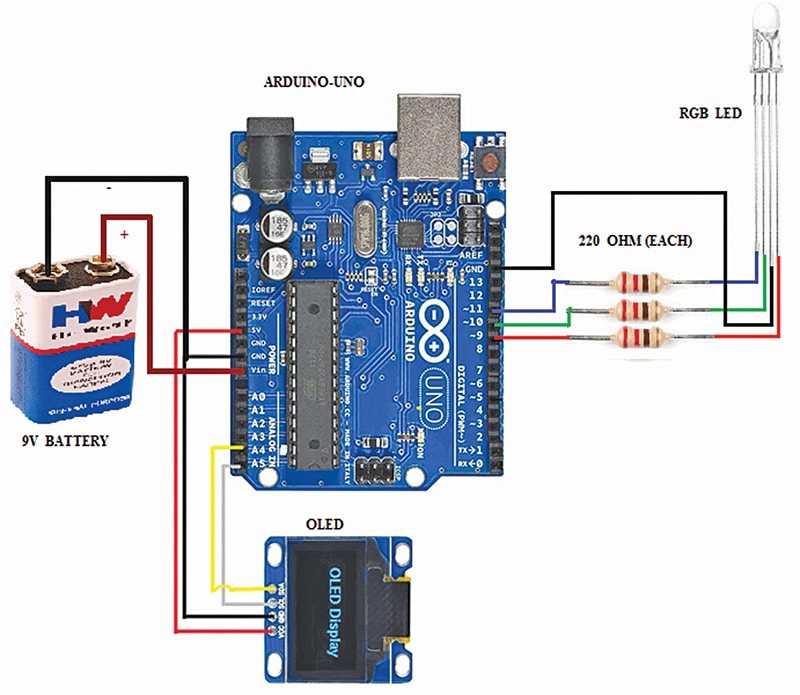
Each LED colour pin (red, green, blue) is linked to a digital output through a 220Ω resistor to limit current. Using high/low logic signals or PWM, the Arduino mixes colours, changing the LED colour every 5 seconds while updating the OLED with the corresponding colour name.
An RGB LED contains three individual LEDs—red, green, and blue—packaged together in a single unit. Each LED is connected to the Arduino through a separate 220Ω current-limiting resistor: the red LED to pin 9, the green LED to pin 10, and the blue LED to pin 11. By adjusting the brightness of each colour using PWM, a diverse set of colours can be generated.
Another component used in this system is the 2.4cm (0.96-inch) OLED display (I²C, SSD1306), connected to the Arduino via the I²C interface. The VCC pin is connected to the Arduino’s 5V pin, GND to GND, SDA (Serial Data) to analogue pin A4, and SCL (Serial Clock) to analogue pin A5, following the standard I²C pin configuration on the Arduino Uno.
Its operation involves the Arduino controlling both the RGB LED and the OLED simultaneously. The OLED can display messages, sensor readings, or system status, while the RGB LED provides visual colour-based feedback. Together, this arrangement can be applied to interactive or decorative systems where both visual display and coloured light indications are required.
Arduino Code
The software for this system is developed in the Arduino IDE, using C/C++ programming to control the RGB LED and display information on the OLED screen. The RGB LED is driven using three PWM pins (9, 10, and 11), allowing brightness control of each colour channel to produce a wide range of colours. The code includes functions to set individual LED colours and create transitions or effects. Timing functions like delay() can be used to control the speed of colour changes, while loops handle repeated sequences.
For the OLED display, the Adafruit SSD1306 and Adafruit GFX libraries are used to initialise and draw text, shapes, or images. The OLED is connected via the I²C interface (SDA to A4, SCL to A5), and the libraries handle all low-level communication with the display controller. These libraries make it straightforward to display sensor readings, system status, or messages alongside the RGB LED colour effects. The program’s setup() function initialises the OLED display and sets pin modes for the RGB LED, while the loop() function continuously updates the LED colour and OLED content based on the programmed logic.

Construction and Testing
The circuit can be assembled either on a breadboard for prototyping or on a general-purpose PCB for permanent use. For breadboard assembly, the Arduino Uno is placed separately, and jumper wires are used to connect the RGB LED and OLED display module, as shown in Fig. 2. For PCB assembly, the same connections are soldered, ensuring correct polarity for the LED and proper resistor placement, while keeping track widths adequate for stable connections.
For testing, the source code is uploaded into the Arduino Uno using a USB cable and a laptop or desktop. The assembly is then completed after removing the USB cable. The circuit is powered by a 9V battery connected to the Arduino’s DC jack.
During testing, the RGB LED cycles through different colours every 5 seconds as PWM signals are sent to pins 9, 10, and 11, while the OLED simultaneously displays the corresponding colour name. If any colour or display output is incorrect, wiring continuity should be checked, resistor values verified, and the OLED’s I²C address confirmed. Once tested and verified, the system operates as intended, providing synchronised LED colour changes and matching text descriptions on the OLED.
Rakesh Jain, Assistant Professor in ECE Department in Geetanjali Institute of Technical Studies, Udaipur, holds a master’s degree in VLSI, BE degree in electronics and communication, and diploma in electronics. His research areas are sensors and microcontrollers, and he has 31 copyrights, 9 design patents registration, 4 Indian utility patents, and 18 DIY articles published in EFY to his credit. He is recipient of Mewar Scientist Award 2023.
