


Bridging the gap created by hardware constraints, simulators are letting one prototype faster and smarter using open-source tools. What are the three powerful options that can transform a workflow in embedded system design?
When I think about the development life cycle of an embedded system, it always begins with an idea, then moves through design, implementation, testing, and finally deployment to the market.
What makes an embedded system unique is that you need both hardware and software. But if you want to test your application logic without waiting for hardware, simulation is the way to go. Emulating the platform lets you verify your ideas, integrate testing into a continuous integration (CI) pipeline, and accelerate development; all without waiting for physical boards to arrive.
Three Main Open-Source Simulators
In this space, three simulation tools are widely used: QEMU, Renode, and SimulIDE. Imagine cutting prototyping time in half or simulating entire IoT (Internet of Things) networks virtually; these tools make it possible.
QEMU
The first thing that comes to mind when talking about QEMU is its abbreviation: Quick Emulator. It has been around for many years and is the default tool for Linux-based systems. What makes it stand out is its range of use. I can use it to emulate a full operating system at the kernel level or run simple applications in user mode, making it more than a developer tool.
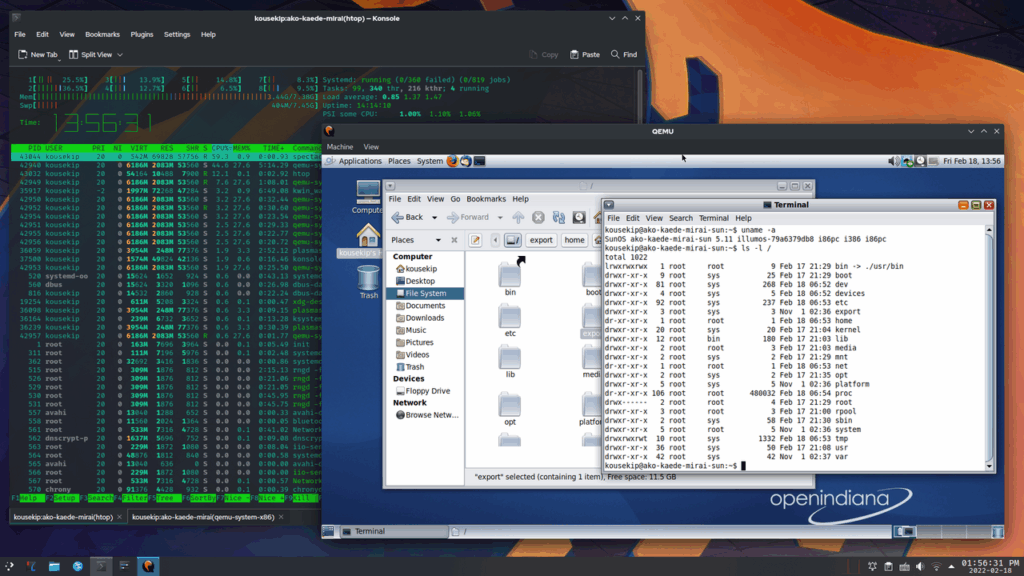
If you are working with virtualisation, QEMU serves as a solid solution. You can modify it, and most printed circuit board (PCB) suppliers provide built-in support for QEMU. It offers comprehensive documentation and community support to help you navigate any issues you may encounter.
The only drawback I see is that this tool has fewer resources for Windows than for Linux. If you want to work on QEMU, Linux is the optimal choice.
You might have noticed that the Zephyr operating system (OS) for embedded systems and IoT devices is becoming increasingly popular for real-time tasks. In embedded designers’ language, we call Zephyr a ‘little brother’ to Linux.
QEMU is optimised for emulating processor architectures and controller units. The majority of vendors that support Zephyr also provide QEMU with their software development kit (SDK), as it can quickly emulate your applications. If I am prototyping a product, I do not need to buy the hardware right away. Even if I just want to test my code, QEMU lets me do it.
I can also integrate it into my CI framework for unit or system-level testing. It gives me the flexibility to integrate with other tools, such as KVM (kernel-based virtual machine), which enables near-native performance. That means I can compile code for one platform and still run it on the host machine without worrying about the architecture it was initially built for.
Renode
Unlike other simulation tools, Renode is a framework that provides a comprehensive set of tools for testing, simulation, and debugging embedded systems. Renode is open source, built by Antmicro, but they also offer a paid version with extra features for those who need customisation. For most cases, the free version is enough.
If I am working as a system-on-chip (SoC) designer, I can use Design Studio tools to assemble components. I can use it by writing JSON config code or just by drag-and-drop. Once the design is ready, I can boot it with U-Boot and test it.
It also makes it easy to build the complete device virtually. I can connect virtual sensors, LEDs, and actuators with microcontrollers or processors.
| Renode uses the idea of a software bill of materials (SBOM), which means I can add or remove the digital components in this tool, and the software will let me know the list of materials used in the design. This makes development flexible and closer to real hardware. |
Another strong feature is multi-node simulation, which allows it to simulate multiple nodes. It is useful for simulating multiple devices connected to a single wireless system. Working with wireless devices, such as Bluetooth or Wi-Fi, I can create a setup that allows multiple devices to communicate. Renode lets me capture logs, debug, and see how the devices behave in real conditions. This is especially useful in IoT development, where devices typically work in groups rather than alone.
Renode works well with modern development practices. I can connect it to CI/CD tools like Jenkins or GitLab, so my tests run automatically whenever I update my code. These tests can be small unit tests or larger system-level tests.
The nice part of Renode is that it uses scripts for simulations, so if I share my script with a teammate, they can run the same setup on their machine and get identical results. On top of that, Renode integrates with familiar tools such as Wireshark for analysing network traffic and GDB for debugging programs.
| Renode dashboard for MCU and MPU (microcontrollers and microprocessors) Renode also gives me access to a dashboard for most of the microcontrollers it supports. The dashboard shows which boards can boot the Zephyr real-time operating system (RTOS) and whether the boot process succeeded or failed. This helps me quickly check if my board is supported. It also supports Das U-Boot (universal boot loader). If I am working with processor-based boards and want to boot an operating system using U-Boot, the dashboard shows which boards are compatible, which boot successfully, and which fail. |
This framework is compatible with all operating systems; it lets you easily move simulation files between platforms with your teammates.
SimulIDE
Lastly, I want to talk about tools that mix hardware and software. If you are someone who writes code but also wants to design circuits and see how both work together, SimulIDE is a good option to try. There are many simulators out there, but this one stands out for its simple UI and ease of use.
It looks as realistic as your real hardware; it supports many hardware components like ICs and different microcontrollers like PIC, AVR, and Arduino-related MCUs.
SimulIDE is better suited for students and hobbyists than for full-scale product developers, but it can still be very handy for quick experiments. It is open source under the general public license (GPL) version 3.
For example, I use SimulIDE to control a servo motor with a keyboard. I can press keys, see the servo rotate, and even watch the signals on an oscilloscope built into the tool. Another example is an electrocardiogram (ECG) circuit simulation, which will be useful for anyone testing algorithms related to biomedical signals. The software comes with some pre-built projects, ready to use and with code that can be modified according to our needs.
So, I can load them, edit the code directly in its built-in editor, and debug using breakpoints and register views. It also supports real-time circuit simulation, microcontrollers, and even some microprocessors.
The interface is simple and beginner-friendly, with features like a code editor and debugger all in one place.
| Are these tools secure or easy to attack? Is it safe if we want to handle customer data? Since they are open source, there is a continuous effort to keep them secure right on their GitHub pages. If any security vulnerabilities are found, they will be flagged and updated. |
This article is based on the session titled “Rapid Prototyping of Embedded Systems with Open Source Simulators” at the India Electronics Week 2025, delivered on 27 February 2025 in Bengaluru by Bharath G, Senior Lead Engineer at Collins Aerospace. It has been transcribed and curated by Janarthana Krishna Venkatesan, journalist at EFY.