




Want to turn your gadget idea into a real PCB without errors or high costs? See how PCB123 helps design and order boards quickly.
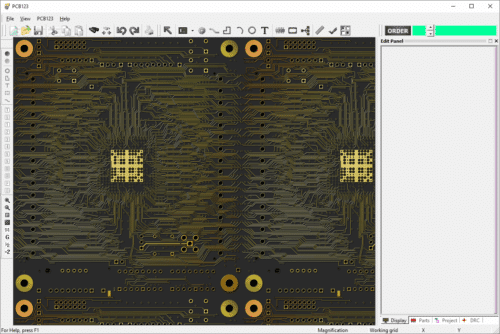
Imagine you want to build a cool electronic gadget, like a little robot or a flashing light. Inside, there are lots of tiny parts like chips, lights, and buttons, and they all need to be connected with thin paths, like roads, so electricity can flow. Doing this task manually can be very difficult and prone to a lot of errors. You might end up with a non-working device.
You have a variety of tools available on the market that can help you achieve this. These tools are called Electronic Design Automation (EDA) tools.
Today, we are going to discuss one such tool, which is very simple to use and is free to use initially. “PCB123 is easy to design, easy to get started, and supports both automatic and manual wiring for flexible PCB design needs”, a user added.
PCB123, developed by Sunstone Circuits, is a full-featured PCB design software that can help you if you have just started designing PCBs or if you are an engineer, hobbyist, or professional.
Consider this tool as a super-smart drawing board on a computer that helps you plan the path and where to put all the parts. You can move things around, draw connections, and check that everything works before you actually build it.
What sets it apart is its unique risk-sharing model. You don’t pay until your design is ready to go. Free access to the software allows anyone to start designing immediately.
PCB123 combines intuitive design tools with professional-grade features. It includes schematic capture, PCB layout, autorouting, real-time design rule checks, and Bill-of-Materials (BOM) management, making it possible to handle even complex designs efficiently.
The tool also offers extensive component libraries and a 3D viewer, helping users visualize multi-layer boards and ensure every element fits correctly before production.
Beyond design, PCB123 streamlines the path from concept to manufacturing. Built-in functions allow users to place orders directly through the tool, with guaranteed on-time delivery or free boards.
Features like unrestricted drill sizes, slots and cutouts, and automatic synchronization of schematic, layout, and BOM keep designs accurate and manufacturing-ready.
Real-time quoting, Design for Manufacturability (DFM) checks, and access to Sunstone’s full manufacturing capabilities ensure every design is practical and producible.
PCB123 Latest Release
The latest version of PCB123 is 5.7.5, though the public release date is not listed. This version fixes problems with rat’s nest lines that appeared in the previous release.
In PCB design, when you first connect components, the software shows “spaghetti-like” lines between pins that need to be routed. These messy lines are called rat’s nest lines. They help you see what still needs to be connected. In the previous version, these lines might have behaved incorrectly. The latest version fixed those problems.
With version 5.7.5, older designs are automatically checked when opened, and any missing rat’s nest lines are restored. This check also happens every time you run the DRC (Design Rule Check).
PCB123 Core Features
As discussed earlier, PCB123 is a professional PCB design software that goes beyond basic functions. Here are a few core features of PCB123:
- Component Library Integration with SnapEDA – SnapEDA has millions of verified components. Adding new components and building libraries is simple, allowing you to quickly create a BOM, saving time and reducing manual work.
- Schematic Capture – PCB123 makes creating and editing schematics easy. Changes are synchronized with the PCB layout, reducing errors between schematic and layout views.
- Flexible Routing – You can manually route wires for custom designs or use automatic routing to optimize layout alignment.
- 3D Rendering – The 3D view lets you check the PCB before production, helping spot alignment or layout errors and minimizing production mistakes.
- Rule Checking (DRC) – Real-time Design Rule Checking marks design errors as they happen, checking for conflicts or violations to improve PCB accuracy.
- Order Integration – PCB123 includes an “Order” button that connects directly to
- Sunstone Circuits, allowing smooth transition from design to manufacturing, including prototype and production options.
- Manufacturing Options – PCB123 supports various board specifications, including different thicknesses, tight tolerances, special copper thicknesses, and complex cutouts—perfect for advanced R&D and specialized applications.
“The main advantage of PCB123 is its low cost and high quality output, but it is not fully compatible with other high-end software such as Altium Designer and requires additional software support,” said one user.
Benefits offered
I am listing a few benefits which you can leverage while using this tool for PCB design.
- Cost-Effective – It is affordable for everyone, from hobbyists to large companies. Its online quoting system provides instant pricing, helping users stay within budget.
- Efficient Design Process – It makes designing PCBs fast and easy. The software is user-friendly, with many design tools and a library of pre-made components to simplify the design process.
- Quick Turnaround Time – It offers fast PCB manufacturing with delivery options like standard, expedited, or overnight. Users can choose quick-turn or full production runs based on their needs.
- High-Quality Manufacturing – It ensures high-quality production using advanced equipment and processes. Testing and inspection services make sure every PCB meets required specifications.
PCB123 Limitations
If we talk about any tool, it will always have a few benefits and a few disadvantages. We have seen the pros. Let us now focus on the cons.
- Very capable software, offering more features than other free PCB tools, which may feel complex for beginners.
- Designs are intended to be ordered from Sunstone only.
- Limited export options; can only save as images or use workarounds for other software.
- It takes time to learn and understand all features.
- Auto-routing is limited (one trace width).
- Steep learning curve for beginners.
- Documentation and user forum are mediocre.
Irrespective of these limitations the tool helps you build your device PCB perfectly and easily. The best part is PCB123 is free PCB design software. It uses a “risk-sharing” model: the software is free, and you only pay when you order manufactured PCBs. The program is available for Windows users.
PCB123 is a useful tool for anyone who wants to design PCBs, whether you are a beginner, hobbyist, or professional. It helps you plan your board, connect components, and check for errors before making it.
The software is free to start, and you only pay when you order the boards. While it can take time to learn all its features and has some limits, PCB123 makes designing and making PCBs much easier and faster, helping you turn your electronic ideas into real devices. To get started, click here.

