

Smart speakers such as Alexa, Google Home, and Apple Home have transformed how people interact with technology, enabling voice-based control of smart devices, instant access to information, and efficient task management. However, most still rely on predefined responses and offer limited intelligence compared to modern generative AI systems.
To overcome these limitations, a Generative AI smart speaker has been developed using advanced large language models (LLMs). Unlike conventional smart speakers, it can generate stories, poems, jokes, emails, and other content on demand while providing more intelligent assistance for everyday tasks. The system supports multiple AI platforms, enabling seamless switching between providers such as OpenAI, DeepSeek, Grok, and others.
POC Video Tutorial
To further extend its capabilities, the smart speaker incorporates a camera. This allows it to read and transcribe books, scan documents, identify objects, describe surroundings, and provide contextual information about items or locations within view. It can also function as a real-time language interpreter and an assistive device for visually impaired users. The prototype is shown in Fig. 1.

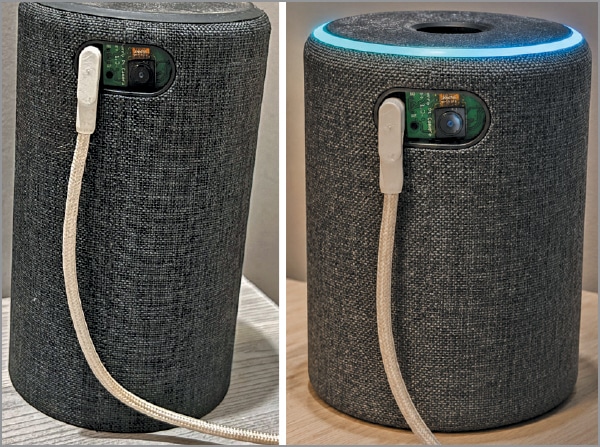
The core of this design is a Raspberry Pi board (such as the Raspberry Pi Zero W, Raspberry Pi 4, Raspberry Pi 5, or a similar model) equipped with Bluetooth Low Energy (BLE) and Wi-Fi connectivity. For audio input and output, a Raspberry Pi-compatible voice HAT with microphone and speaker support is required. In the prototype, a Google Voice Bonnet is used for audio processing. Video capture is handled by the official Raspberry Pi camera, which connects directly to the Raspberry Pi through its CSI camera interface.
Along with these key modules, several supporting components are required to complete the system. The components needed to build the system are listed in the Bill of Materials table.
| Bill Of Materials | ||
| Name | Description | Quantity |
| Raspberry Pi Zero W/Raspberry Pi 4/ Raspberry Pi 5 | Single-board computer (SBC) | 1 |
| RPi camera | 4MP Raspberry Pi CSI camera | 1 |
| Voice bonnet/Sound HAT | Raspberry Pi audio HAT | 1 |
| 4Ω-10Ω speaker | Speaker for Raspberry Pi | 2 |
| Raspberry Pi CSI camera cable | CSI FPC cable | 1 |
| 5V, 2A AC-DC adaptor | 5V, 2A power supply for Raspberry Pi and speaker | 1 |
Software
First, install Raspberry Pi OS and Python on the Raspberry Pi. If the Raspberry Pi already includes a pre-configured SD card, this step can be skipped. The prototype described here uses a Voice Bonnet kit supplied with Raspberry Pi OS, Python, and the required audio configurations pre-installed.
Next, obtain an API key from the generative AI service intended for use. The software supports multiple LLM platforms, including OpenAI ChatGPT, Gemini, Grok, DeepSeek, and others. Simply create an account with the preferred provider and generate an API key. Depending on the provider and model, access may be free or paid.
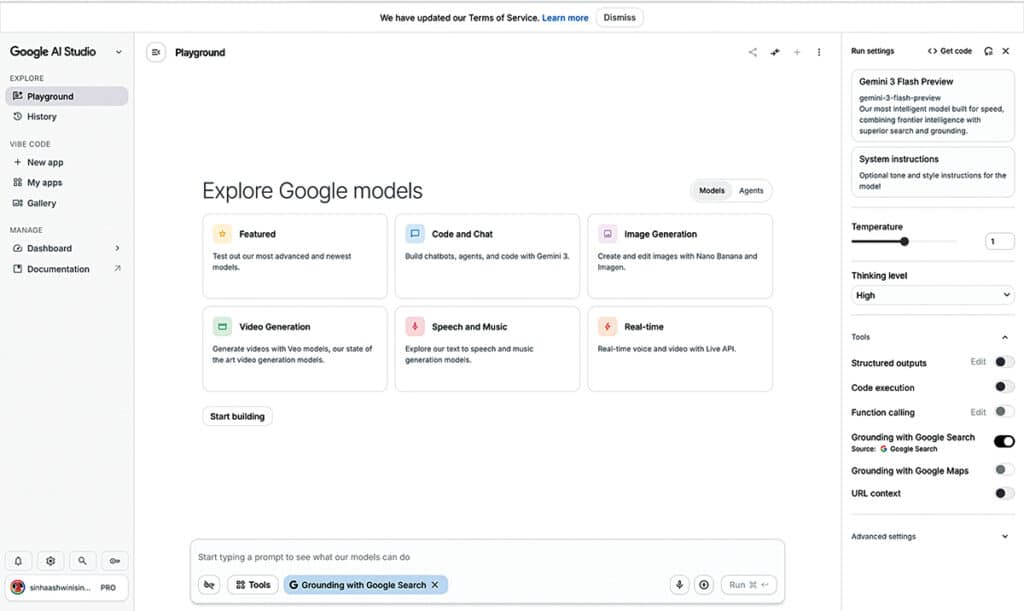
For this system, Google’s free Gemini model is used. After logging into the Gemini API dashboard, generate an API key and save it for later use in the software configuration. Fig. 2 shows the process of creating a Gemini API key.
Next, install the Python libraries required for the Generative AI Smart Speaker. These libraries support wake-word detection, voice capture, speech recognition, camera interfacing, AI model communication, and audio playback. Open the terminal in Raspberry Pi OS and install the required modules using:
sudo pip3 install <module_name>For example:
sudo pip3 install openwakewordSimilarly, install the following libraries:
- openwakeword – Detects the wake word and activates the smart speaker
- pyaudio – Captures audio from the microphone
- speech_recognition – Converts speech into text
- openai – Provides access to generative AI and LLM services
- numpy – Performs numerical and data-processing operations
- gtts – Converts text responses into speech
- pygame – Plays audio responses through the speaker
- opencv-python – Captures and processes images from the camera
- base64 – Encodes image data before sending it to AI models. This module is included with Python and does not require installation
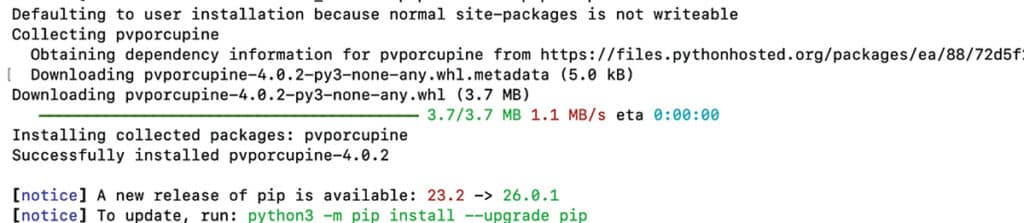
After all the required modules have been installed, the Raspberry Pi is ready for software development and AI integration. Fig. 3 shows the installation of Python modules.
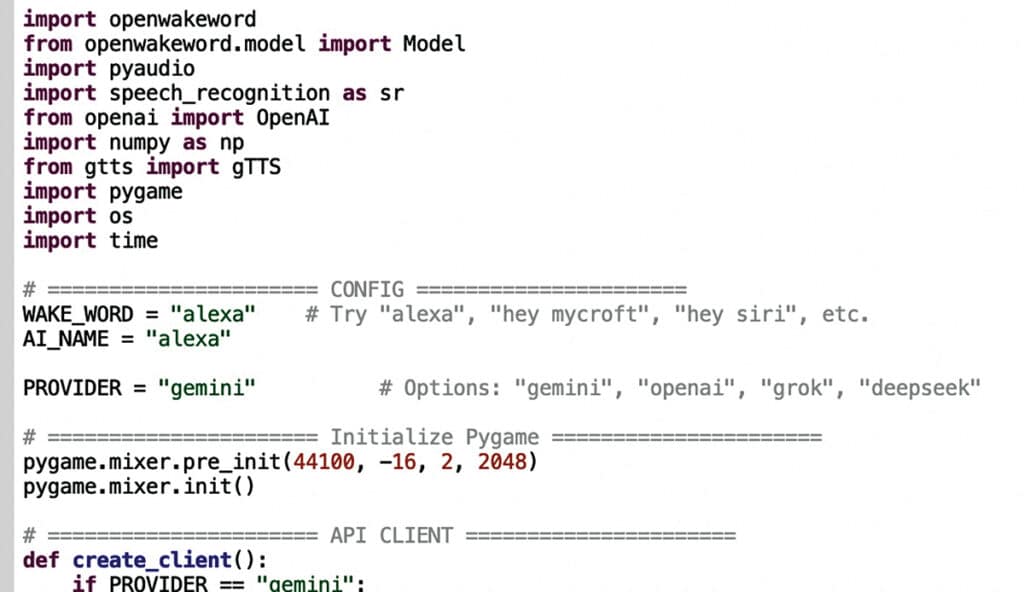
After installing all the required libraries, the next step is to prepare the software for the generative AI smart speaker. The code begins by importing the necessary Python modules and configuring the API key and the LLM model to be used. In this system, Gemini is used as the AI provider.
Next, define the assistant’s name and the wake word used to activate the smart speaker. A custom wake word can be trained, or one of the pre-trained wake words available with OpenWakeWord can be used, such as Alexa, Jarvis, Mycroft, or Siri. In the prototype, the Alexa wake word was selected, and the assistant was also named Alexa for simplicity and ease of use. Fig. 4 shows the import of the Python module and the configuration of the AI name and wake word.
Next, create functions for commands used to control smart-home appliances or perform other automation tasks. These functions can operate Raspberry Pi GPIO pins or communicate with external devices and services through APIs. When a spoken command matches a predefined function, the corresponding action is executed immediately.
If the command does not match any predefined function, the speech is sent to the configured LLM through its API. The AI model then generates an appropriate response, enabling the speaker to answer questions, tell jokes and stories, provide news and weather updates, and perform a wide range of conversational tasks. The system supports multiple LLM providers and can be switched easily to another model by updating the configuration and API key.
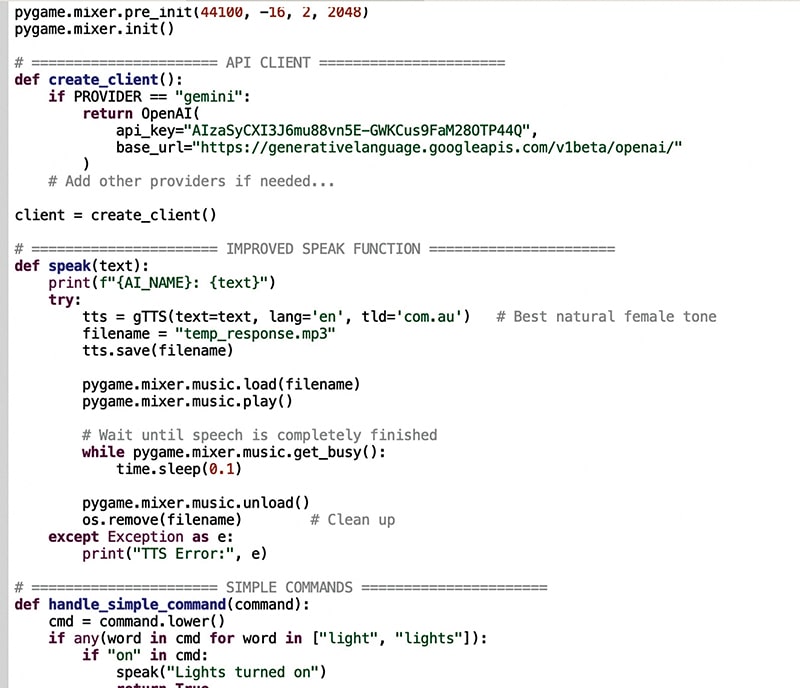
To extend its capabilities, additional functions for image analysis, translation, and transcription have been implemented. Using OpenCV and a connected camera, the smart speaker can capture images, identify objects, read text from books or documents, and describe its surroundings. It can also translate languages, transcribe speech, and assist with multilingual conversations. These features make the generative AI smart speaker significantly more capable than conventional smart speakers. Fig. 5 shows the code snippet used to configure the API connection to the generative AI model.
Connection