Large language models are machine learning models designed for a range of language-related tasks such as text generation and translation. Here’s how open source software can help you build your own large language model.
A large language model (LLM) is an advanced artificial intelligence system designed to process and generate human-like text based on vast amounts of data. These models leverage deep learning techniques, particularly transformer architectures, to understand, predict, and generate natural language.
Popular examples include:
- OpenAI’s GPT
- Google’s Gemini
- Meta’s Llama
- DeepSeek
LLMs can perform various tasks such as text generation, summarisation, translation, sentiment analysis, and even code generation, making them powerful tools for numerous applications.
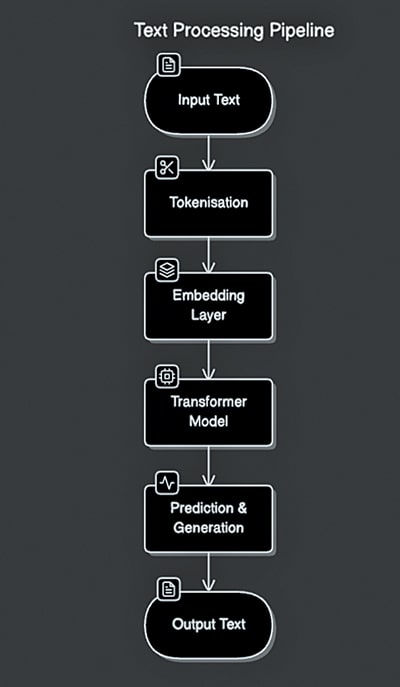
While many organisations rely on commercial AI models like OpenAI’s GPT or Google’s Gemini, there are compelling reasons to build a custom LLM, such as:
- Tailoring the model for industry-specific needs, such as legal, healthcare, or finance, ensuring better accuracy and relevance.
- Reducing reliance on expensive API calls from proprietary providers, leading to long-term cost savings.
- Enhancing data privacy and security by keeping sensitive information in-house rather than relying on third-party providers.
- Fine-tuning models for specialised tasks, improving performance over generic solutions.
- Maintaining independence from commercial AI providers and their pricing models or usage restrictions.
Open source models like BLOOM, GPT-Neo, and Llama provide flexible alternatives to proprietary models while requiring technical expertise for setup and maintenance. When deciding between open source and proprietary solutions, key differences must be considered (Table 1).
| Table 1 Key differences between open source and proprietary solutions | ||
| Feature | Open Source LLMs | Proprietary LLMs |
| Customisation | Full control over modifications and fine-tuning | Limited customisation options |
| Cost | Typically lower upfront cost but require infrastructure | Pay-per-use pricing is potentially expensive |
| Data privacy | Can be deployed on-premises for complete control | Data may be stored and processed externally |
| Scalability | Require own infrastructure and expertise | Scalable cloud-based solutions |
| Support and updates | Community-driven support | Enterprise-grade support and frequent updates |
What you should consider before building your own LLM
Here’s a detailed breakdown of crucial factors.
Define your use case
Specificity
Don’t just say ‘chatbot’. Define the exact purpose. Will it be for customer service, technical support, creative writing assistance, code generation, or something else? The more specific you are, the better you can tailor your LLM.
- Target audience. Who will be using this LLM? Their needs and expectations will influence the model’s design and training.
- Desired output. What kind of output are you looking for? Text, code, summaries, translations? The format and style of the output are important considerations.
- Performance metrics. How will you measure the success of your LLM? Accuracy, fluency, relevance, response time? Define these metrics before you start building.
- Integration. How will the LLM integrate with your existing systems and workflows? APIs, deployment environment, etc.
- Ethical considerations. What are the potential biases in your data and how will you mitigate them? How will you ensure responsible use of the LLM?
Hardware requirements
Training an LLM is computationally intensive and demands robust hardware. Consider:
GPUs/TPUs
Nvidia A100, H100, or Google TPUs are commonly used for deep learning tasks.
Memory requirements
Higher RAM and VRAM are needed to handle large datasets efficiently.
Cloud vs on-premises
AWS, Google Cloud, and Azure offer scalable GPU/TPU instances. More control over infrastructure requires a higher upfront investment.
Data: The training material
Data is very crucial to any LLM. It’s what fuels its learning. First, you need to find your data: public datasets, web scraping, or your own files. But quantity isn’t everything—quality is key. Clean, consistent, and unbiased data is essential. Think of it as giving your LLM a healthy diet. A small amount of good data is better than mountains of junk. Make sure your data is diverse, too, reflecting the real world.
Before feeding it to your LLM, you’ll need to prepare it: breaking down text, ensuring consistency, and handling missing bits. And if you’re using sensitive data, protect it! Privacy is paramount.
Budget and regulatory compliance
Building an LLM involves two crucial, intertwined aspects: your budget and regulatory compliance. Think of them as the financial and legal guardrails of your project.
First, you need a realistic budget. This covers everything from cloud computing costs (which can be substantial) and data acquisition fees to salaries for your team of experts. Don’t forget software, tools, and ongoing maintenance. But your budget isn’t just about spending; it’s also about spending wisely.
That’s where regulatory compliance comes in. Failing to comply with data privacy laws (like GDPR or CCPA), intellectual property rights, or other relevant regulations can lead to hefty fines and legal trouble, blowing your budget out of the water. So, compliance isn’t just a legal necessity; it’s a financial one.
Factor compliance costs into your budget from the start. This might include legal consultations, data anonymisation tools, or security audits. By considering both budget and compliance together, you can ensure your LLM project is not only innovative but also financially sound and legally secure.
Popular open source frameworks for building LLMs
Hugging Face Transformers
Hugging Face Transformers is one of the most popular open source libraries for working with LLMs. It provides an easy-to-use interface for deploying and fine-tuning transformer models, making it an essential tool for researchers and developers.
Strengths
- Vast model repository with thousands of pretrained models.
- Simple APIs for inference and training.
- Strong community support and extensive documentation.
- Supports multiple frameworks, including PyTorch and TensorFlow.
Use cases
- Text generation and summarisation
- Sentiment analysis
- Question answering and conversational AI
Hugging Face hosts a vast collection of pretrained models, such as BERT, GPT-2, T5, and BLOOM. Users can fine-tune these models on custom datasets using transfer learning, reducing computational costs compared to training from scratch.
OpenAI’s GPT models (via open source APIs)
Although OpenAI’s latest GPT models are not fully open source, it provides APIs for accessing models like GPT-4 and GPT-3.5. Community-driven implementations, such as GPT-J by EleutherAI, attempt to provide open alternatives.
Key points
- OpenAI’s API provides access to powerful models but requires usage-based licensing.
- Open implementations like GPT-NeoX offer community-driven alternatives.
- GPT models excel in text completion, summarisation, and conversational AI applications.
PyTorch and TensorFlow
PyTorch and TensorFlow are foundational deep-learning frameworks used for developing LLMs from scratch or fine-tuning existing ones.Table 2 compares them.
| Table 2: A comparison of PyTorch and TensorFlow | ||
| Feature | PyTorch | TensorFlow |
| Flexibility | Dynamic computation graph for flexibility | Optimised for large-scale production deployments |
| Adoption | Popular among researchers and academics | Backed by Google with strong enterprise adoption |
| Ecosystem | Strong Hugging Face integration | Extensive tools for model optimisation and serving |
LangChain
LangChain is an open source framework designed to build LLM-powered applications by integrating different components like memory, tools, and agents.
Features
- Simplifies building AI-powered workflows.
- Provides modules for context-aware reasoning and tool use.
- Compatible with multiple LLM providers, including OpenAI and Hugging Face.
Use cases
- Chatbots with memory
- Document summarisation
- Autonomous AI agents
Rasa
Rasa is an open source framework tailored for building AI-driven chatbots and virtual assistants.
Key features
- NLU (natural language understanding) and dialogue management.
- On-premises deployment for data privacy.
- Customisable and extensible architecture.
Use cases
- Customer service automation
- Enterprise chatbots
- Voice assistants
Table 3 lists several other projects that contribute to the open source LLM landscape.
| Table 3: Other open source LLM frameworks | |
| EleutherAI (GPT-Neo, GPT-J, GPT-NeoX) | Open source alternatives to OpenAI’s GPT models. |
| Cohere | Provides API-based access to large language models. |
| BLOOM | A multilingual open source LLM developed by the BigScience initiative. |
| Table 4: Tools for preprocessing and managing training data | ||
| Category | Description | Popular tools |
| Data cleaning and annotation | Before training a model, data must be cleaned and properly labelled. This ensures accuracy and reduces biases in machine learning models. Annotation tools help in tagging datasets for supervised learning. | Prodigy (AI-assisted annotation), Label Studio (open source data labelling), Snorkel (programmatic data labelling) |
| Dataset management | Keeping track of dataset versions, changes, and metadata is crucial for reproducibility in ML projects. Dataset management tools help maintain consistency and collaboration. | Weights & Biases (W&B) (experiment tracking and dataset versioning), DVC (Data Version Control, Git-like versioning for datasets) |
| Synthetic data generation | When real-world data is insufficient or lacks diversity, synthetic data generation can create realistic, model-ready datasets. AI-powered tools can generate high-quality training data for various applications. | GPT-based generators (AI-generated synthetic data), Other tools (custom solutions for domain-specific needs) |
Training and fine-tuning large language models
Fine-tuning basics
Fine-tuning an LLM involves training a pre-trained model on a smaller, task-specific dataset to improve performance on a particular use case. This is useful when:
- The base model is too general and lacks domain-specific knowledge.
- Performance on a specific task is suboptimal using a pre-trained model.
- Data privacy or customisation is required, and external APIs are not an option.
- Improving efficiency by training a smaller model on targeted data instead of using a massive model.
Frameworks for fine-tuning
Several frameworks facilitate fine-tuning LLMs efficiently.
Hugging Face Trainer
The trainer API from Hugging Face simplifies the training process.
from transformers import Trainer,
TrainingArguments,
AutoModelForSequenceClassification,
AutoTokenizer from datasets import
load_dataset

# Load dataset and model
dataset = load_dataset(“imdb”)
model = AutoModelForSequenceClassification.
from_pretrained(“bert-base-uncased”,
num_labels=2)
tokenizer = AutoTokenizer.from_
pretrained(“bert-base-uncased”)

def preprocess_data(examples):
    return tokenizer(examples[“text”],
truncation=True, padding=True)

dataset = dataset.map(preprocess_data,
batched=True)

# Define training arguments
training_args = TrainingArguments(
    output_dir=”./results”, per_device_
train_batch_size=8, num_train_epochs=3,
logging_dir=”./logs”
)

# Trainer instance
trainer = Trainer(
    model=model, args=training_args,
train_dataset=dataset[“train”], eval_
dataset=dataset[“test”]
)

trainer.train()
PyTorch Lightning
PyTorch Lightning offers a structured approach for scalable model training.
import pytorch_lightning as pl
from transformers import AutoModel,
AutoTokenizer class
LLMFineTuner(pl.LightningModule):
    def __init__(self, model_name=”
bert-base-uncased”, num_labels=2):
        super().__init__()
        self.model = AutoModel.from_
pretrained(model_name, num_labels=num_
labels)

    def forward(self, x):
        return self.model(x)
Distributed training
For large scale fine-tuning, distributed training tools help efficiently utilise multiple GPUs or TPUs.
DeepSpeed
Optimises large scale training with memory-efficient techniques.
Horovod
Open source framework for distributed deep learning.
Ray Train
Provides scalable model training across clusters.
Here’s an example for enabling DeepSpeed in Hugging Face Trainer:
training_args = TrainingArguments(
    output_dir=”./results”,
    per_device_train_batch_size=8,
    num_train_epochs=3,
    logging_dir=”./logs”,
    deepspeed=”ds_config.json”  #
DeepSpeed config file
)
Optimising training
Using FP16 precision (instead of FP32) speeds up training and reduces memory consumption.
training_args = TrainingArguments(fp16=True, output_dir=”.
/results”)
Checkpointing
Saving checkpoints ensures training can resume after interruptions.
training_args = TrainingArguments(save_steps=500,
save_total_limit=3, output_dir=”./results”)
Evaluation and deployment of machine learning models
Evaluating a machine learning model is a crucial step to ensure its performance and reliability before deployment. Various metrics and benchmark datasets are used to assess the effectiveness of the model.
Evaluation metrics
Depending on the type of model and task, different evaluation metrics are used.
- Perplexity.Commonly used in language models, Perplexity measures how well a probability distribution predicts a sample.
- BLEU (Bilingual Evaluation Understudy).Evaluates the quality of machine-generated translations against human references.
- ROUGE (Recall-Oriented Understudy for Gisting Evaluation). Measures the overlap of n-grams between the model’s output and a reference text, often used for text summarisation.
- Accuracy, Precision, Recall, F1-score. Used in classification models to measure correctness and performance.
- Mean Squared Error (MSE) and R-squared.Applied in regression tasks to measure prediction errors.
Benchmark datasets
Benchmark datasets provide standardised comparisons for model evaluation
(Table 5).
| Table 5: Benchmark datasets | |
| GLUE | A collection of tasks for evaluating natural language understanding (NLU) models. |
| SuperGlue | An advanced version of GLUE designed for more complex language tasks. |
| ImageNet | A widely used dataset for image classification models. |
| MS COCO | Used for object detection and image captioning models. |
| SQuAD | A dataset for evaluating question-answering models. |
Once a model is evaluated and optimised, it is deployed to serve real-world applications. Several tools and frameworks facilitate deployment (Table 6).
| Table 6: Deployment tools | |
| ONNX | Enables interoperability between different deep learning frameworks, allowing models trained in one framework to be deployed in another. |
| TensorRT | A high-performance deep learning inference library optimised for Nvidia GPUs. |
| Hugging Face Inference API | Provides pre-trained models with an easy-to-use API for quick deployment. |
Building your own LLM may seem daunting, but with the right open source tools, the process is more accessible than ever. The key is to start small—experiment with fine-tuning an existing model before scaling up to full-fledged training.
Whether you’re building a proprietary AI assistant, a specialised content generator, or a research-driven model, the open source community has provided everything you need.
Ready to build your LLM? Choose your framework, set up your environment, and start training today!
The future of AI is open source—be part of the revolution!
This article was first published in April 2025 issue of Open Source For You magazine.
The author, Raj Patel, is a SaaS enthusiast and technical content creator.