




Augmented reality (AR) is an enhanced version of reality created by the use of technology to add some digital information on an image. Or else we can say that AR is a live direct or indirect view of a physical, real-world environment whose elements are augmented by computer-generated perceptual information.
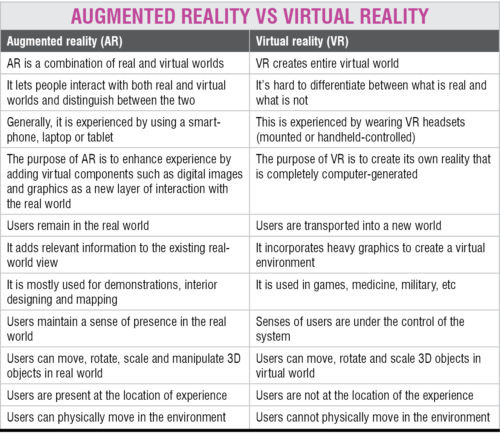
Virtual reality (VR) is a completely computer-generated scenario that simulates a realistic experience. In simple words, it is an artificial, computer-generated simulation/recreation of a real-life environment. VR generates realistic images and sounds that put you in the middle of a spectacular imaginary world. AR adds virtual stuff to the real-world environment. The differences between the two are listed in the table on this page.
Also read: Virtual Reality is now moving towards real-life scenarios.
Also read: Guidelines for Virtual Reality.
Let’s break it down in simple, practical terms.
- Augmented Reality (AR) adds digital elements on top of the real world.
- Virtual Reality (VR) completely replaces the real world with a fully virtual environment.
Think of it this way:
- AR = real world plus digital
- VR = real world replaced by digital
What Is Augmented Reality (AR)?
Augmented Reality overlays computer-generated images, sounds, or information onto your real-world view. You still see your surroundings—AR just enhances them.
How AR Works
AR typically uses:
- Smartphone cameras
- Tablets
- AR glasses
- Sensors and computer vision
The device detects the real environment and places digital objects in the correct position.
Everyday Examples of AR
- Instagram/Snapchat face filters
- Pokémon Go gameplay
- IKEA furniture preview apps
- Heads-up displays in cars
- Industrial maintenance overlays
Key Characteristics of AR
- You remain in the real world
- Digital content is layered on reality
- Usually works on phones or lightweight glasses
- Less immersive but more practical for daily use
What Is Virtual Reality (VR)?
Virtual Reality creates a completely computer-generated environment that replaces your real surroundings. When you wear a VR headset, the physical world disappears and you are fully immersed in a digital space.
How VR Works
VR systems typically include:
- VR headset (HMD)
- Motion controllers
- Sensors or cameras
- Powerful graphics processing
The headset blocks your view of the real world and shows a 3D virtual environment that responds to your head and body movements.
Common Uses of VR
- Immersive gaming
- Flight simulators
- medical training
- virtual tours
- military and safety training
- metaverse experiences
Key Characteristics of VR
- Fully immersive
- Real world is blocked out
- Requires dedicated headset
- High engagement and presence
AR vs VR: Side-by-Side Comparison
| Feature | Augmented Reality (AR) | Virtual Reality (VR) |
|---|---|---|
| Environment | Real world enhanced | Fully virtual world |
| Immersion level | Partial | Complete |
| Hardware | Phone, tablet, AR glasses | VR headset required |
| User awareness | User sees surroundings | User isolated from real world |
| Complexity | Generally lighter | More hardware intensive |
| Best for | Daily utility, retail, maintenance | Gaming, simulation, training |
When Should You Use AR?
AR is the better choice when you want to enhance real-world tasks without disconnecting users from their environment.
Ideal AR Applications
- Smart maintenance and repair
- Retail try-before-you-buy
- Navigation overlays
- Classroom learning aids
- Industrial field support
Why industries love AR:
It improves productivity without removing situational awareness.
When Should You Use VR?
VR shines when the goal is full immersion and deep engagement.
Ideal VR Applications
- Gaming and entertainment
- Safety training simulations
- Medical procedure training
- Virtual tourism
- Design visualization
Why VR is powerful:
It can simulate dangerous, expensive, or impossible real-world scenarios safely.
The Middle Ground: Mixed Reality (MR)
You may also hear about Mixed Reality (MR).
MR goes a step further than AR by allowing digital objects to interact with the real world in real time. Think of it as AR with deeper environmental understanding.
Simple hierarchy:
- AR → overlays
- MR → interactive overlays
- VR → fully virtual world
Future Outlook: AR vs VR in the Real World
Both technologies are growing fast, but their adoption patterns differ.
AR Growth Drivers
- Smartphone compatibility
- Enterprise productivity use cases
- Lower hardware barrier
- Industrial digital transformation
VR Growth Drivers
- Gaming ecosystem
- Training simulations
- Falling headset costs
- Metaverse development
Industry trend:
- AR is dominating enterprise and industrial use
- VR is leading in gaming and immersive training
Final Thoughts
Augmented Reality and Virtual Reality are not competitors—they are complementary technologies solving different problems.
- Choose AR when you want to enhance reality.
- Choose VR when you want to replace reality.
As hardware improves and AI becomes more deeply integrated, the line between AR, MR, and VR will continue to blur.

