Verilator is a Verilog hardware description language (HDL) simulator that can compile synthesisable Verilog code into C++ or SystemC. It is designed primarily for high-performance simulations, and supports simple assertions and code-coverage analysis. It is released under GNU LGPL/Perl artistic licence. You can install it on Fedora 20 (x86_64) using the following:
[stextbox id=”grey”]$ sudo yum install verilator[/stextbox]
Consider a simple hello.v example.

[stextbox id=”grey”]
module hello;

initial begin
$display(“Hello!”);
$finish;
end
endmodule
[/stextbox]
A C++ wrapper file is written to test drive the hello module.
[stextbox id=”grey”]
#include “Vhello.h”
#include
int
main (int argc, char **argv, char **env)
{
Verilated::commandArgs(argc, argv);
Vhello* top = new Vhello;
while (!Verilated::gotFinish()) { top -> eval(); }
exit (0);
}
[/stextbox]
You can compile the above code with Verilator and generate required simulation files with –cc.
[stextbox id=”grey”]$ verilator –cc hello.v –exe main.cpp[/stextbox]
Before running main.cpp, you need to install gcc and gcc-C++ in your system.
This produces obj_dir with Makefiles and C++ code. These generated files can then be compiled using the following:
[stextbox id=”grey”]
$ cd obj_dir
$ make -j -f Vhello.mk Vhello
g++ -I. -MMD -I/usr/share/verilator/include \
-I/usr/share/verilator/include/vltstd -DVL_PRINTF=printf \
-DVM_TRACE=0 -DVM_COVERAGE=0 \
-c -o main.o ../main.cpp
g++ -I. -MMD -I/usr/share/verilator/include \
-I/usr/share/verilator/include/vltstd -DVL_PRINTF=printf \
-DVM_TRACE=0 -DVM_COVERAGE=0 \
-c -o verilated.o /usr/share/verilator/include/
verilated.cpp
/usr/bin/perl /usr/share/verilator/bin/verilator_includer \
Vhello.cpp > Vhello__ALLcls.cpp
/usr/bin/perl /usr/share/verilator/bin/verilator_includer \
Vhello__Syms.cpp > Vhello__ALLsup.cpp
g++ -I. -MMD -I/usr/share/verilator/include \
-I/usr/share/verilator/include/vltstd -DVL_PRINTF=printf \
-DVM_TRACE=0 -DVM_COVERAGE=0 \
-c -o Vhello__ALLsup.o Vhello__ALLsup.cpp
g++ -I. -MMD -I/usr/share/verilator/include \
-I/usr/share/verilator/include/vltstd -DVL_PRINTF=printf \
-DVM_TRACE=0 -DVM_COVERAGE=0 \
-c -o Vhello__ALLcls.o Vhello__ALLcls.cpp
Archiving Vhello__ALL.a …
ar r Vhello__ALL.a Vhello__ALLcls.o Vhello__ALLsup.o
ar: creating Vhello__ALL.a
ranlib Vhello__ALL.a
g++ main.o verilated.o Vhello__ALL.a -o Vhello -lm
-lstdc++ 2>&1 | c++filt
[/stextbox]
You can test the hello module with the following command:
[stextbox id=”grey”]
$ cd ..
$ ./obj_dir/Vhello
Hello!
– hello.v:5: Verilog $finish
[/stextbox]
Verilator accepts a number of arguments as options. -V lists the version of the software and provides a summary of configuration and environment settings. A pre-processing output of the code is produced with -E, without actually compiling or generating any code. This is illustrated below.
[stextbox id=”grey”]
$ verilator -cc hello.v -E
`line 1 “hello.v” 1
module hello;
`line 3 “hello.v” 0
initial begin
$display(“Hello!”);
$finish;
end
endmodule
`line 9 “hello.v” 2
[/stextbox]
-CFLAGS allows the user to override any C++ compiler flags during the build process. For example,
[stextbox id=”grey”]$ verilator -cc hello.v -CFLAGS -O0 –exe main.cpp[/stextbox]
The respective flags are passed to the compiler in the generated Makefiles. -O0 disables optimisation. The user can explicitly specify the level of optimisation with -On, where n is an integer. The highest level of optimisation is -O3.
Verilator can also produce SystemC output with -sc. SystemVerilog support also exists, and the relevant code can be generated with -sv.
If you want to analyse the intermediate steps in the compilation process, you can use –dump-tree:
[stextbox id=”grey”]
$ verilator –dump-tree –cc hello.v –exe main.cpp
dot -Tps -o ~/a.ps obj_dir/Vhello_01_linkcells.dot
dot -Tps -o ~/a.ps obj_dir/Vhello_21_task_call.dot
dot -Tps -o ~/a.ps obj_dir/Vhello_33_gate_simp.dot
dot -Tps -o ~/a.ps obj_dir/Vhello_34_gate_opt.dot
dot -Tps -o ~/a.ps obj_dir/Vhello_40_orderg_pre.dot
dot -Tps -o ~/a.ps obj_dir/Vhello_41_orderg_acyc.dot
dot -Tps -o ~/a.ps obj_dir/Vhello_42_orderg_order.dot
dot -Tps -o ~/a.ps obj_dir/Vhello_43_orderg_domain.dot
dot -Tps -o ~/a.ps obj_dir/Vhello_44_ordermv_simpl.dot
dot -Tps -o ~/a.ps obj_dir/Vhello_45_orderg_done.dot
[/stextbox]
–cdc performs a clock domain crossing (CDC) analysis, which can be invoked on an input module as follows:
[stextbox id=”grey”]$ verilator -cc input.v –cdc[/stextbox]
Verilator can check for warnings. Consider the following Verilog code:
[stextbox id=”grey”]
module test;
wire a, b, c;
and (x, b, c);
endmodule
[/stextbox]
An implicit warning is produced by Verilator as shown below:
[stextbox id=”grey”]
$ verilator -cc lint.v –exe main.cpp
%Warning-IMPLICIT: lint.v:4: Signal definition not found,
creating implicitly: x
%Warning-IMPLICIT: Use “/* verilator lint_off IMPLICIT
*/” and lint_on around source to disable this message.
%Error: Exiting due to 1 warning(s)
%Error: Command Failed verilator_bin -cc lint.v –exe main.cpp
[/stextbox]
Lint warnings can be disabled with -Wno-lint.
[stextbox id=”grey”]$ verilator -cc lint.v –exe main.cpp -Wno-lint
$[/stextbox]
Verilator can also produce a useful statistics file with –stats. Vhello_stats.txt file is created in objdir for hello.v module.
[stextbox id=”grey”]$ verilator –cc hello.v –exe main.cpp –stats[/stextbox]
There also exists –profile-cfuncs that adds profiling code to the generated C++ files. Tools like gprof [2] can be used on the generated output to analyse the input Verilog code.
[stextbox id=”grey”]$ verilator -cc hello.v –exe main.cpp –profile-cfuncs
[/stextbox]
The following is a half-adder example:
[stextbox id=”grey”]
module ha(a, b, sum, carry);
input a;
input b;
output sum;
output carry;
assign carry = a & b;
assign sum = a ^ b;
endmodule
[/stextbox]
The simulation to test the half-adder example is given by main.cpp file.
[stextbox id=”grey”]
#include “Vhalfadder.h”
#include
#include “verilated_vcd_c.h”
unsigned int main_time = 0;
double sc_time_stamp () {
return main_time;
}
int
main (int argc, char **argv, char **env)
{
Verilated::commandArgs(argc, argv);
Vhalfadder* top = new Vhalfadder;
Verilated::traceEverOn(true);
VerilatedVcdC* tfp = new VerilatedVcdC;
top->trace (tfp, 99);
tfp->open (“counter.vcd”);
top -> sum = 0;
top -> carry = 0;
top -> a = 0;
top -> b = 0;
while (main_time < 5 && !Verilated::gotFinish()) { if ((main_time % 4) == 0) { top -> a = 0;
top -> b = 0;
}
if ((main_time % 4) == 1) {
top -> a = 1;
top -> b = 0;
}
if ((main_time % 4) == 2) {
top -> a = 0;
top -> b = 1;
}
if ((main_time % 4) == 3) {
top -> a = 1;
top -> b = 1;
}
top -> eval();
if (tfp) tfp -> dump(main_time);
main_time ++;
}
top -> final();
if (tfp) tfp -> close();
delete top;
exit(0);
}
[/stextbox]
The while loop handles the different cases for various combinations of the input. Steps to compile, build and test the half-adder example can be automated in a Makefile.
[stextbox id=”grey”]
TARGET=halfadder
all:
verilator -cc $(TARGET).v –exe sim_main.cpp –trace
build:
make -j -C obj_dir -f V$(TARGET).mk V$(TARGET)
test:
./obj_dir/V$(TARGET)
clean:
rm -rf obj_dir *~ *.vcd
[/stextbox]
Sources can be compiled with Verilator using make.
[stextbox id=”grey”]
$ make
verilator -cc halfadder.v –exe_main.cpp –trace
[/stextbox]
The generated C++ code is then built using the following:
[stextbox id=”grey”]
$ make build
make -j -C obj_dir -f Vhalfadder.mk Vhalfadder
make[1]: Entering directory `/home/guest/halfadder/obj_dir’
g++ -I. -MMD -I/usr/share/verilator/include \
-I/usr/share/verilator/include/vltstd -DVL_PRINTF=printf \
-DVM_TRACE=1 -DVM_COVERAGE=0 \
-c -o main.o ../main.cpp
g++ -I. -MMD -I/usr/share/verilator/include \
-I/usr/share/verilator/include/vltstd -DVL_PRINTF=printf \
-DVM_TRACE=1 -DVM_COVERAGE=0 \
-c -o verilated.o /usr/share/verilator/include/
verilated.cpp
g++ -I. -MMD -I/usr/share/verilator/include \
-I/usr/share/verilator/include/vltstd -DVL_PRINTF=printf \
-DVM_TRACE=1 -DVM_COVERAGE=0 -c -o verilated_vcd_c.o \
/usr/share/verilator/include/verilated_vcd_c.cpp
/usr/bin/perl /usr/share/verilator/bin/verilator_includer \
Vhalfadder.cpp > Vhalfadder__ALLcls.cpp
/usr/bin/perl /usr/share/verilator/bin/verilator_includer \
Vhalfadder__Trace.cpp Vhalfadder__Syms.cpp \
Vhalfadder__Trace__Slow.cpp > Vhalfadder__ALLsup.cpp
g++ -I. -MMD -I/usr/share/verilator/include \
-I/usr/share/verilator/include/vltstd -DVL_PRINTF=printf \
-DVM_TRACE=1 -DVM_COVERAGE=0 \
-c -o Vhalfadder__ALLcls.o Vhalfadder__ALLcls.cpp
g++ -I. -MMD -I/usr/share/verilator/include \
-I/usr/share/verilator/include/vltstd -DVL_PRINTF=printf \
-DVM_TRACE=1 -DVM_COVERAGE=0 \
-c -o Vhalfadder__ALLsup.o Vhalfadder__ALLsup.cpp
Archiving Vhalfadder__ALL.a …
ar r Vhalfadder__ALL.a Vhalfadder__ALLcls.o Vhalfadder__
ALLsup.o
ar: creating Vhalfadder__ALL.a
ranlib Vhalfadder__ALL.a
g++ main.o verilated.o verilated_vcd_c.o Vhalfadder__ALL.a \
-o Vhalfadder -lm -lstdc++ 2>&1 | c++filt
make[1]: Leaving directory `/home/guest/halfadder/obj_dir’
You can test the code with the following:
$ make test
./obj_dir/Vhalfadder
[/stextbox]
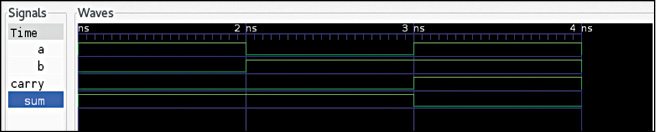
This produces counter.vcd file, which can be viewed in GTKWave. A screenshot of the waveform is shown in Fig. 1.
Download source code: click here
Install GTKwave before viewing the waveform.
You may also refer to Verilator manual at www.veripool.org/projects/verilator/wiki/Manual-verilator for more options and examples.
Shakthi Kannan is MS in information technology from Rochester Institute of Technology, Rochester, New York, the USA. Currently, he is working as senior engineer (R&D) at Manufacturing System Insights, Chennai. He is a software enthusiast who blogs at shakthimaan.com